VOOZH about

URL: https://www.geeksforgeeks.org/installation-guide/install-kali-linux-on-usb-drive/

⇱ How to Install Kali Linux with Persistence on USB Drive - GeeksforGeeks


  • Courses
  • Tutorials
  • Interview Prep

How to Install Kali Linux with Persistence on USB Drive

Last Updated : 2 May, 2026

A Kali Linux persistent USB allows you to carry a fully functional, portable cybersecurity lab in your pocket. Persistence allows a Live USB to:

  • Save installed tools and updates
  • Retain files and downloads
  • Remember system configurations
  • Preserve user preferences across reboots

Without persistence, Kali runs in Live mode and resets everything after shutdown.

System Requirements

Before proceeding, ensure you have:

  • USB Drive (Minimum 16GB, Recommended 32GB)
  • A working computer (Windows, Linux, or macOS)
  • Latest Kali Linux Live ISO
  • Bootable USB tool:
    • Rufus (Windows)
    • balenaEtcher (macOS/Linux)

You can download the ISO from the official website of Offensive Security.

Step-by-Step: Install Kali Linux with Persistence

The below-mentioned steps can be used to install Kali Linux persistently on a USB drive, which also allows the users to keep the installed applications, files, and preferences even after reboots.

Step 1: Download Kali Linux ISO

  • Visit the official Kali Linux website.
  • Navigate to the Downloads section.
  • Under the Live category, download the latest 64-bit ISO (recommended for modern systems).
  • Save the file to your computer.
πŸ‘ Kali_Linux_Download

Step 2: Download Official Rufus

  • Go to Rufus' Official website > Download it to create a bootable USB drive
πŸ‘ Rufus_Download

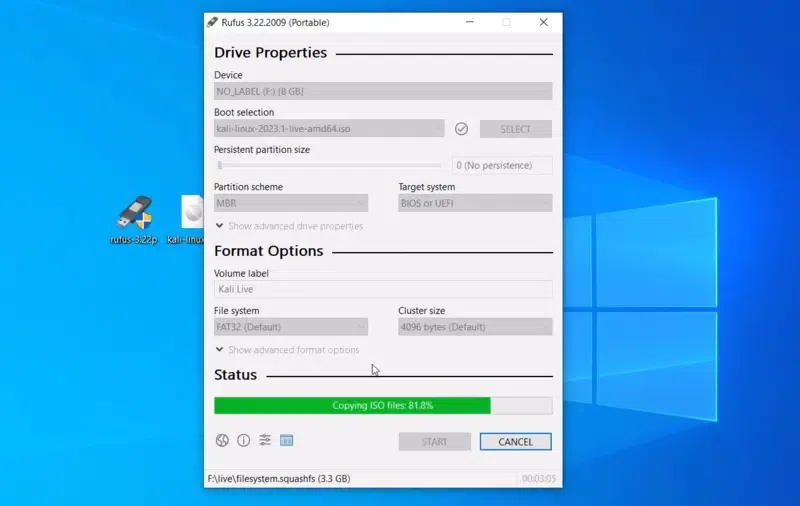
Step 3: Configure a system Bootable USB

  • Insert your USB drive.
  • Open Rufus.
  • Under Device, select your USB drive.
  • Under Boot Selection, choose the Kali Linux ISO.
  • Partition scheme:
    • Select MBR (works for BIOS & UEFI systems).
  • File system:
    • Choose FAT32.
  • Click Start.
  • If prompted, choose ISO Image mode.

Wait for the flashing process to complete.

πŸ‘ USB_Config

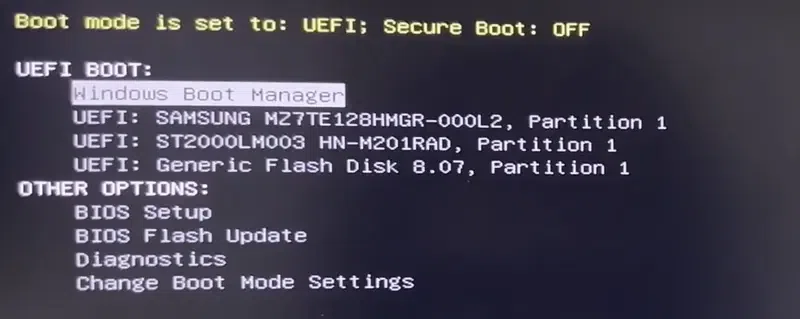
Step 4: Boot from the USB Drive

  1. Restart your system.
  2. Enter Boot Menu (usually F10, F12, ESC, or DEL depending on system).
  3. Select the USB drive.
  4. From the Kali boot menu, choose: Live system (persistence)

If persistence isn’t visible yet, don’t worry, we’ll configure it next.

πŸ‘ System_USB_Config

Step 5: Run Kali Linux from the configured USB Drive

  • Choose the "Live System with USB persistence" option > Tap on Enter > Enter Password and Connect.
πŸ‘ Kali_Linux

Also Read

Comment