|
VOOZH | about |
|
VOOZH | about |
NestJS comes with a built-in exceptions layer that handles all unhandled exceptions across the application. This layer ensures that when an exception is not handled by your application code, it is caught and processed, automatically sending a user-friendly response.
In this article, we’ll explore the built-in exception filters, how to use and customize them, and how to create your own exception filters.
Table of Content
Exception filters in NestJS are a mechanism that lets you handle errors in a structured way across your application. They provide a centralized point to manage exceptions, log errors, and send appropriate responses back to the client.
In NestJS, exception filters are implemented using the ExceptionFilter interface. Filters can be applied:
NestJS has integrated HTTP exception filters that the developer can use out of the box. These filters are supposed to work with HTTP-related exceptions to turn them over to the characteristic HTTP response.
Syntax:
import { Controller, Get, HttpException, HttpStatus } from '@nestjs/common';

@Controller('example')
export class ExampleController {
 @Get()
 getExample() {
 throw new HttpException('Forbidden', HttpStatus.FORBIDDEN);
 }
}
Here for instance, should getExample() be called, NestJS raises an HttpException with status 403 Forbidden. This is done by the built-in exception filter which comes with major programming languages and simply sends back a standard message.
Creating custom exceptions allows for more flexibility and organization in your error handling. Custom exceptions can inherit from HttpException.
Syntax:
import { ExceptionFilter, Catch, ArgumentsHost, HttpException } from '@nestjs/common';
import { Request, Response } from 'express';

@Catch(HttpException)
export class CustomHttpExceptionFilter implements ExceptionFilter {
 catch(exception: HttpException, host: ArgumentsHost) {
 const ctx = host.switchToHttp();
 const response = ctx.getResponse<Response>();
 const request = ctx.getRequest<Request>();
 const status = exception.getStatus();

 response
 .status(status)
 .json({
 statusCode: status,
 timestamp: new Date().toISOString(),
 path: request.url,
 });
 }
}
In this example, the CustomHttpExceptionFilter handles HttpException and returns a custom JSON response.
Global exception filters are quite different from other filters because they can be applied to each route handler as well as each controller in the application. They are particularly useful where there are exceptions that may occur in the course of the application.
Syntax:
import { Module } from '@nestjs/common';
import { APP_FILTER } from '@nestjs/core';
import { CustomHttpExceptionFilter } from './filters/custom-http-exception.filter';

@Module({
 providers: [
 {
 provide: APP_FILTER,
 useClass: CustomHttpExceptionFilter,
 },
 ],
})
export class AppModule { }
In this example, the CustomHttpExceptionFilter is registered as a global filter using the APP_FILTER token.
Method-level exception filters are applied to individual methods within a controller. This allows for fine-grained control over exception handling.
Syntax:
import { Controller, Get, UseFilters } from '@nestjs/common';
import { CustomHttpExceptionFilter } from './filters/custom-http-exception.filter';

@Controller('example')
export class ExampleController {
 @Get()
 @UseFilters(CustomHttpExceptionFilter)
 getExample() {
 throw new HttpException('Forbidden', HttpStatus.FORBIDDEN);
 }
}
In this example, the CustomHttpExceptionFilter is applied only to the getExample() method.
Global filters handle exceptions across the entire application.
Syntax:
import { Module } from '@nestjs/common';
import { APP_FILTER } from '@nestjs/core';
import { CustomExceptionFilter } from './filters/custom-exception.filter';

@Module({
 providers: [
 {
 provide: APP_FILTER,
 useClass: CustomExceptionFilter,
 },
 ],
})
export class AppModule { }
Controller-level filters handle exceptions within a specific controller.
Syntax:
import { Controller, UseFilters, Get } from '@nestjs/common';
import { CustomExceptionFilter } from './filters/custom-exception.filter';

@UseFilters(CustomExceptionFilter)
@Controller('example')
export class ExampleController {
 @Get()
 getExample() {
 throw new Error('Custom Error');
 }
}
Method-level filters handle exceptions for specific methods.
Syntax:
import { Controller, Get, UseFilters } from '@nestjs/common';
import { CustomExceptionFilter } from './filters/custom-exception.filter';

@Controller('example')
export class ExampleController {
 @Get()
 @UseFilters(CustomExceptionFilter)
 getExample() {
 throw new Error('Custom Error');
 }
}
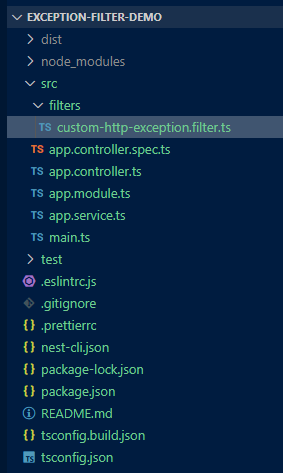
If you don't have the NestJS CLI installed, you can install it globally:
npm install -g @nestjs/cliCreate a new application using the NestJS CLI:
nest new exception-filter-demoNavigate into the project directory:
cd exception-filter-demo"dependencies": {
"@nestjs/common": "^10.0.0",
"@nestjs/core": "^10.0.0",
"@nestjs/platform-express": "^10.0.0",
"reflect-metadata": "^0.2.0",
"rxjs": "^7.8.1"
},
"devDependencies": {
"@nestjs/cli": "^10.0.0",
"@nestjs/schematics": "^10.0.0",
"@nestjs/testing": "^10.0.0",
"@types/express": "^4.17.17",
"@types/jest": "^29.5.2",
"@types/node": "^20.3.1",
"@types/supertest": "^6.0.0",
"@typescript-eslint/eslint-plugin": "^7.0.0",
"@typescript-eslint/parser": "^7.0.0",
"eslint": "^8.42.0",
"eslint-config-prettier": "^9.0.0",
"eslint-plugin-prettier": "^5.0.0",
"jest": "^29.5.0",
"prettier": "^3.0.0",
"source-map-support": "^0.5.21",
"supertest": "^7.0.0",
"ts-jest": "^29.1.0",
"ts-loader": "^9.4.3",
"ts-node": "^10.9.1",
"tsconfig-paths": "^4.2.0",
"typescript": "^5.1.3"
}
Modify the app.module.ts to include the global filter:
Modify the app.controller.ts to include a route that throws an exception:
To start the application run the following command.
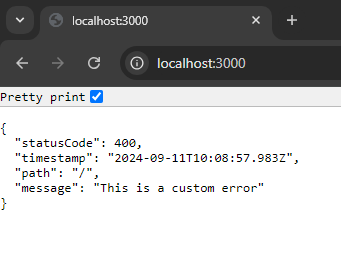
npm startWhen you run the application and navigate to the root URL, the custom exception filter will intercept the exception and return a structured JSON response:
This output demonstrates how the custom exception filter handles exceptions and formats the response according to the application's needs.