|
VOOZH | about |
|
VOOZH | about |
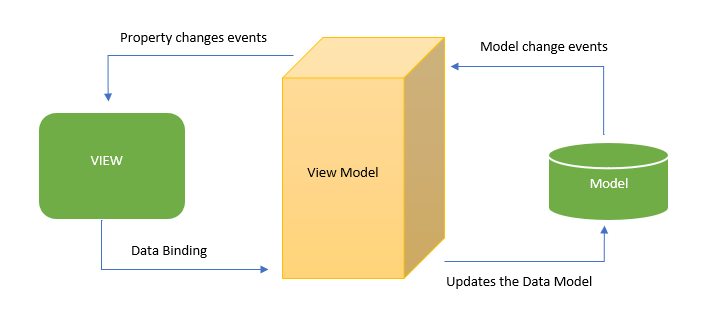
Vue.js is a front-end progressive javascript framework for building User Interfaces ( UI ) and Single Page Applications. This framework focuses on Model – View – ViewModel architecture pattern that connects the View ( User Interface ) and the Model ( Data Objects ). Vue.js uses many built-in directives for interacting between View and Model. It helps to manipulate/modify the DOM with help of Vue instances. The v-model is a special directive that helps to create reactive objects with Vue instances to interact between Model and View layers for changing data properties in the DOM. In this article, we will see how a View-model Works In Vue.js.
View-model has the following components:
Syntax:
<div>
<p> {{ name }} </p>
<div>Syntax:
data : { name: "geeksforgeeks" }Syntax:
<script>
 const app = new Vue( { /*.....Connect the View and Model Here.....*/ } );
</script>
The following Vue directives are used:
We will understand the Model-View-ViewModel implementation with the help of examples.
Example 1: In the below example v-model directive is used for two-way data binding. v-model is one of the Vue directives used to DOM input elements to be able to modify the data through the Vue instance. This directive synchronizes with the state of the Vue instance (data properties). v-model.lazy is a data binding modifier that only syncs after change events. For example when you enter a text in the input field and then click ENTER or lose focus of the input field it will bind the data. Creating a new Vue instance for two-way binding data using v-model and v-model.lazy directives.
Output:
Example 2: In the below example, we are creating a Vue instance for radio buttons binding with the v-model directive. whenever click any radio button it will render the value for the selected input. v-model directive helps Vue instances to interact between Model and View layers for changing data properties in the DOM.
Output: