|
VOOZH | about |
|
VOOZH | about |
In this article, we will build a simple Google Chrome extension. After this, you can develop your own extensions very quickly.
Prerequisite: So before we start we need some basic things on our computer.
Creating Application:
Step 1: Create a Project Folder and move into that folder:
mkdir Project_name
cd Project_name
Step 2: Create manifest.json file (Very important and the file name cannot be changed)
touch manifest.jsonStep 3: Create popup.html file (Very important and the file name cannot be changed)
touch popup.htmlStep 4: Create script.js and style.css files:
touch script.js style.cssStep 5: Add an image for the logo and name it logo.png (128 x 128)
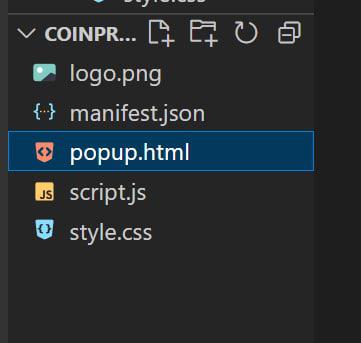
Project Structure: The project should look like below:
Let me describe the files, so we can understand them in a better way:
Example: This example will illustrate how to Build a Crypto Price Tracker- Google Chrome Extension
Just visit CoinGecko and go all the down and find Crypto API. Now select the free plan and continue by logging in to get an API key. Now after that, the next steps are really easy to search the coin section and from there you can get the data of the currency that you want.
Hereafter fetching the data we are changing the innerHTML of the currency price div.
So our Chrome extension is ready to use and now one last step, we have to list it to the Chrome extension store or we can just use this in our own Chrome browser.
Steps to run the application: Follow the below steps to implement the extension into your browser and use it:
Step 1: Chrome Extension Settings
Step 2: Turn on Developer Mode
Step 3: Load unpacked
Step 4: Select the folder where you wrote the codes
Step 5: It will appear in your Chrome extension section.
Now just pin the Chrome Extension and click on the icon to use it.
Output: