|
VOOZH | about |
|
VOOZH | about |
Firebase with Vite and Vue Firebase, combined with Vite and Vue, opens up a powerful combination of real-time capability, fast development, and seamless backend integration. Firebase offers a real-time database, authentication, and cloud storage services that vastly reduce having to manage any backend infrastructure.
Vite brings next-generation development experience for Vue apps with features such as instant server start, lightning-fast HMR, and optimized base splitting. Combined, they let you create responsive real-time applications with features like authentication, data syncing, and cloud storage with the optimized build processes of Vite and the reactive data binding of Vue. It streamlines not only the frontend development process but also the backend tasks with much speed, ultimately deploying an application faster and making it more scalable.
First, we need to create a Vite project and select Vue as its web framework.
Step 1: Use the below command to create a vite project.
npm create vite@latestType the project name of your choice. Then follow the steps and select vue as framework and variant as javascript or typescript as per your choice.
Step 2: Now, change the directory to your project name, install dependencies, and finally run the server locally on your machine using the below commands.
cd yourproject_name
npm install
npm i firebse
npm run dev
"dependencies": {
 "@vue/cli-plugin-babel": "4.1.1",
 "vue": "^2.6.11",
 "firebase": "10.13.1"
 }
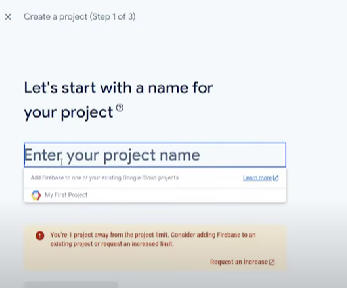
Step 3: Go to firebase website. Login and create a project directory.
Step 4: After you are done creating a project on firebase website. Go to project setting and select web as required app. You can allow hosting if required also.
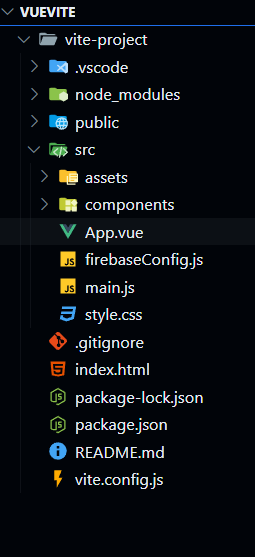
Step 5: Now firebase will provide you with SDK(software development kit). Inside the src folder your vue project, create a firebaseConfig.js paste them into this file and save it.
Step 6: Add the code into firebaseConfig.js file to initialize the firebase.
Step 7: Now, let's make a vue component and name it firebaseConfig.vue inside the src/components folder.
Step 8: Next make changes in the App.vue file in the src folder.
This a simple Vue 3 component designed to demonstrate the initialization of Firebase Analytics in a Vue project. It consists of a static template displaying a heading ("Firebase Analytics Example") and a paragraph instructing users to check their Firebase Analytics dashboard for events. You can make the component as per your requirements and import firebase methods in the component.
Firebase's integration to the Vite-powered Vue project is pretty straightforward, effective, and allows one to make their web applications fully equipped with backend services like authentication, a database, and analytics. With Vite's fast development environment and powered by the Vue reactive system, you can easily use it for setting up Firebase using the Firebase SDK. In this configuration, you will turn on user authentication, real-time data management, and analytics tracking with ease. It allows Firebase services interaction with simple components; easy scaling allows integration with different Firebase tools coupled with a modern, responsive front-end.