|
VOOZH | about |
|
VOOZH | about |
Vite is a frontend development tool, used to build projects and multiple page applications in React.js. It is a beginner-friendly user tool that was developed by the founder of Vue.js, another framework of React.js. we will learn how to set up Vite for a Multi-Page Application.
Step 1: Create a vite project using the following command:
npm create vite@latestStep 2: Name your project & select the React framework here using the downward arrow key.
Vanilla
Vue
React
Preact
Lit
Svelte
Solid
Qwik
Others
Step 3: Select Variant: choose any variant of your choice using the downward arrow key,i.e: choose JavaScript.
TypeScript
TypeScript + SWC
JavaScript
JavaScript + SWC
Step 4: Now, switch to my-react-app directory
cd my-react-appStep 5: Install node dependencies.
npm install
Step 6: Use the following command to install dependencies to allow accessing multiple pages.
npm install react-router-dom"dependencies": {
"react": "^18.3.1",
"react-dom": "^18.3.1",
"react-router-dom": "^6.26.1"
},
React-router-dom is a dependency in Vite that is used to access and create multiple web page applications. A popular term, Routing is used for the same. We use routes in Vite to route, or go to the other web page. For eg. The default route of a website www.abc.com would have a route of '/', and we can create a route for the login page, which would be a part of the same website, but would redirect to a different page with the url www.abc.com/login.
Step 7: Add Browser Router to main.jsx
Step 8: Add Routes and Route
<Routes>
 <Route path="/login" element={<Login />} />
</Routes>
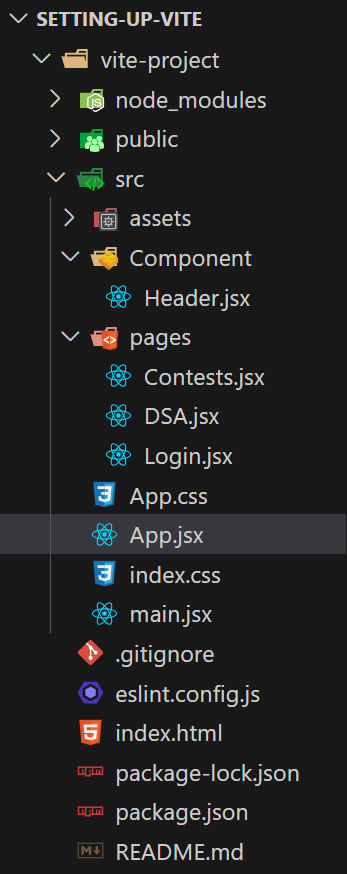
Here are all the components and pages code:
Step 9: Create Navigate function
To navigate to different routes, we use useNavigate. Here, we have created a button within the App.jsx component on clicking which the useNavigate() function is triggered, and we ca specify the route we want to go back to. Here, we have defined a variable of navigate that the function returns and it takes us to the default route, or home page of the application on click.
Here is the final App.jsx file with navigate function and other routes:
Output: