|
VOOZH | about |
|
VOOZH | about |
Using compressed texture formats in WebGL can significantly improve performance and reduce the memory footprint of your WebGL applications. Textures, which are essentially images applied to 3D models, can take up a lot of memory and processing power.
Compressed texture formats allow you to use textures in a compressed state, reducing the overall size while maintaining quality, which leads to faster load times and better performance.
Compressed texture formats are specialized image formats optimized for rendering in 3D environments. Unlike standard image formats like JPEG or PNG, compressed texture formats are designed to be directly used by the GPU, which means the textures don’t need to be decompressed by the CPU, saving valuable resources.
There are several compressed texture formats available in WebGL, each with its own set of features and compatibility across different devices:
To use compressed textures in WebGL, you'll typically need to use extensions that provide support for these formats. Here’s a step-by-step guide:
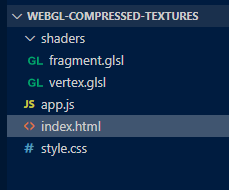
Create an index.html file in the root of your project. This file sets up the basic structure and includes the WebGL canvas.
Create a style.css file to ensure the canvas covers the whole screen.
This script will initialize the WebGL context, create shaders, and generate a simple checkerboard texture programmatically.
Create the shader files inside the shaders folder.