|
VOOZH | about |
|
VOOZH | about |
Vue Router helps link between the browser's URL/History and Vue's components allowing for certain paths to render whatever view is associated with it. A vue router is used in building single-page applications (SPA).
The vue-router can be set up by default while creating your new project. In this article, we will install it separately. So we can see how it works.
Project Setup and Module Installation:
npm install vue-router // ORIt can be used via a script tag as shown below.
vue add router
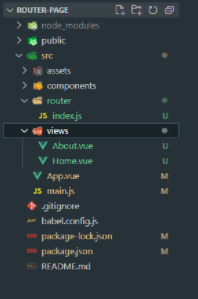
<script src="https://unpkg.com/vue-router@4.5.1/dist/vue-router.global.js"></script>vue create router-page vue add routerProject Structure: It will look like this.
👁 ImageThis project uses Vue Router to add navigation in a Vue.js application. It shows how to switch between pages like Home, About, and Profile without reloading.
<router-link>, while <router-view> dynamically loads the active component.#app element.views/Home.vue: Home Componentviews/About.vue: About Componentviews/Profile.vue: Profile Componentrouter/index.js: Router ConfigurationHome, About, Profile).Step to run the application: Run the server using the following command.
npm run serveOutput: Open your browser and go to http://localhost:8080/ you will see the following output.
👁 Image