|
VOOZH | about |
|
VOOZH | about |
JavaScript is a single threaded programming language used for web development. It supports synchronous and asynchronous execution. In synchronous execution, statements run one after another, and each task waits for the previous one to finish. In asynchronous execution, some tasks run in the background without stopping the execution of other code.
Synchronous programming executes code in sequence, where each statement waits for the previous one to complete before running. This makes the flow simple and predictable.
Example:
Hi
Geek
How are you?
In the above code, “Hi” is logged first, then “Geek”, and finally “How are you”. Each statement executes only after the previous one completes.
Asynchronous programming, on the other hand, allows multiple tasks to run independently of each other. In asynchronous code, a task can be initiated, and while waiting for it to complete, other tasks can proceed. This non-blocking nature helps improve performance and responsiveness, especially in web applications.
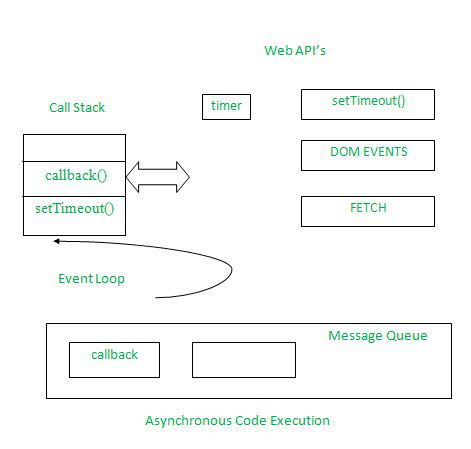
setTimeout, HTTP requests, and event listeners are handled by browser Web APIs without blocking the call stack.Example:
Output
Hi
End
Geek
So, what the code does is first it logs in Hi then rather than executing the setTimeout function it logs in End and then it runs the setTimeout function.
At first, as usual, the Hi statement got logged in. As we use browsers to run JavaScript, there are the web APIs that handle these things for users. So, what JavaScript does is, it passes the setTimeout function in such web API and then we keep on running our code as usual. So it does not block the rest of the code from executing and after all the code its execution, it gets pushed to the call stack and then finally gets executed. This is what happens in asynchronous JavaScript.
| Feature | Synchronous JavaScript | Asynchronous JavaScript |
|---|---|---|
| Code Flow | Executes in a fixed sequence | Executes tasks independently |
| Blocking | Blocks further execution until completion | Does not block other code execution |
| Complexity | Simple and easy to understand | More complex due to callbacks, promises, etc. |
| Best Used For | Simple and sequential tasks | Time-consuming operations like API calls and timers |