|
VOOZH | about |
|
VOOZH | about |
Vue.js is a progressive JavaScript framework for developing web user interfaces. It is a versatile framework providing high speed and performance. We can create Single Page Applications as well as Full Stack applications.
Vue.js Composition API Teleport is a built-in component in Vue.js. With the help of Teleport, we can port an element to another element. It means although the component doesn't exist in the DOM, it is loaded from another place and is placed to load on some condition.
The teleport element is useful for popups or modals in applications when you want to get the user's attention. Teleport needs to know, where the element can be displayed. Here are the following attributes used by the Teleport element.
We can pass values and functions to the teleported element as required.
Syntax: First we define the body where we want to display the element and then teleport the element here as follows:
<Teleport to="body">
 <!-- Teleport element -->
</Teleport>
Example: In the following example, we have two models, one a simple modal that appears simple and another modal that is situated in another file, which has an animation that teleports to the current body of HTML code.
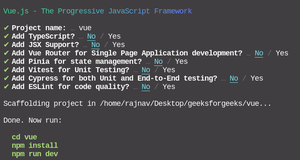
Step 1: Create a new Vue.js project using the npm node.js package manager.
npm init vue@latestEnter the project name and preset the project as follows:
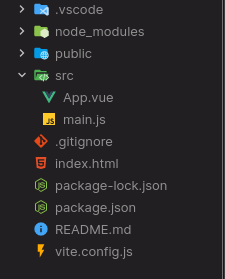
Project Structure: After successful installation, the following project structure will be formed.
Step 2: In the App.vue, create the script setup code where we will set the appearance of the initial modal to false. We will have two models, so according to it, two variables.
Step 3: In the template section, create the simple modal using Teleport. Also, add the buttons to close and open the modal.
Step 4: We have added a space for an animated modal. We will create an animated modal in another file called Modal.vue. So create a new file src/Modal.vue and use the transition for animation of the Modal.
Step 6: Import the Modal.vue in the App.vue and then place the Teleport element as we have done for the simple modal.
Step 7: Run the project using the following command and see the output.
npm run devIt will run the project on http://localhost:3000/ and the result will be as follows.
Output:
Reference:https://vuejs.org/guide/built-ins/teleport.html#teleport