|
VOOZH | about |
|
VOOZH | about |
Vue.js components are essential for creating adaptable and organized web applications. They let you divide your user interface into separate, self-sufficient sections, each handling its own specific part of the UI. This modular structure enhances the management and organization of complex applications. Leveraging components allows for code reuse throughout your application, which streamlines development and makes maintenance easier. This method not only fosters consistency but also makes updates and debugging simpler, resulting in applications that are easier to scale and maintain.
Vue.js Components are essential for creating custom, reusable elements in Vue applications. They bundle HTML, JavaScript, and CSS into modular units, enhancing scalability and maintainability. You can build your own components or use built-in ones.
A Vue.js component is composed of three main sections:
Example: Here’s a simple example of a Vue.js component.
Vue.js components are essential for developing scalable and maintainable web applications. Here’s how to create and integrate a component into your Vue.js project:
Step 1: Install Vue CLI
Open your terminal and run the following command to install Vue CLI globally
npm install -g @vue/cliStep 2: Create a New Vue Project by typing the following command in the terminal:
vue create my-vue-app
cd my-vue-app
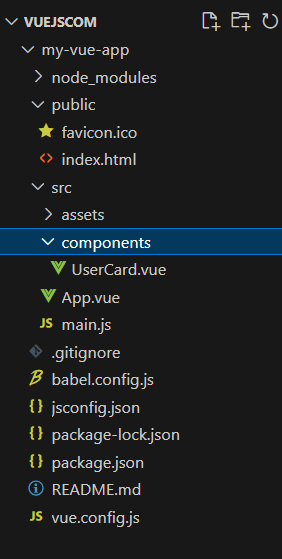
Step 3: Navigate to the src folder of your project and create a new directory named components.
Step 4: Inside the components folder, create a file named UserCard.vue. Using PascalCase for filenames helps in maintaining consistency.
Step 5:UserCard.vue component might look like below:
Step 6: Import and register the UserCard component in your main entry file.
Step 7: Use the Component in App.vue, Include the component in your template to display user profiles with the provided data.
"dependencies": {
 "core-js": "^3.8.3",
 "vue": "^3.2.13"
 }
Example: This example shows the creation of VueJS component.
Step 8: Ensure your development environment is running to view the component in action:
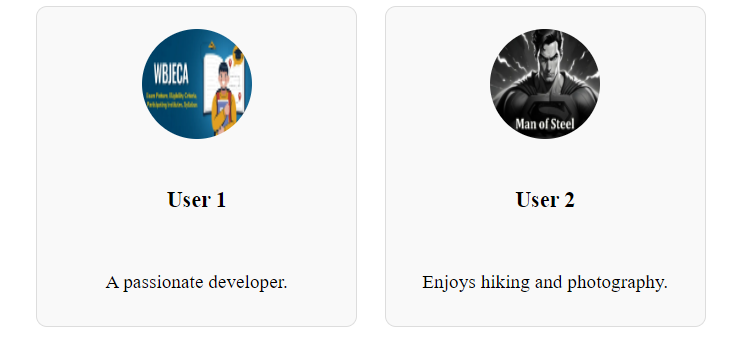
npm run serveStep 9: Open your application in a browser to verify that the usercard component is rendered correctly.
Output:
By following this guide, You’ve learned how to create and add a UserCard component to your Vue.js project, including how to build, register, and use it with dynamic data. Applying scoped styles and running the development server helps ensure everything works smoothly. Keep experimenting to build more advanced Vue.js components.