What Does the @ Mean Inside an Import Path in VueJS?
Last Updated : 20 Sep, 2024
The @ symbol in VueJS is an alias for the src directory in a Vue project, simplifying the import paths. By default, Vue CLI projects come with this alias already set up. It allows you to write cleaner, shorter paths when importing files from the src directory.
Complete Setup and Configuration
Step 1: Create a Vue CLI Project
If you don’t already have a Vue project, create one using Vue CLI:
Install Vue CLI globally if not already installed:
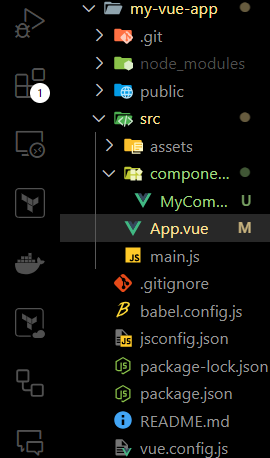
Here’s an example of how you can use the @ alias in your Vue project.
Import a component using the @ alias
In the App.vue file, you can import MyComponent.vue using the @ alias instead of a relative path.
Add code to "MyComponent.vue" (located in src/components/)
Step 3: Customize Aliases
By default, the @ alias points to the src folder. If you want to add more aliases or modify the existing ones, you can do so in the vue.config.js file.
Create/Edit vue.config.js: In the root of your project (if the file doesn’t already exist), create a vue.config.js file.
Use Custom Aliases: You can now use your custom aliases throughout your project. For example, if you want to import assets or components with the newly defined aliases:
// In any component, using custom aliases
import Logo from '@assets/logo.png'; // For assets
import MyComponent from '@components/MyComponent.vue'; // For components
Step 4: Run the Application
Once you have set up everything, you can run the development server to check if everything is working fine.