|
VOOZH | about |
|
VOOZH | about |
In Julia, printf is not a built-in function but a macro provided by the Printf module of Julia's standard library. This macro allows you to format strings similarly to the C programming language's printf function. The Printf.@printf macro takes a format string followed by zero or more arguments and outputs a formatted string to the standard output.
Syntax:
@printf([io::IO], "%Fmt", args...)
Print arguments using C style format specification string. Optionally, an IO may be passed as the first argument to redirect output.
Note:
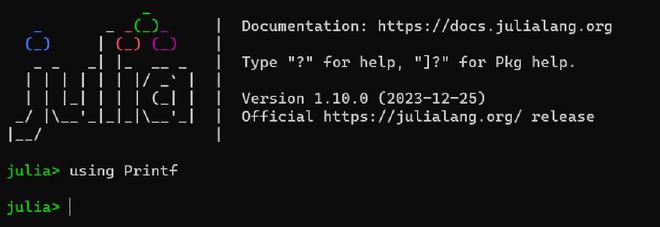
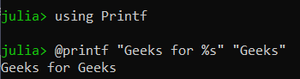
First type the 'using Printf' function in Julia REPL so that we can use the @printf macro ahead:
First type @printf then formatted string and format specifier in inverted commas - " " and then type arguments in inverted commas.
Note:
Do not use any ',' - comma like C language in Julia and if you want to use comma than make sure that you also use round brackets after @printf.
Without brackets:
Output:
With brackets:
Output:
Only a single character will be printed even if you provide a string as an argument.
Output:
Note:
Starting in Julia 1.8, %s (string) and %c (character) widths are computed using textwidth, which e.g. ignores zero-width characters (such as combining characters for diacritical marks) and treats certain "wide" characters (e.g. emoji) as width 2.
Below is the Julia program to implement the floating point numbers using %f:
Output:
Below is the Julia program to implement limiting float to two digits in %f:
Output:
Below is the Julia program to implement the scientific notation using %e:
Output:
Below is the Julia program to implement limiting scientific notation to three digits in %e:
Output:
Below is the Julia program for Padding to length 5 using %i:
Output:
Below is the Julia program for Padding with zeros to length 6 using %i:
Output:
All C language format specifiers can be similarly used in Julia.
Dynamic width specifiers like %*s and %0*.*f can print width and precision together.
Output:
Use dynamic width and precision 0.12
Note:
Dynamic width specifiers like %*s and %0*.*f require Julia 1.10.
Inf and NaN are printed consistently as Inf and NaN for flags %a, %A, %e, %E, %f, %F, %g, and %G. Furthermore, if a floating point number is equally close to the numeric values of two possible output strings, the output string further away from zero is chosen.
Output:
Output:
Similarly, like the @printf macro of the Printf module, Julia also has an @sprintf macro in the Printf module. @sprintf macro is used to return the formatted output of @printf as a string.
Syntax:
@sprintf("%Fmt", args...)
Output: