|
VOOZH | about |
|
VOOZH | about |
Subdomain Enumeration is the non-negligible step of Penetration Testing. Every Tester has to Enumerate Subdomains for different phases. Several scripts are automated to find subdomains of the specified target, but Altdns is a superb security tool that can discover and explore subdomains. Altdns is a python script or python language-based tool. Altdns has the feature to generate permutation, alteration, and mutations of subdomains of the specified target domain. The Tester can use these generated names for DNS lookups. Altdns is an open-source tool and free to use. Altdns tool works efficiently in the phases of Information gathering, Reconnaissance subdomains, and finding subdomains from even HTTPS secured websites. Altdns tool generates two lists of subdomains as a result. The 1st list is a collection of identified subdomains, and the 2nd list s the group of possible words used as a subdomain like testing, status backup, etc.
Note: Make Sure You have Python Installed on your System, as this is python-based tool. For more information, refer to the article Python Installation Steps on Linux
Step 1: Fire up your Kali Linux terminal and move to Desktop using the following command.
cd Desktop👁 Image
Step 2: You are on Desktop, now create a new directory called Altdns using the following command. In this directory, we will complete the installation of the Altdns tool.
mkdir Altdns👁 Image
Step 3: Now switch to Altdns directory using the following command.
cd Altdns/👁 Image
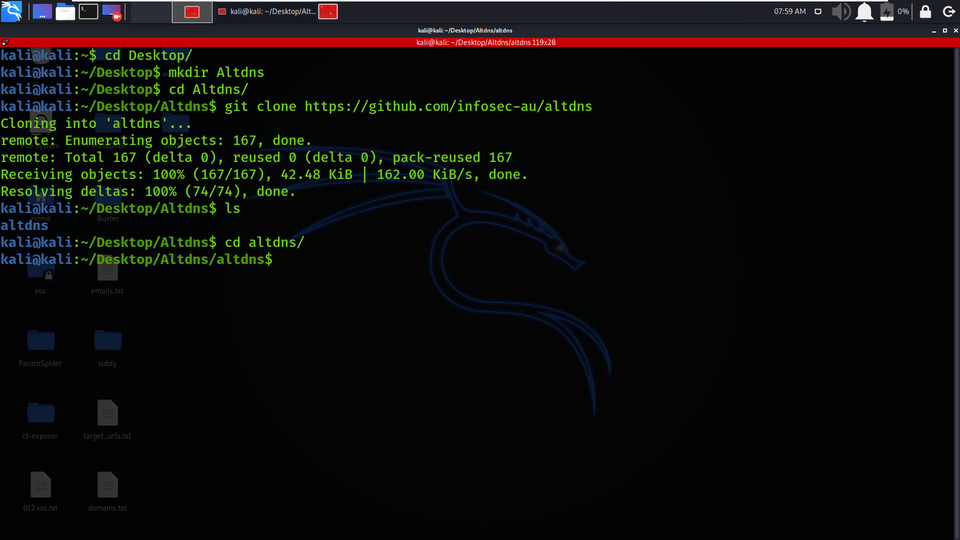
Step 4: Now you have to install the tool. You have to clone the tool from GitHub.
git clone https://github.com/infosec-au/altdns👁 Image
Step 5: The tool has been downloaded successfully in the Altdns directory. Now list out the contents of the tool by using the following command.
ls👁 Image
Step 6: There is a new directory created named altdns. Move to that directory using the following command.
cd altdns/👁 Image
Step 7: Once again to discover the contents of the tool, use the below command.
ls👁 Image
Step 8: Install the essential requirements using the following command.
pip3 install -r requirements.txt👁 Image
Step 9: Check the help menu page of altdns tool to get a better understanding of the tool. Use the following command.
python3 altdns --help👁 Image
python 3 altdns -i target_subdomains.txt -o result_data_output -w possible_words.txt -r -s results_output.txt
Example 1: Generate a list of altered subdomains & resolve them
python3 altdns -i subdomains.txt -o data_output -w words.txt -r -s results_output.txt
1. In the below Screenshot (Fig 1), we have created a list of geeksforgeeks.org domain's subdomain. The list is saved in the subdomains.txt. This file will be used to find the permutations and alterations in subdomains.
👁 Image2. In the below Screenshot, this is the file which consists of permutations words. This data set has more than 200+ permuted words. You can specify your own wordlist using -w flag.
👁 Image3. In the below Screenshot, our actual resolving process is started in which the data_output.txt file will contain the massive list of altered and permuted subdomains after the scan is over and the results_output.txt file will contain the final list of permuted subdomains found that are valid and have a DNS record.
👁 Image4. In the below Screenshot, there are contents of data_output.txt file which consists of the massive list of altered and permuted subdomains.
👁 Image5. In the below Screenshot, there are contents of results_output.txt file which consists of the final list of permuted subdomains found that are valid and have a DNS record.
👁 ImageExample 2 : Using Thread Flag
python3 altdns -i subdomains.txt -o data_output -w words.txt -r -s results_output.txt -t 20
In the below Screenshot, the thread value is provided using the -t flag which is used to limit the threads the resolver will use parallelly.
👁 ImageUsing the Altdns tool you can easily Generate permutations, alterations, and mutations of subdomains and then resolves them.