|
VOOZH | about |
|
VOOZH | about |
The arch command is a simple yet powerful utility in Linux used to display the architecture of the system's hardware. By running this command, users can quickly determine the type of processor their system is running on, such as i386, x86_64, or arm. Knowing the architecture is crucial for installing compatible software, diagnosing hardware issues, or configuring certain applications.
Here, we explore how to use the arch command, its syntax, options, and examples.
arch [OPTION]The arch command takes minimal input. When run without any options, it simply returns the architecture type of your machine.
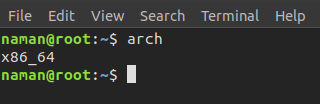
The most common use case of the arch command is running it without any options to print the system's architecture.
👁 ImageDisplays a brief help message with information on how to use the command. 👁 arch --help
Shows the version information of the arch command and exits.
The arch command in Linux is a simple, yet effective tool for checking the architecture of your system. Using the arch command ensures you’re working with the right system information and can make more informed decisions regarding compatibility and performance.