|
VOOZH | about |
|
VOOZH | about |
The command "atrm" is used to delete scheduled at jobs by specifying their job number. Users can only remove their own jobs, while only the superuser (root) has the privilege to delete jobs scheduled by other users.
atrm <job_id>Example 1: Schedule the jobs by using the "at" command.
The command "at" allows you to run a command or script to run once at a specific time in the future.
Syntax:
echo "enter the string" | at <time>Example 2: List all the scheduled "at" jobs by using the command "atq"
You can use the atq command in Linux to view a list of all jobs that have been scheduled using the at command but have not yet run. The list includes the job ID, scheduled time, date, and user who scheduled the job.
Syntax:
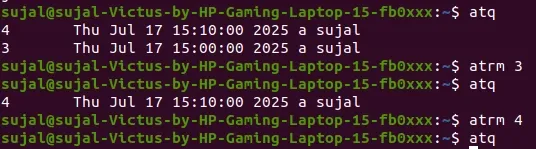
atqHere, we scheduled 2 jobs with their job ID - "3 and 4" on time "3:00 PM and 3:10 PM"
Example 3: Delete the scheduled jobs by using the command "atrm"
you can delete the jobs by giving the job ID to the command "atrm"
Syntax:
atrm <Job_ID>Example 4: To print the version no of "at" use "V" command
you can see the version which is installed in the computer
Syntax:
atrm -VExample 5: For delete multiple no of jobs
you can delete multiple no of jobs by using the single command
Syntax:
atrm <Job-ID1> <Job_ID2> <Job_ID3> .........so on...List all the jobs by using the command "atq"
👁 Image
Deleting multiple jobs by using single atrm command:
atrm 21 26👁 ImageThe "atrm" command is a straightforward yet important utility in Linux used to manage scheduled tasks. It enables users to cancel jobs that were previously queued with the at command. Regular users are permitted to remove only their own scheduled jobs, whereas the superuser (root) has the ability to delete any job from the queue, regardless of ownership. When used alongside the atq command, which lists scheduled tasks, atrm provides an effective way to control and manage one-time job scheduling in a Linux system.