|
VOOZH | about |
|
VOOZH | about |
awk is a powerful text-processing command in Linux used to analyze, filter, and manipulate structured data such as logs, CSV files, and command output. It works by scanning input line by line and performing actions based on patterns and fields.
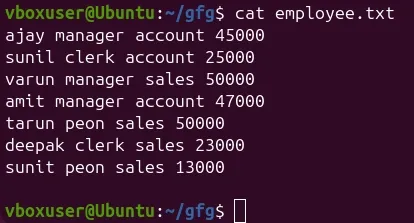
The following text file is used as the input file for all cases below:
Command:
$cat employee.txt Output:
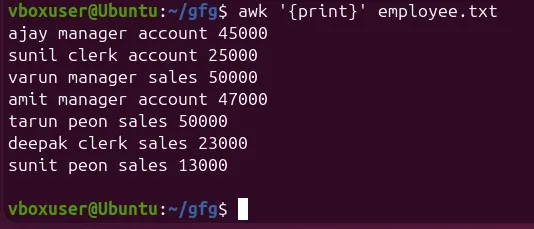
By default Awk prints every line of data from the specified file.
Command:
$ awk '{print}' employee.txtOutput:
There is no pattern given. So the actions are applicable to all the lines. Action print without any argument prints the whole line by default, so it prints all the lines of the file without failure.
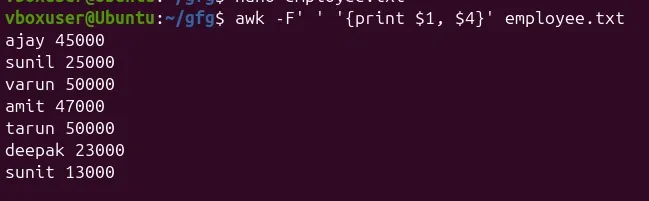
awk [options] 'pattern {action}' input-file > output-fileExample: Use Space (default separator)
awk -F' ' '{print $1, $4}' employee.txtOutput:
Here,
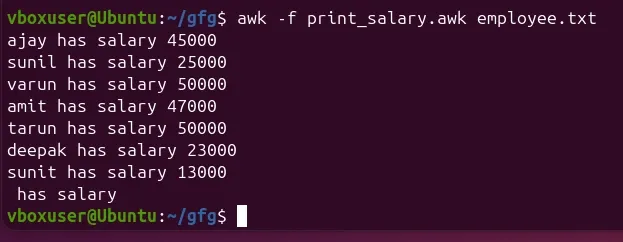
You can write your AWK code in a file and execute it with -f.
Example: Create a script file named print_salary.awk:
{ print $1, "has salary", $4 }awk -f print_salary.awk employee.txtOutput:
The -v option lets you define variables before AWK begins processing.
Example 1: Define a Custom Message
awk -v msg="Employee Details:" 'BEGIN {print msg}'Output:
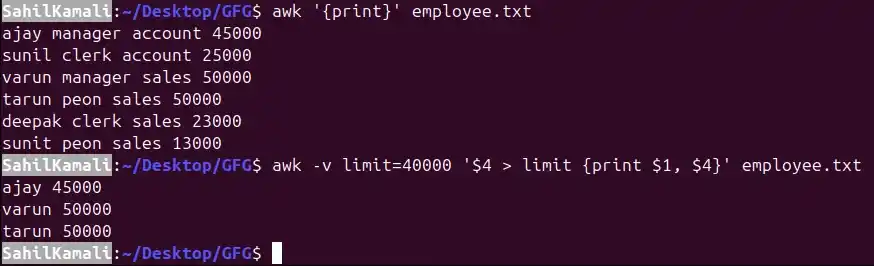
Example 2: Use Variable in Condition
awk -v limit=40000 '$4 > limit {print $1, $4}' employee.txtOutput:
👁 awk-v-limitAwk's built-in variables include the field variables—$1, $2, $3, and so on ($0 is the entire line) - that break a line of text into individual words or pieces called fields.
It is used to find and print every line in the employee.txt file that contains the word "manager."
Command:
$ awk '/manager/ {print}' employee.txt Output:
ajay manager account 45000
varun manager sales 50000
amit manager account 47000
For each record i.e line, the awk command splits the record delimited by whitespace character by default and stores it in the $n variables. If the line has 4 words, it will be stored in $1, $2, $3 and $4 respectively. Also, $0 represents the whole line.
Command:
$ awk '{print $1,$4}' employee.txt Output:
ajay 45000
sunil 25000
varun 50000
amit 47000
tarun 15000
deepak 23000
sunil 13000
satvik 80000
It is used to add line numbers to each line of the employee.txt file and then print the numbered lines to the standard output (your terminal).
Command:
$ awk '{print NR,$0}' employee.txt Output:
1 ajay manager account 45000
2 sunil clerk account 25000
3 varun manager sales 50000
4 amit manager account 47000
5 tarun peon sales 15000
6 deepak clerk sales 23000
7 sunil peon sales 13000
8 satvik director purchase 80000
Command:
$ awk '{print $1,$NF}' employee.txt Output:
ajay 45000
sunil 25000
varun 50000
amit 47000
tarun 15000
deepak 23000
sunil 13000
satvik 80000
It is used to print specific lines (from line 3 to line 6, inclusive) of a file named employee.txt, along with their corresponding line numbers.
Command:
$ awk 'NR==3, NR==6 {print NR,$0}' employee.txt Output:
3 varun manager sales 50000
4 amit manager account 47000
5 tarun peon sales 15000
6 deepak clerk sales 23000
For the given text file:
Command:
cat geeksforgeeks.txtOutput:
A B C
Tarun A12 1
Man B6 2
Praveen M42 3
It is used to read a file line by line, prefix each line with its line number, and then print only the line number followed by the first word of that line.
$ awk '{print NR "- " $1 }' geeksforgeeks.txtOutput:
1 - A
2 - Tarun
3 – Manav
4 - Praveen
Command:
$ awk '{print $2}' geeksforgeeks.txtOutput:
B
A12
B6
M42
It is used to process the file geeksforgeeks.txt, but it will not produce any output.
Command:
$ awk 'NF < 0' geeksforgeeks.txthere NF should be 0 not less than and the user have to print the line number also:
correct answer : awk 'NF == 0 {print NR}' geeksforgeeks.txt
OR
awk 'NF <= 0 {print NR}' geeksforgeeks.txt
Output:
0It is used to find and print the length of the longest line in the file named geeksforgeeks.txt.
Command:
$ awk '{ if (length($0) > max) max = length($0) } END { print max }' geeksforgeeks.txtOutput:
13It is used to count and print the total number of lines in a file.
Command:
$ awk 'END { print NR }' geeksforgeeks.txtOutput:
3It is used to filter and print only those lines from geeksforgeeks.txt that have more than 10 characters.
Command:
$ awk 'length($0) > 10' geeksforgeeks.txtOutput:
Tarun A12 1
Praveen M42 3
It is used to find and print every line from the file geeksforgeeks.txt where the third piece of data (or column) in that line is exactly "B6".
Command:
$ awk '{ if($3 == "B6") print $0;}' geeksforgeeks.txtThis command is used to generate and print the squares of numbers from 1 to 6.
Command:
$ awk 'BEGIN { for(i=1;i<=6;i++) print "square of", i, "is",i*i; }'Output:
square of 1 is 1
square of 2 is 4
square of 3 is 9
square of 4 is 16
square of 5 is 25
square of 6 is 36