|
VOOZH | about |
|
VOOZH | about |
The 'column' command in Linux is a powerful utility used to format text input into organized columns, making it easier to read and analyze data. This command can take input from a file or standard input, and it arranges the data into columns by breaking up the text and distributing it across rows and columns. The command fills rows before filling columns, and it can be customized with various options to adjust how the output is displayed.
The 'column' command reads data line by line and arranges it into a tabular format, filling rows first before moving on to the next column. This formatting approach makes the data more structured and easier to view, especially when dealing with text that contains tabular data. Empty lines are ignored by default unless the '-e' option is used, which includes them in the output.
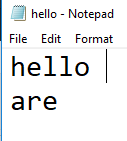
column [-entx] [-c columns] [-s sep] [file ...]Suppose you have a text file with the following contents:
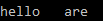
To display the information of the text file in form of columns, you enter the command:
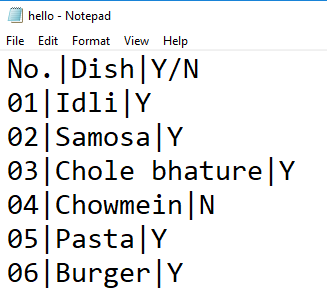
column filename.txtSuppose, you want to sort into different columns the entries that are separated by particular delimiters. For example, this sample text file:
To separate the column based on the delimiter "|", you would give the following command, which in turn produces the given output:
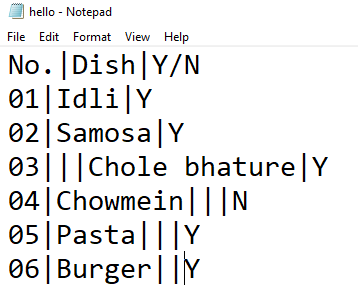
In case you give multiple delimiters(same type), the command treats them as a single one. For example:
Upon application of command yields the output:
The 'column' command comes with a variety of options that allow you to control the formatting and display of data:
The 'column' command in Linux is a versatile tool that simplifies the task of organizing data into a readable columnar format. With various options for customizing the display, including JSON output, right alignment, and custom delimiters, 'column' is perfect for data analysis, scripting, and any scenario where structured text presentation is needed. By mastering the 'column' command, you can make data more accessible and improve the overall usability of your command-line output.