|
VOOZH | about |
|
VOOZH | about |
In Linux, we create users for multiple purposes, so in Linux, it's very common to make new users depending on the tasks. So sometimes we need to create more than one user or multiple users. We can't do it one by one as it would be very time-consuming, so we can use automated scripts to make our tasks easy.
Here we have used a shell script to make multiple users in just one go.
In this method, we will not be using any script, we will just use a command to make multiple users in simple steps.
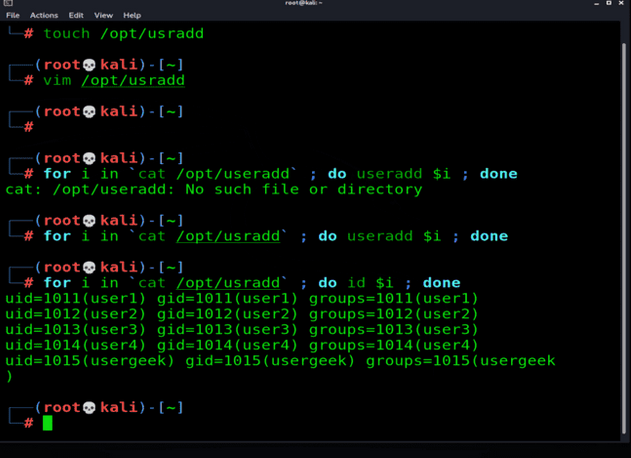
Step 1: Create a file and list down the names of users in it.
touch /opt/usradd👁 Image
Step 2: Run for loop given below
for i in `cat /opt/usradd` ; do useradd $i ; done👁 Image
Step 3: To view the created users simply type "id" in place of useradd
for i in `cat /opt/usradd` ; do id $i ; done
OR
awk - F: '{print $1}' /etc/passwd👁 ImageStep 4: To give different passwords to each user, interactively use "passwd" in place of useradd.
for i in `cat /opt/usradd` ; do passwd $i ; done👁 Image
Step 1: First, we have created a text file containing all the names of users. and saved it at a specific location.
create a text file userlist with all the usernames in it.

vim /tmp/userlist
👁 Image
Step 2: After that we write a script to automate the task.
creating a .sh file to write the script in it.

vim /usr/sbin/createuser.sh
👁 Image
Step 3: We wrote the following script
//execute the Script using a bash shell
#!/bin/bash

//location of the txt file of usernames
userfile=/tmp/userlist

//extracting usernames from the file one-by-one
username=$(cat /tmp/userlist | tr 'A-Z' 'a-z')

//defining the default password
password=$username@123

//running loop to add users
for user in $username
do
 //adding users '$user' is a variable that changes
 // usernames accordingly in txt file.
 useradd $user
 echo $password | passwd --stdin $user
done

//echo is used to display the total numbers of
//users created, counting the names in the txt
//file, tail to display the final details of
//the process on both lines(optional)
echo "$(wc -l /tmp/userlist) users have been created"
tail -n$(wc -l /tmp userlist) /etc/passwd
👁 Image
Step 4: Give permissions to the script file. u+x, the only user will be able to execute this file
//here we are giving the executable permission
//of the file to the user.
chmod u+x /usr/sbin/createuser.sh
👁 Image