|
VOOZH | about |
|
VOOZH | about |
When a program is executed, it toggles multiple times into user mode and kernel mode. In user mode, a process has limited access to resources, while in kernel mode it has access to privileged hardware resources and its data. A process toggles from user mode to kernel mode using System Calls.
Strace is a tool to analyze system call activities of a process. It gives us information about:
Analyzing system calls helps a lot when you do not have access to source code and debugging is done using executable binary only. This article is not about How To use Strace tool, its more about analyzing the output of Strace tool because while executing Strace on a process, it dumps a lot of information related to system calls.
At first instance, it looks very scary and analyzing each system call would be a very time-consuming task. Moreover, it may not be required because most of the starting system calls are for the housekeeping purpose and do not add much value to debugging. Once system call flow is understood for one process, then it can be easily identified and remove housekeeping system calls and concentrate on important one for debugging our actual problem.
strace [options] [command]To analyze the system calls of a program, use the following command:
strace ./a.outThis will display all system calls executed during the runtime of the program.
Program:
geeksforgeeks: hello world !!
Compile the above program using the below command:
$ gcc hello.c
Find the Strace out of the above-compiled program using the below command:
$ strace ./a.out
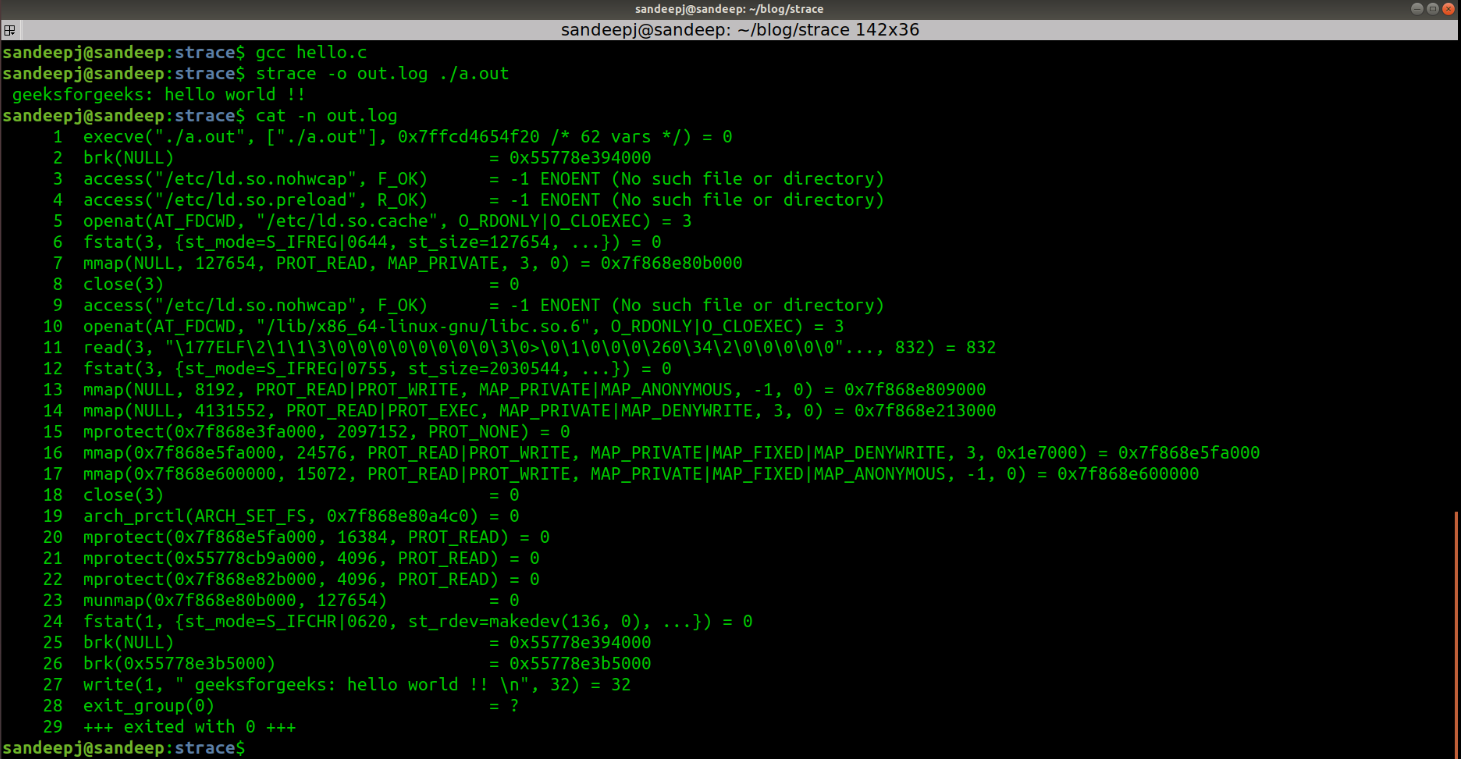
Now, the Strace output for the above program is:
👁 Strace outputBefore starting analyzing system calls, let's briefly talk about program execution w.r.t. system calls:
Now break the Strace output into meaningful chunks for better understanding:
When we run ./a.out executable in bash console, a new child process is forked and execve() is run to load new program "a.out". 👁 Image
It has 3 parameters:
Here return value is 0, which means success. More details about execve() system call can be found on the man page of execve using "man 2 execve".
This system call sets data segment size to the specified address. Here brk(NULL) is used to get the top of the data segment address, which is the heap start address. Hence, calling brk() with NULL returns, heap start address which is later used to allocate heap memory.👁 brk()
This system call checks about file permissions. It has 2 parameters:👁 Image
If the return value is -1, which means checked file is not present.
The presence of this file disables the loading of optimized libraries. In the latest distributions, this file is not present. ld.so.preload file containing a list of shared object files to be loaded before the program.👁 ld.so.nohwcap
Opens a file /etc/ld.so.cache and returns files descriptor 3. /etc/ld.so.cache, contains the list of directories in which shared libraries shall be searched on.
Gets the file attributes like modes, size, creation/modification timestamps, etc for the same file descriptor. The second parameter is the details of the attributes read.
Uses file size 127481, read by fstat() and maps entire file into virtual memory of process and returns mapped virtual memory address 0x7ff58cf81000.
After successful mapping, the file is closed using close() system call.
This is corresponding to printf() statement, which puts data on stdout of process using write() system call. 👁 Image
Program exits with 0(SUCCESS). 👁 Image
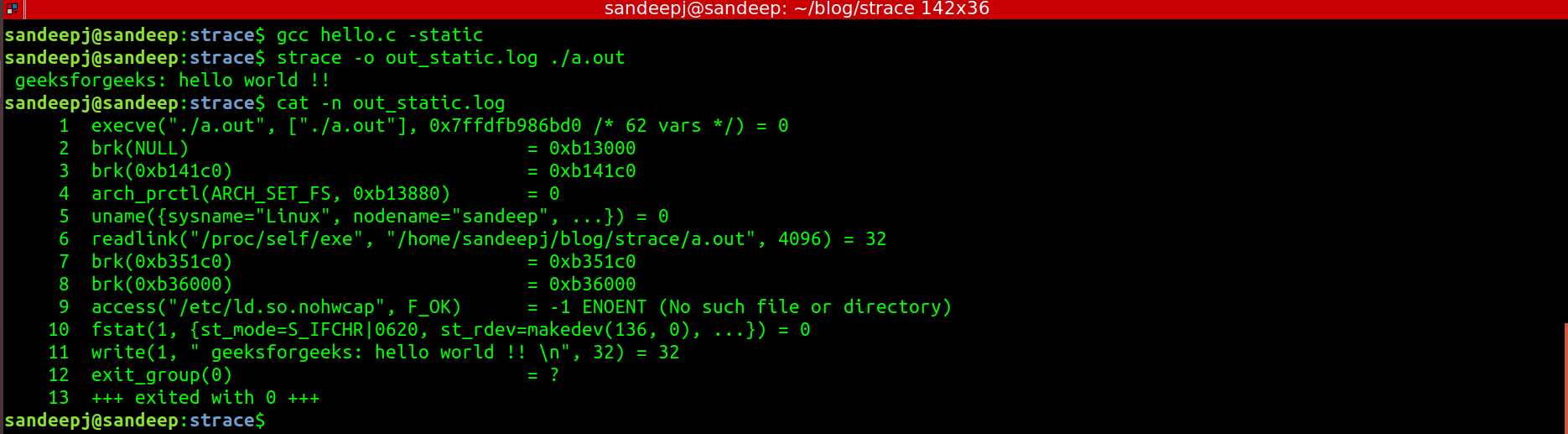
Now it has seen that most of the system calls were to prepare process to execute. Mostly shared library mapping was causing most of the system calls. It can cross-check this by running Strace on statically built executable binary.
Below is the Strace output for the "Hello World" program built using "-static" option:
👁 Hello World program using static optionIt can see that statically built executable does not call open(), mmap(), close() etc, which was done to map shared libraries. Now we have enough understanding about system calls to analyze Strace tool output and to filter out interested system calls for debugging. For any system call detail, best place would be its man page. Which can be accessed using below command.
$ man 2 <System Call>
strace -c ./a.outstrace -e openat ./a.outstrace -o output.txt ./a.outstrace -p <PID>Analyzing Strace output helps in understanding how system calls interact with the kernel, especially when debugging is limited to binaries. By filtering out non-critical system calls, such as those related to shared libraries or housekeeping tasks, developers can focus on the most relevant system calls to troubleshoot issues efficiently.