|
VOOZH | about |
|
VOOZH | about |
The diff3 command in Linux is used to compare three files line by line. It is mainly used when you want to identify differences between three versions of the same file, such as during file merging, conflict resolution, or version control tasks. Internally, diff3 uses the diff command to perform comparisons and present the differences in a structured format.
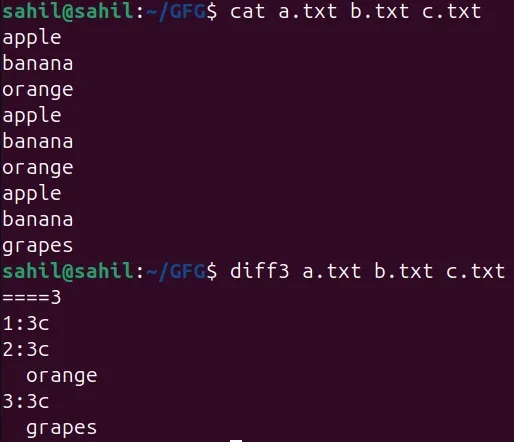
This example shows how diff3 compares three text files and reports which file differs. It helps users understand the basic output format of the command.
Command:
diff3 a.txt b.txt c.txtOutput:
Note: In the output, you may see these markers:
====: All three files are different at this line
====1: Only file 1 differs
====2: Only file 2 differs
====3: Only file 3 differs
This helps you quickly identify which file contains unique changes.
diff3 [options] file1 file2 file3Notes: All three files must exist unless one file is provided through standard input (-).
The order of files matters because diff3 reports which specific file differs.
By default, diff3 prints differences directly to the terminal.
The diff3 command provides several options that control how differences are displayed, how files are merged, and how conflicts are handled. Below are the most commonly used and meaningful options, explained with simple examples.
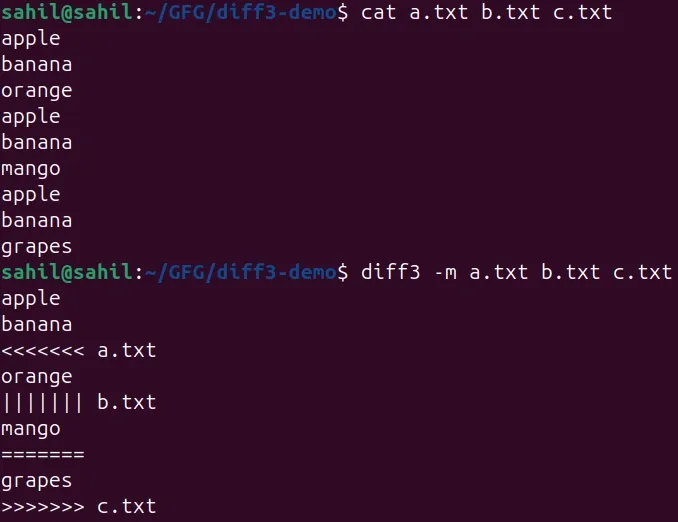
The -m option combines the contents of all three files and produces a merged output. When conflicts occur, diff3 inserts conflict markers so the user can manually resolve them. This option is commonly used during file merging.
Example: Merge Three Files and Show Conflicts
This example shows how diff3 merges three files and highlights conflicting lines using markers. It helps users understand how merge conflicts are represented.
Command:
diff3 -m a.txt b.txt c.txtOutput:
The -e option outputs changes in the form of an editor script. Instead of merging files, it generates commands that can be applied to update one file based on differences.
Example: Generate Editor Commands for Changes
This example shows how diff3 outputs editing instructions rather than merged content. It is useful for automated or script-based editing.
Command:
diff3 -e a.txt b.txt c.txtOutput:
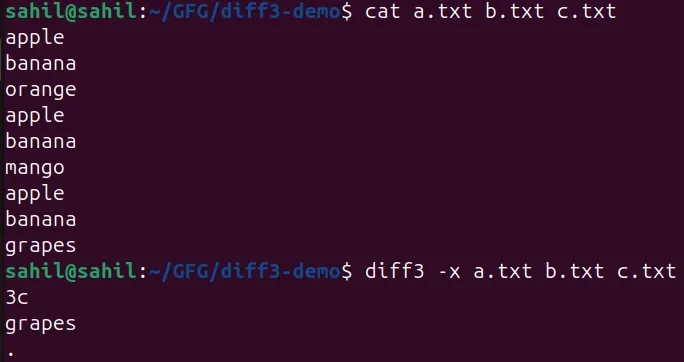
The -x option displays only those differences where all three files differ. It ignores cases where only one file is different.
Example: Display Only Full Conflicts
This example shows how diff3 filters output to display only major conflicts involving all three files. It helps reduce noise in complex comparisons.
Command:
diff3 -x a.txt b.txt c.txtOutput:
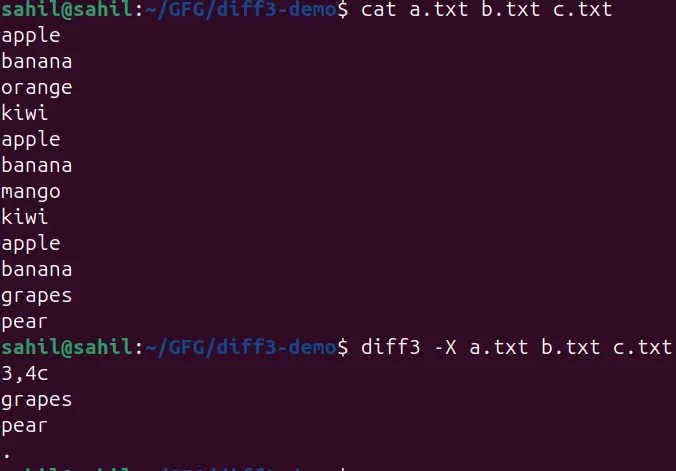
The -X option works like -x but also detects overlapping line ranges in conflicts. This provides more detailed conflict information.
Example: Highlight Overlapping Changes
This example helps identify conflicts that overlap across multiple lines, making it easier to understand complex edits.
Command:
diff3 -X a.txt b.txt c.txtOutput:
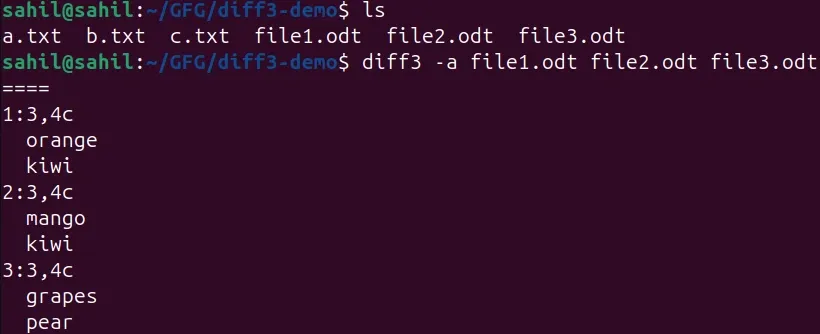
The -a option forces diff3 to treat all input files as text files, even if they are binary or non-text.
Example: Compare Non-Text Files as Text
This example shows how diff3 attempts to compare non-text files by treating them as text. It is mainly useful for inspection or debugging.
Command:
diff3 -a file1.odt file2.odt file3.odtOutput:
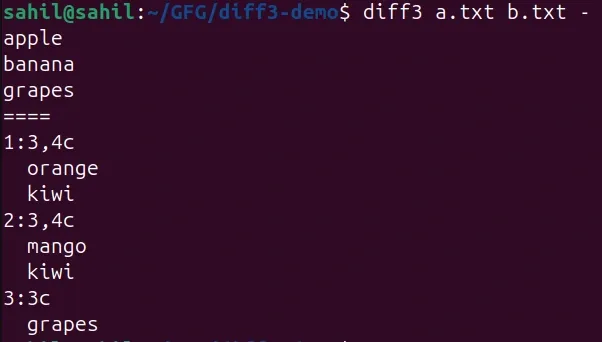
Using - allows one of the files to be provided via standard input (stdin) instead of an actual file.
Example: Provide Third File Using stdin
This example shows how diff3 accepts file content from the terminal. It is useful in pipelines or dynamic input scenarios.
Command:
diff3 a.txt b.txt -Input
apple
banana
grapes
Ctrl + D
Output:
The diff3 command is mainly used in situations where multiple versions of the same file exist and differences must be identified or resolved. Below are some practical and easy-to-understand real-world scenarios where diff3 is commonly used.
When two developers modify the same file differently, version control systems may create conflicts. The diff3 command helps compare the original file with the two modified versions to understand where conflicts occur.
Command:
diff3 -m original.txt user1.txt user2.txtNote: This is similar to how Git internally handles three-way merges.
System administrators often maintain similar configuration files across multiple servers. diff3 helps identify which system’s configuration differs.
Command:
diff3 config_server1.conf config_server2.conf config_backup.confIf a file is edited multiple times manually and backups are kept, diff3 helps determine what changed and where.
Command:
diff3 report_old.txt report_edit1.txt report_edit2.txtThe diff3 command can be used in shell scripts to automatically detect conflicts or differences.
Command:
diff3 -s file1.txt file2.txt file3.txtSometimes file content is generated dynamically. diff3 allows one file to be read from standard input.
Command:
cat new_version.txt | diff3 base.txt old_version.txt -