|
VOOZH | about |
|
VOOZH | about |
When dealing with large text files containing various information, it's often necessary to extract specific data such as email addresses. While manual extraction is possible, it can be time-consuming and error-prone. This is where the powerful grep command in Linux comes to our rescue. In this article, we'll explore how to use grep to efficiently extract email addresses from text files.
The grep command is a powerful tool in Linux used for searching and matching patterns within files or text streams. It uses regular expressions to find and print lines that match a specified pattern.
grep [options] pattern [file...]Where,
Let's start with a basic example of using grep to search for a simple pattern in a file:
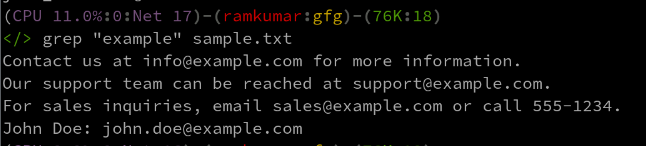
grep "example" sample.txtThis command will search for the word "example" in the file sample.txt and print all lines containing that word.
Grep offers various options to modify its behavior and output. Here are some commonly used options:
Option | Description |
|---|---|
-i | Ignore case distinctions |
-v | Invert the match (select non-matching lines) |
-n | Print line numbers along with matching lines |
-r | Recursively search subdirectories |
-e | Use a regular expression pattern |
-o | Print only the matched parts of a matching line |
Now, let's focus on our main task: extracting email addresses from a text file. We'll use a regular expression to match the general format of email addresses.
A typical email address follows this format: username@domain.com
We can create a regular expression to match this pattern:
[a-zA-Z0-9._%+-]+@[a-zA-Z0-9.-]+.[a-zA-Z]{2,}This regular expression matches:
Let's create a sample text file (sample.txt) with some content including email addresses:
Welcome to our company!
Contact us at info@example.com for more information.
Our support team can be reached at support@example.com.
For sales inquiries, email sales@example.com or call 555-1234.
John Doe: john.doe@example.com
Jane Smith: jane_smith123@email.co.uk
Invalid email: not.an.email
Another invalid: @missing.username.comNow, let's use grep with our regular expression to extract email addresses:
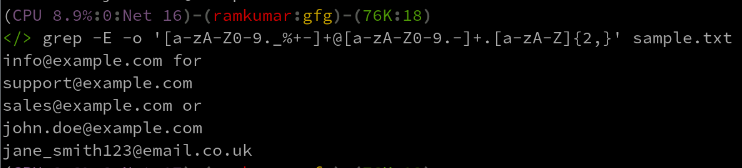
grep -E -o '[a-zA-Z0-9._%+-]+@[a-zA-Z0-9.-]+.[a-zA-Z]{2,}' sample.txtHere's what each part of the command does:
The grep command, combined with regular expressions, provides a powerful and efficient way to extract email addresses from text files in Linux. By understanding the basic syntax and options of grep, along with crafting an appropriate regular expression, you can easily automate the process of finding and extracting specific patterns of data from large text files.
This technique can be extended to search for other types of data patterns, making grep an invaluable tool for text processing and data extraction tasks in Linux environments.