|
VOOZH | about |
|
VOOZH | about |
grpck command in Linux System verifies the integrity of the groups' information. It checks that all entries in /etc/group and "/etc/gshadow" have the proper format and contain valid data. The user is prompted to delete entries that are incorrectly formatted or which have uncorrectable errors.
grpck [options] [group [gshadow]]Checks are made to verify that each entry has:
The checks for the correct number of fields and a unique group name are fatal. If an entry has the wrong number of fields, the user will be prompted to delete the entire line. The commands which operate on the /etc/group and /etc/gshadow files are not able to alter corrupted or duplicated entries. grpck should be used in those circumstances to remove the offending entries.
Configuration: The following configuration variables in /etc/login.defs change the behavior of this tool:
The grpck command exits with the following values:
grpck command without any Option: It will give two message immediately
Example:👁 grpck command
We can't use grpck command directly. Only the Administrator or root user can use this commands.
Different options with the grpck Command:👁 Different options with the grpck Command
We can use grpck command when we are Administrator or root user. Use command given below to enter in root or administrator mode.
Sudo -iExample:👁 Example
Now we will create Users and will apply grpck command to see how it will work. We can Create Group and User using this command.
addgroup group_name
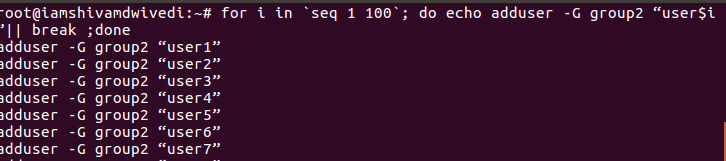
adduser user_name -G group_namefor i in `seq 1 100`; do echo adduser -G group1 "user$i"|| break ;doneExamples:👁 Image
We are seeing some unknown things from starting like - /etc/passwd, /etc/shadow etc. Let's see what are these unknown symbols signifies.These are configuration files which come into play after a user created.
When a new user is added, the information is stored as a single, colon-separated line in /etc/passwd. Here is an example of an entry in this file:
# tail -1 /etc/passwd With shadow passwords, a new entry is automatically added to /etc/shadow when a new user is created. This file can be viewed only by root. Here is an example of an entry in this file:
# tail -1 /etc/shadow Hashed group passwords are stored in this file. However, group passwords are rarely used. Here is an example of an entry in this file:
# tail -1 /etc/gshadow Because Oracle Linux uses a UPG scheme, a new entry is automatically created in /etc/group when a new user is added. The group name is the same as the username. Here is an example of an entry in this file:
# tail -1 /etc/group Now we successfully stored user in-group and know about all configuration Files .
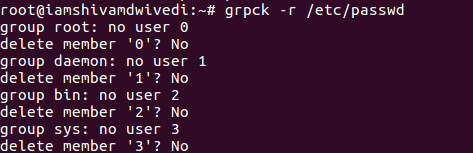
Execute the grpck command in read-only mode. This causes all questions regarding changes to be answered no without user intervention.
grpck -r /etc/passwd Example:👁 -r --read-only
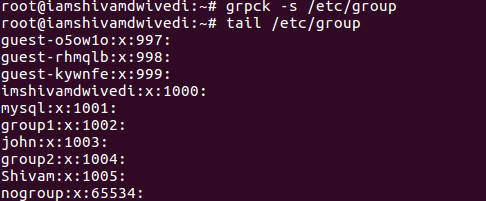
Sort entries in /etc/group /etc/gshadow by GID(Group ID).
grpck -s /etc/group Example:👁 -s --sort
The grpck command is an essential tool for ensuring the integrity of group-related information on a Linux system. By verifying and correcting errors in the "/etc/group" and "/etc/gshadow" files, it helps prevent issues that could arise from corrupted or duplicated entries. If you're managing a large number of users or simply maintaining a clean system, grpck is a valuable command for system administrators.