|
VOOZH | about |
|
VOOZH | about |
The head command in Linux is used to display the first few lines of one or more text files directly in the terminal.
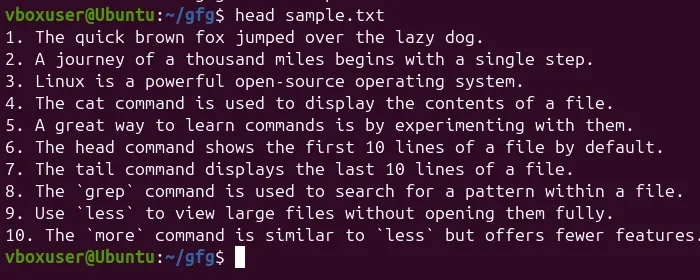
Run the basic head command to display the first 10 lines of the sample.txt file.
head sample.txt.txt.Output:
Let us consider two files having name state.txt and capital.txt contains all the names of the Indian states and capitals respectively.
$ cat state.txt
Andhra Pradesh
Arunachal Pradesh
Assam
Bihar
Chhattisgarh
Goa
Gujarat
Haryana
Himachal Pradesh
Jammu and Kashmir
Jharkhand
Karnataka
Kerala
Madhya Pradesh
Maharashtra
Manipur
Meghalaya
Mizoram
Nagaland
Odisha
Punjab
Rajasthan
Sikkim
Tamil Nadu
Telangana
Tripura
Uttar Pradesh
Uttarakhand
West Bengal
$ cat capital.txt
Hyderabad
Itanagar
Dispur
Patna
Raipur
Panaji
Gandhinagar
Chandigarh
Shimla
Srinagar
Example:
$ head state.txt
Andhra Pradesh
Arunachal Pradesh
Assam
Bihar
Chhattisgarh
Goa
Gujarat
Haryana
Himachal Pradesh
Jammu and Kashmirhead [options] [file(s)]head reads from standard input (stdinOption 1. -n num:
$ head -n 5 state.txt
Andhra Pradesh
Arunachal Pradesh
Assam
Bihar
Chhattisgarh
Option 2. -c num:
$ head -c 6 state.txt
Andhra
Option 3. -q:
Without using -q option$ head state.txt capital.txt
==> state.txt <==
Andhra Pradesh
Arunachal Pradesh
Assam
Bihar
Chhattisgarh
Goa
Gujarat
Haryana
Himachal Pradesh
Jammu and Kashmir

==> capital.txt <==
Hyderabad
Itanagar
Dispur
Patna
Raipur
Panaji
Gandhinagar
Chandigarh
Shimla
Srinagar


With using -q option$ head -q state.txt capital.txt
Andhra Pradesh
Arunachal Pradesh
Assam
Bihar
Chhattisgarh
Goa
Gujarat
Haryana
Himachal Pradesh
Jammu and Kashmir
Hyderabad
Itanagar
Dispur
Patna
Raipur
Panaji
Gandhinagar
Chandigarh
Shimla
Srinagar
Option 4. -v:
$ head -v state.txt
==> state.txt <==
Andhra Pradesh
Arunachal Pradesh
Assam
Bihar
Chhattisgarh
Goa
Gujarat
Haryana
Himachal Pradesh
Jammu and Kashmir
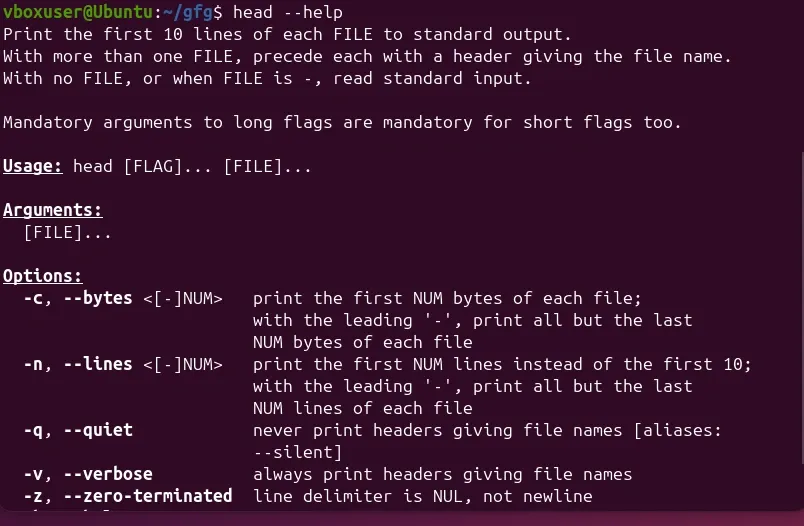
Option 5. '--help
head --helpOutput:
The primary purpose of the head command is to print the first few lines (or bytes) of a file to the standard output. It helps system administrators and developers to:
head Commandhead with tools like grep, tail, or sort for advanced workflows.Now, we're going to discuss some of the best real-world scenarios that can be used using head command in Linux:
For this purpose, we use the head, tail, and pipeline(|) commands. The command is: head -M file_name | tail +N since the head command takes first M lines and from M lines tail command cuts lines starting from +N till the end, we can also use head -M file_name | tail +(M-N+1) command since the head command takes first M lines and from M lines tail command cuts (M-N+1) lines starting from the end. Let say from the state.txt file we have to print lines between 10 and 20.
$ head -n 20 state.txt | tail -10
Jharkhand
Karnataka
Kerala
Madhya Pradesh
Maharashtra
Manipur
Meghalaya
Mizoram
Nagaland
OdishaThe head command can be piped with other commands. In the following example, the output of the ls command is piped to head to show only the three most recently modified files or folders.
Display all recently modified or recently used files.
$ ls -t
e.txt
d.txt
c.txt
b.txt
a.txt

Cut three most recently used file.
$ ls -t | head -n 3
e.txt
d.txt
c.txt
It can also be piped with one or more filters for additional processing. For example, the sort filter could be used to sort the three most recently used files or folders in the alphabetic order.
$ ls -t | head -n 3 | sort
c.txt
d.txt
e.txtThere are number of other filters or commands along which we use head command. Mainly, it can be used for viewing huge log files in Unix.