hostnamectl command provides a proper API used to control Linux system hostname and change its related settings. The command also helps to change the hostname without actually locating and editing the
/etc/hostname file on a given system.
Syntax:
hostnamectl [OPTIONS...] COMMAND ....
Where
COMMAND can be any of the following:
- status: Used to check current hostname settings.
- set-hostname NAME: Used to set system hostname.
- set-icon-name NAME: Used to set icon name for host.
- set-chassis NAME: Set chassis type for host.
Types of hostname:
- Static: Assigned by system admin and it is used to initialize the kernel hostname during boot time.
- Dynamic or Transient: Assigned by mDNS server or DHCP server during run time.
- Pretty: It's a high-level hostname assigned by system admin or end-user.
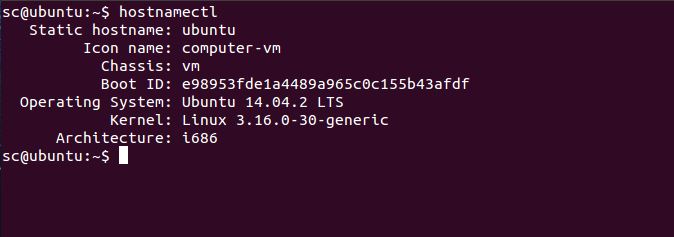
Example 1: Running
hostnamectl command to check the current host names. We can either execute
hostnamectl or
hostnamectl status, the result will be same as status option is automatically assumed if no option is given.
👁 Image
👁 Image
Example 2: To change static host name to
geeksforgeeks. It may require root permission.
hostnamectl set-hostname geeksforgeeks --static
👁 Image
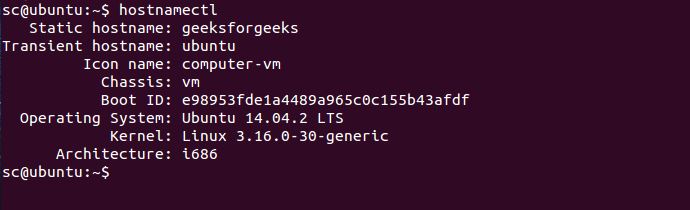
Now, let us verify the changed hostnames using the
hostnamectl command.
👁 Image
As you see that the static hostname has been updated to
geeksforgeeks.
Options:
- -h, --help: Show help text and exit.
👁 Image
- --version: Show package version and exit.
👁 Image
- --transient: This option is used when we particularly want to set transient hostname only.
Example: To set transient name to ubuntu.
👁 Image
Now, let's check the transient name using hostnamectl.
👁 Image
- --static: This option is used when we only want to set static hostname.
👁 Image
Now, let's verify the change using hostnamectl.
👁 Image
- --pretty: This option is used when we only want set pretty hostname. The name that is to be set needs to be in the double quote(" ").
👁 Image
Verifying the change using following command: hostnamectl --pretty status
👁 Image
- --no-ask-password: This option do not prompt for password for authentication in any privileged operations.
- -H --host=[USER@]HOST: This option is used to change the host names remotely. May need root privilege while execution.
hostnamectl set-hostname -H [username]@HostName
Here, HostName is the remote host that we want to configure.
Example: To set server3 as host name on a remote server called as 172.102.2.24 we can use the following command:
hostnamectl set-hostname server3 -H root@172.102.2.24