|
VOOZH | about |
|
VOOZH | about |
openSUSE is well known for its GNU/Linux-based operating systems, mainly Tumbleweed, a tested rolling release, and Leap, a distribution with Long-Term-Support(LTS). MicroOS and Kubic are new transactional, self-contained distributions for use as desktop or container runtime.
Here we figure out which version of the openSUSE Linux distribution is installed and running on a device in this post. The os-release file includes information about all openSUSE versions.
Methods 1: using lsb-release.
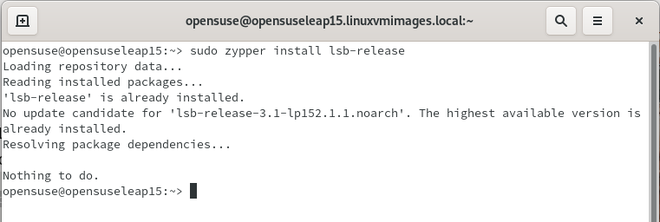
If the lsb-release package is not available on your device, use the zypper command to install it:
$ sudo zypper install lsb-release
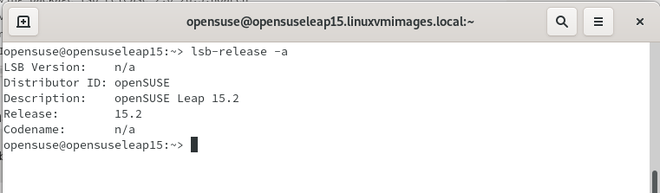
After installation run the following command:
$ lsb_release -a👁 How to Find openSUSE Linux Version
We can show all the details above, but we also have other options.
Show the release number:
lsb_release -r
Find the distributor’s ID:
lsb_release -d
View a description of the Linux distro:
lsb_release -d
Display the code name of the OpenSUSE:
lsb_release -c
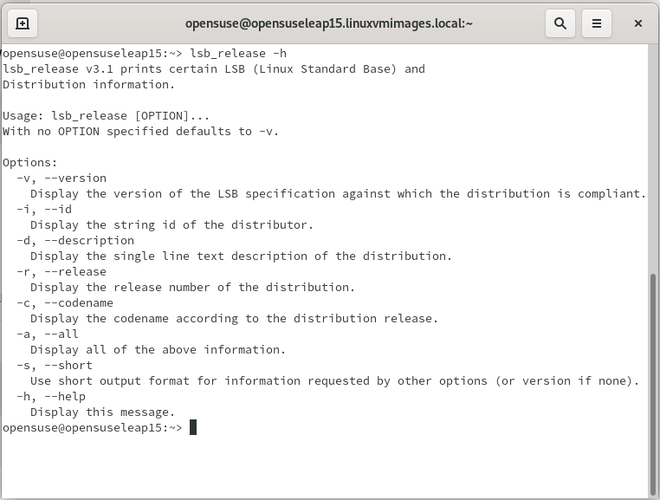
It's simple to display a help message on the screen. You simply need to type the following command:
lsb_release -h
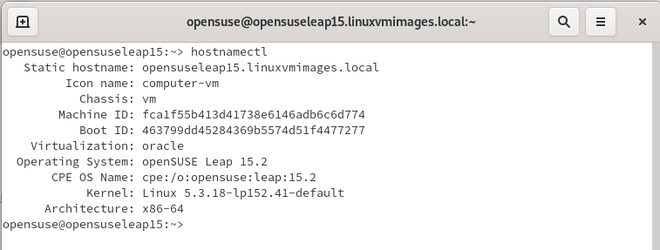
To query and modify the device hostname and related settings, use the hostnamectl command. It will even show you the version of your operating system. Run the hostnamectl command as follows:
$ hostnamectl👁 How to Find openSUSE Linux Version
Methods 2: using cat utility.
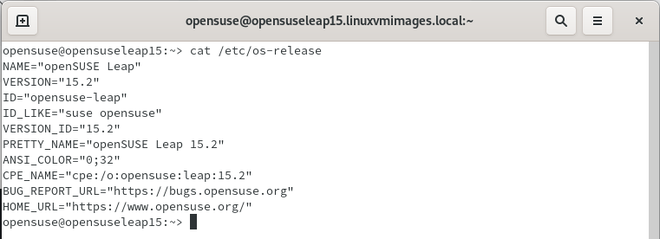
Alternatively, open the terminal and use the cat command to display the contents of /etc/os-release and /usr/lib/os-release:
$ cat /etc/os-release
OR
$ cat /usr/lib/os-release file
That's it! We've covered both graphical and command-line methods for determining which version of openSUSE you're running in this short article.