|
VOOZH | about |
|
VOOZH | about |
Wireless networking plays a crucial role in modern computing, enabling devices to connect and communicate without the need for physical cables. In the Linux ecosystem, the iwconfig command stands as a powerful tool for configuring and managing wireless network interfaces. This article will delve into the details of the iwconfig command, covering its features, usage, and practical applications.
The iwconfig command is part of the wireless-tools package in Linux and is used to configure and display information about wireless network interfaces. It provides a convenient way to view and modify wireless interface settings, such as network name (SSID), encryption keys, and transmission power. iwconfig may also be used to display the parameters, and the wireless statistics which are extracted from /proc/net/wireless.
The iwconfig command in Linux follows a straightforward syntax that allows users to configure and display information about wireless network interfaces. Here's an overview of the basic syntax:
iwconfig [INTERFACE] [OPTIONS]Here,
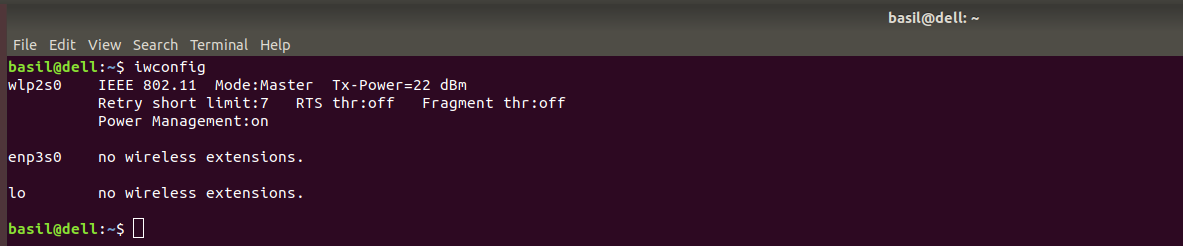
interface: This is the wireless network interface that you want to configure or query. It could be something like wlan0 or wlp2s0, depending on your system. If no interface is specified, iwconfig will display information for all wireless interfaces.options: These are various parameters and configurations that you can set or query for the specified wireless interface. Some common options include:Before diving into configuration, it's essential to identify the available wireless interfaces on your system. Execute the following command:
👁 ImageThis will display a list of wireless interfaces along with their current configuration details.
To view detailed Information:
To obtain more detailed information about a specific wireless interface (e.g., wlp0s20f3), use:
iwconfig wlp0s20f3essid : Set the ESSID (or Network Name - in some products it may also be called Domain ID).
iwconfig [Interface] essid "Your Network name"
👁 Image--help : Displays help regarding iwconfig command, such as the different modes in the options.
iwconfig --help
👁 Imagenwid):The nwid option in iwconfig allows you to set or disable the network ID. This can be useful for network identification purposes. Here is an example:
iwconfig [Interface] nwid on/off
nick):The nick option is used to set the nickname or station name for a wireless interface. This can be handy for personalizing the identification of your device. Example:
iwconfig [Interface] nickname "My Node"mode):The mode option in iwconfig sets the operating mode of the wireless device based on the network topology. Modes can include Ad-Hoc, Managed, Master, Repeater, Secondary, and Monitor. Example:
iwconfig [Interface] mode Managed
hhfreq/channel):The freq and channel options allow you to set the operating frequency or channel for the wireless device. Example:
iwconfig [Interface] freq 2.46000000
iwconfig [Interface] channel 3ap):The ap option in iwconfig forces the wireless card to register with the Access Point specified by the address. Example:
iwconfig [Interface] ap 00:60:1D:01:23:45
rate):The rate option is used to set the bitrate in bits per second for wireless cards that support it. Example:
iwconfig [Interface] rate 11M
txpower):The txpower option in iwconfig allows you to set the transmit power in dBm for wireless cards supporting multiple power levels. Example:
iwconfig [Interface] txpower 15
sens):The sens option sets the sensitivity threshold, defining how sensitive the wireless card is to poor operating conditions such as low signal or interference. Example:
iwconfig [Interface] sens -80
retry):The retry option in iwconfig sets the maximum number of times the MAC can retry transmission. Example:
iwconfig [Interface] retry 16
rts):The rts option adds a handshake before each packet transmission to ensure that the channel is clear. Example:
iwconfig [[Interface] rts 250
frag):The frag option sets the maximum fragment size, always lower than the maximum packet size. Example:
iwconfig [Interface] frag 512
key/enc):The key or enc option is used to manipulate encryption or scrambling keys and security mode. Example:
iwconfig [Interface] key 0123-4567-89
power):The power option is used to manipulate power management scheme parameters and mode. Example:
iwconfig [Interface] power off
modu):modu : This option is used to force the card to use a specific set of modulations. Example:
iwconfig [Interface] modu auto
commit):commit : This option forces the card to apply all pending changes. Example:
iwconfig [Interface] commitIn this article we discussed wireless connections which are crucial for devices to talk to each other without using physical cables. In Linux, there's a handy tool called iwconfig that helps manage these wireless connections. This article explores how iwconfig works, explaining its features like changing network names, adjusting transmission power, and more. It breaks down the basic syntax of using iwconfig, making it easier for users to configure their wireless settings. Whether you're setting up a nickname for your device or tweaking sensitivity levels, iwconfig is a versatile tool that makes wireless networking in Linux a lot simpler.