|
VOOZH | about |
|
VOOZH | about |
The modinfo command in Linux is used to display information about a Linux kernel module. It extracts detailed information from the modules available in the system and provides insights into their properties, dependencies, parameters, and more. If the module name is provided without a file name, the command automatically searches the '/lib/modules/kernel-version' directory for the specified kernel version.
The modinfo command is compatible with all Linux Kernel architectures, making it a versatile tool for system administrators, developers, and users working with kernel modules.
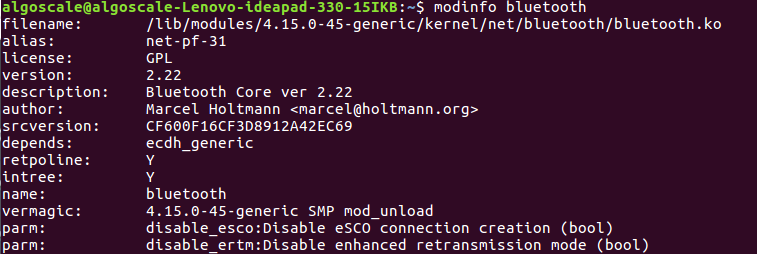
modinfo [-0] [-F field] [-k kernel] [modulename|filename...]The below command displays information about the Bluetooth module, including the module's author, description, license, dependencies, and more.
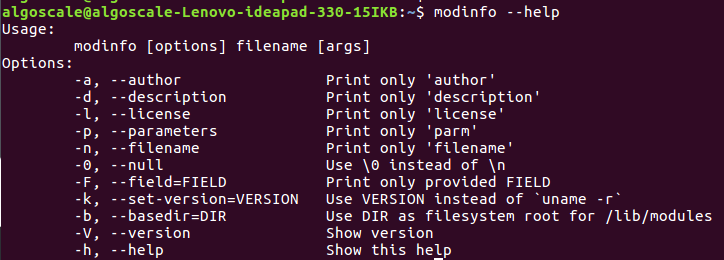
modinfo bluetooth👁 Basic ExampleIt will print the general syntax of the modinfo along with the various options and gives a brief description about each option.
Example:
modinfo --helpThis option gives the version information of modinfo command.
Example:
modinfo -V👁 ImageThis option only print this field value, one per line. Field names are case-insensitive. Common fields that may include author, description, license, parm, depends, and alias. There are possibly multiple parm, alias and depends on fields. The special field filename lists are the filename of the module.
Example:
modinfo -F modulenameThis option specifies the root directory for kernel modules instead of the default location. It is useful when modules are stored in a custom directory.
For example, to retrieve module information from a custom modules directory instead of the default location, the -b option can be used by specifying the base directory, followed by the module name.
Example:
modinfo -b /lib/modules e1000eThis option provides information about a kernel other than the currently running one. It is particularly useful for distributions that need to extract details from a newly installed kernel’s modules, such as when creating an 'initrd/initramfs' image before booting into that kernel.
For example, to determine which firmware files are required by different modules of a new kernel, the -k option can be used by specifying the kernel version, followed by the module name
modinfo -k 6.5.0-rc1 e1000eThis option use the ASCII zero character to separate field values, instead of a new line. This option is proven useful for scripts since a new line can theoretically appear inside a field.
Example:
modinfo bluetooth -0👁 ImageThese are the shortcuts used for the --field flag's author, description, license, parm and filename arguments to make the transition from the old modutils modinfo easy.
Example:
modinfo bluetooth -a👁 Imagemodinfo bluetooth -n👁 Imagemodinfo bluetooth -d👁 Imagemodinfo bluetooth -l👁 Imagemodinfo bluetooth -p👁 Image