The output will be the absolute path of your current location in the file system.
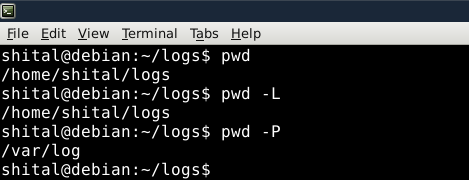
In the given example the directory /home/shital/logs/ is a symbolic link for a target directory /var/logs/
Syntax
The basic syntax of the 'pwd' command is
pwd [OPTIONS]
This command doesn't have any arguments or options, but it can accept flags for specific behavior.
1. Displaying the Current Working Directory Using Binary pwd (/bin/pwd):
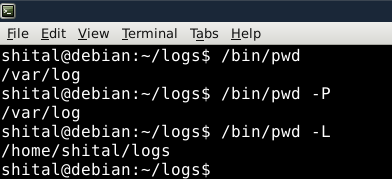
The binary /bin/pwd displays the absolute path of the current working directory directly from the system’s executable, ensuring accurate results even in complex environments.
The default behavior of Built-in pwd is the same as pwd -L. Using "pwd -L" to obtain the symbolic path of a directory containing a symbolic link.
The default behavior of /bin/pwd is the same as pwd -P. Utilizing "pwd -P" to display the actual path, ignoring symbolic links.
2. The $PWD Environment variable.
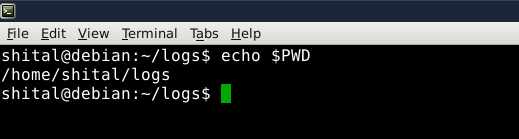
The $PWD environment variable is a dynamic variable that stores the path of the current working directory. It holds the same value as 'pwd -L' – representing the symbolic path.