|
VOOZH | about |
|
VOOZH | about |
Tail Command in Linux is used to display the last part of a file, showing recent content such as logs or updates.
Let us consider two files having a name state.txt and capital.txt containing all the names of the
Indian states and capitals, respectively.
Command:
cat state.txtOutput:
Andhra Pradesh
Arunachal Pradesh
Assam
Bihar
Chhattisgarh
Goa
Gujarat
Haryana
Himachal Pradesh
Jammu and Kashmir
Jharkhand
Karnataka
Kerala
Madhya Pradesh
Maharashtra
Manipur
Meghalaya
Mizoram
Nagaland
Odisha
Punjab
Rajasthan
Sikkim
Tamil Nadu
Telangana
Tripura
Uttar Pradesh
Uttarakhand
West Bengal
tail state.txttail [OPTION]... [FILE]...This section covers the most commonly used options and practical examples of the tail command to help you efficiently view and monitor the end of files in Linux.
tail command displays the last 10 lines of a file.-n option followed by the desired number.num value is mandatory; leaving out a number will cause an error.n option, but the - sign is required.tail -n 3 state.txt👁 85
or
tail -3 state.txt
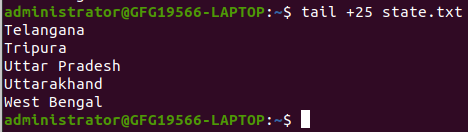
head command.tail +25 state.txt-c option in the tail command is used to print the last ‘num’ bytes from the specified file.-c followed by a positive or negative number depending on your requirement.-c -num displays the last num bytes from the file.-c +num displays all data after skipping num bytes from the beginning of the file.Note: Without positive or negative sign before num, command will display the last num bytes from the file specified.
tail -c -7 state.txtor
tail -c 7 state.txttail -c +263 state.txtCommand:
cat capital.txtOutput:
Amaravati
Itanagar
Dispur
Patna
Raipur
Panaji
Gandhinagar
Chandigarh
Shimla
Srinagar (summer), Jammu (winter)
Ranchi
Bengaluru
Thiruvananthapuram
Bhopal
Mumbai
Imphal
Shillong
Aizawl
Kohima
Bhubaneswar
Chandigarh
Jaipur
Gangtok
Chennai
Hyderabad
Agartala
Lucknow
Dehradun
Kolkata
Without using -q option
Command:
tail state.txt capital.txtOutput:
With using -q option
tail state.txt -q capital.txt-f option in the tail command is used to continuously monitor a file in real-time.Ctrl + C.$ tail -f logfile
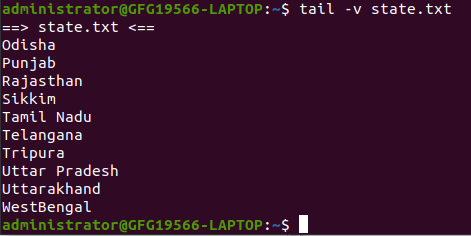
By using this option, data from the specified file is always preceded by its file name.
tail -v state.txtThis option is used to display the version of tail which is currently running on your system.
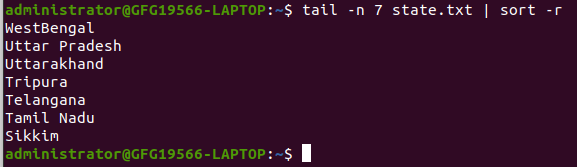
tail --versionThe tail command can be piped with many other commands of the unix. In the following example output of the tail command is given as input to the sort command with -r option to sort the last 7 state names coming from file state.txt in the reverse order.
tail -n 7 state.txtUsing Tail command with pipe `|`
tail -n 7 state.txt | sort -rIt can also be piped with one or more filters for additional processing. Like in the following example, we are using cat, head and tail command and whose output is stored in the file name list.txt using directive(>).
cat state.txt | head -n 20 | tail -n 5 > list.txtcat list.txt