|
VOOZH | about |
|
VOOZH | about |
The tree command in Linux displays the directory structure in a hierarchical, tree-like format, providing a clear visual representation of files and subdirectories.
Below are examples of the tree command in Linux.
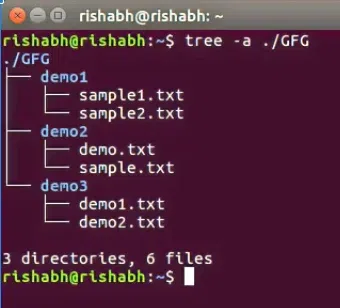
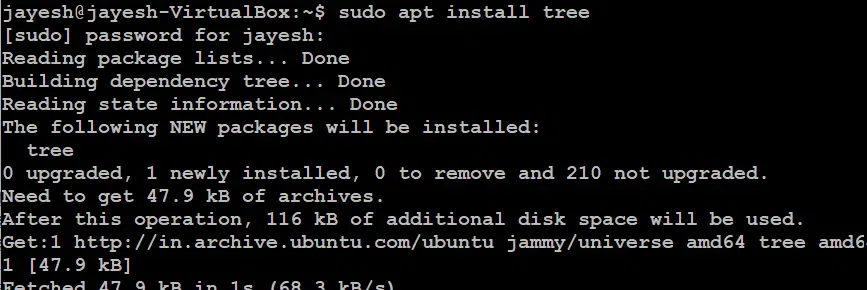
tree -a ./GFG tree [options]By default, the tree command is not installed. Type the following command to install the same
sudo apt updatesudo apt install tree -yThe -y automatically confirms the installation.
Note that in version greater than RHEL 8, we need to need dnf command.
For example, in installation in RHEL 9.
sudo dnf install treesudo apt-get install tree brew install treeIf we want to display the directory structure using the simple `tree` command without adding any option.
Here `tree` command will output the directory structure, starting from the current directory.
Given below the list of examples of tree command in linux:
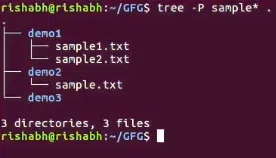
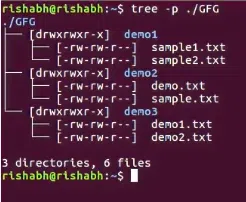
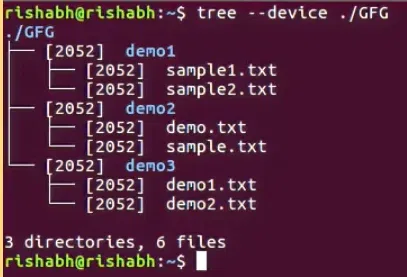
tree -P sample* . tree -daifv --noreport . | xargs -I {} tree -aifv -L 1 --noreport {} | xargs -I {} find {} -prune -type ftree --filelimit 3 ./GFG tree -p ./GFG tree --device ./GFG tree -t ./GFGtree -aif --noreport | grep "\.pdf$"Options | Description |
|---|---|
| --help | --help |
| --version | Outputs the version of the tree. |
| `-a` or `--all` | Includes hidden files and directories in the tree. |
| `-d` or `--dirs-only` | List directories only. |
| `-f` or `--full-path` | Prints the full path prefix for each file. |
| `-i` or `--ignore-case` | Ignores case when sorting filenames. |
| -x | Stay on the current file system only, as with find -xdev. |
| -I | Do not list those files that match the wild-card pattern. |
| `-p` or `--prune` | Omits the specified directory from the tree. |
| --filelimit # | Do not descend directories that contain more than # entries. |
| -t | Sort the output by last modification time instead of alphabetically. |
| --noreport | Omits printing of the file and directory report at the end of the tree listing. |
| -s | Print the size of each file along with the name. |
| -u | Print the username, or UID # if no username is available, of the file. |
| -g | Print the group name, or GID # if no group name is available, of the file |
| -D | Print the date of the last modification time for the file listed. |
| --inodes | Prints the inode number of the file or directory |
| --device | Prints the device number to which the file or directory belongs |
| -F | Append a `/' for directories, a `=' for socket files, a `*' for executable files and a `|' for FIFO's, as per ls -F |
| -q | Print non-printable characters in file names as question marks instead of the default carrot notation. |
| -N | Print non-printable characters as is instead of the default carrot notation. |
| -r | Sort the output in reverse alphabetic order. |
| --dirsfirst | List directories before files. |
| -n | Turn colorization off always, over-ridden by the -C option. |
| -C | Turn colorization on always, using built-in color defaults if the LS_COLORS environment variable is not set. Useful to colorize output to a pipe. |
| -A | Turn on ANSI line graphics hack when printing the indentation lines. |
| -S | Turn on ASCII line graphics (useful when using linux console mode fonts). This option is now equivalent to `--charset=IBM437' and will eventually be depreciated. |
| -L level | Max display depth of the directory tree. |
| -R | Recursively cross down the tree each level directories (see -L option), and at each of them execute tree again adding `-o 00Tree.html' as a new option. |
| -H baseHREF | Turn on HTML output, including HTTP references. Useful for ftp sites. baseHREF gives the base ftp location when using HTML output. That is, the local directory may be `/local/ftp/pub', but it must be referenced as `ftp://host-name.organization.domain/pub' (baseHREF should be `ftp://hostname.organization.domain'). Hint: don't use ANSI lines with this option, and don't give more than one directory in the directory list. If you want to use colors via CSS stylesheet, use the -C option in addition to this option to force color output. |
| -T title | Sets the title and H1 header string in HTML output mode. |
| --charset charset | Set the character set to use when outputting HTML and for line drawing. |
| --nolinks | Turns off hyperlinks in HTML output. |
| -o file name | Send output to file name. |
Many users compare tree with other directory listing tools like ls, find, and du. Adding this section can boost engagement and keyword ranking: