|
VOOZH | about |
|
VOOZH | about |
PHP stands for hypertext preprocessor. MySQL is a database query language used to manage databases.
In this article, we are going to discuss how to get the count of rows in a particular table present in the database using PHP and MySQL.
Requirements:
Approach: By using PHP and MySQL, one can perform database operations. We can get the total number of rows in a table by using the MySQL mysqli_num_rows() function.
Syntax:
mysqli_num_rows( result );The result is to specify the result set identifier returned by mysqli_query() function.
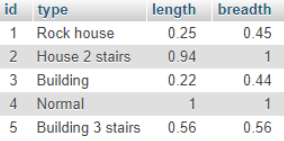
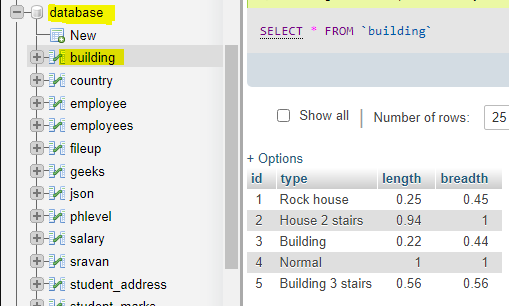
Example: The following table has 5 rows.
👁 ImageTo count the number of rows in the building table, the following code snippet is used.
$sql = "SELECT * from building";

if ($result = mysqli_query($con, $sql)) {

 // Return the number of rows in result set
 $rowcount = mysqli_num_rows( $result );

 // Display result
 printf("Total rows in this table : %d\n", $rowcount);
 }
Output: The expected result is as follows.
Total rows in this table : 5
Steps for the approach:
Steps:
PHP code:
Output: After running the above PHP file in localhost, the following result is achieved.
Total rows in this table : 5
Example 2: In the following example, we count the table rows using MySQL count() function. It's an aggregate function used to count rows.
Syntax:
select count(*) from table;
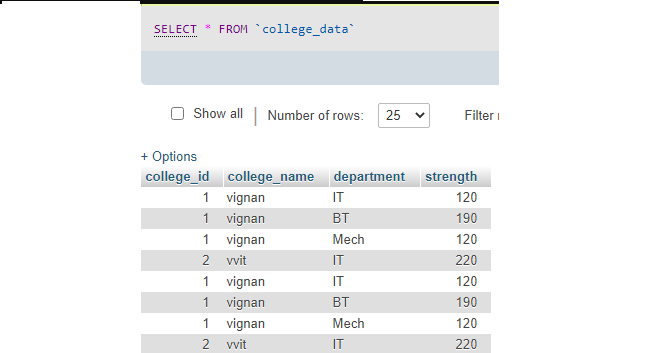
Consider the table.
👁 ImagePHP code:
Output:
Total Rows is 8