|
VOOZH | about |
|
VOOZH | about |
In this article, we learn to parse a CSV file using PHP code, along with understanding its basic implementation through examples.
Approach: The following approach will be utilized to parse the CSV File using PHP, which is described below:
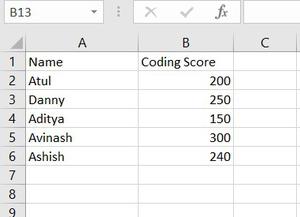
Step 1. Add data to an Excel file. The following example is given for sample data having Name and Coding Score as their column headers.
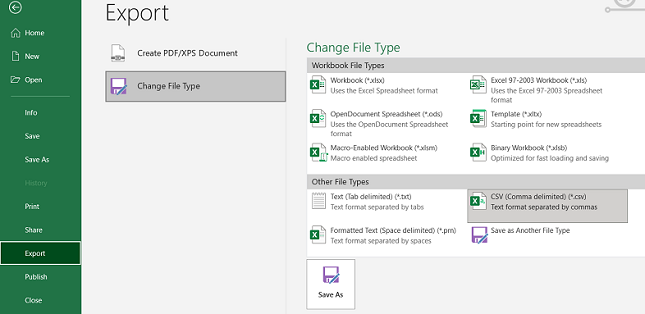
👁 ImageStep 2. Convert to CSV file by following the path. Go to File>Export>Change File Type> CSV Type. Save the file in your working folder with the name "Book1.csv".
👁 ImageStep 1. Create a folder and add that CSV file and create a new PHP file in it.
Step 2. Open the PHP file and write the following code in it which is explained in the following steps.
$open = fopen("filename.csv", "r");$data = fgetcsv($open, 1000, ",");while (($data = fgetcsv($open, 1000, ",")) !== FALSE)
{
// Read the data
}
fclose($open);Example 1: This example describes the usage of the fclose() Method in PHP to parse a CSV File in PHP.
Output:
array(6) {
 [0]=>
 array(2) {
 [0]=>
 string(5) "Name "
 [1]=>
 string(12) "Coding Score"
 }
 [1]=>
 array(2) {
 [0]=>
 string(4) "Atul"
 [1]=>
 string(3) "200"
 }
 [2]=>
 array(2) {
 [0]=>
 string(5) "Danny"
 [1]=>
 string(3) "250"
 }
 [3]=>
 array(2) {
 [0]=>
 string(6) "Aditya"
 [1]=>
 string(3) "150"
 }
 [4]=>
 array(2) {
 [0]=>
 string(7) "Avinash"
 [1]=>
 string(3) "300"
 }
 [5]=>
 array(2) {
 [0]=>
 string(6) "Ashish"
 [1]=>
 string(3) "240"
 }
}
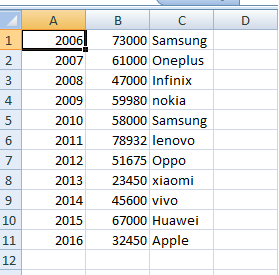
Example 2: This code is another example of parsing a CSV file and returning the result in HTML tabular format.
sampleCSVfile.csv: This file is used in the above PHP file.
👁 ImageOutput:
👁 Parse a CSV File in PHP