|
VOOZH | about |
|
VOOZH | about |
Break statement in MATLAB is used for breaking out of an iterative loop, for or while loop. The break in MATLAB is similar to the break statements in other programming languages such as C, C++, Python, etc. We will see how to break out of a single for or while loop and the nested implementation of the same.
for <iteration condition>
statement 1
--------------
break conditional
break
end
while <condition>
statement 1
--------------
break conditional
break
end
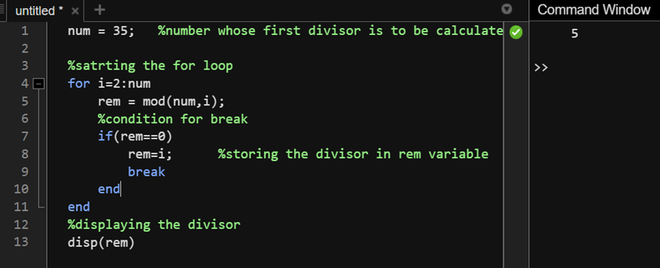
We will use a loop that returns the first complete divisor of a number in the specified range.
Example 1:
S
Output:
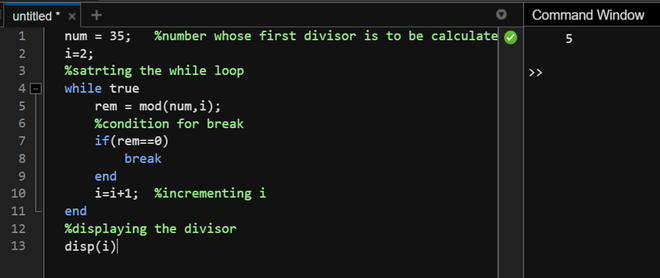
We will use the same case with the while loop to see the usage of a break in the while loop.
Example 2:
Output:
Using the break statement with nested loops.
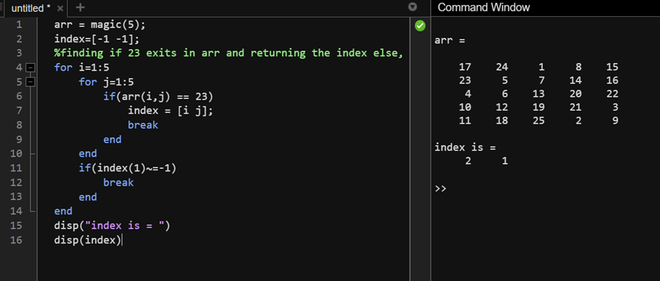
We will find the index of number 23 in magic square of 5x5 using nested loops.
Example 3:
Output:
As can be seen, 23 is located in the 1st column of the 2nd row thus, the index is 2,1.