|
VOOZH | about |
|
VOOZH | about |
Switch statements in MATLAB allow having multiple cases as conditionals. It is an implementation of the simple if-elif-else-end cycle but, better. In this article, we will see how nested switch statements work in MATLAB with the help of example.
switch choice_1
case <1>
switch choice_2
case <B>
statements
.
end %end of inner switch
.
end %end of outer switch
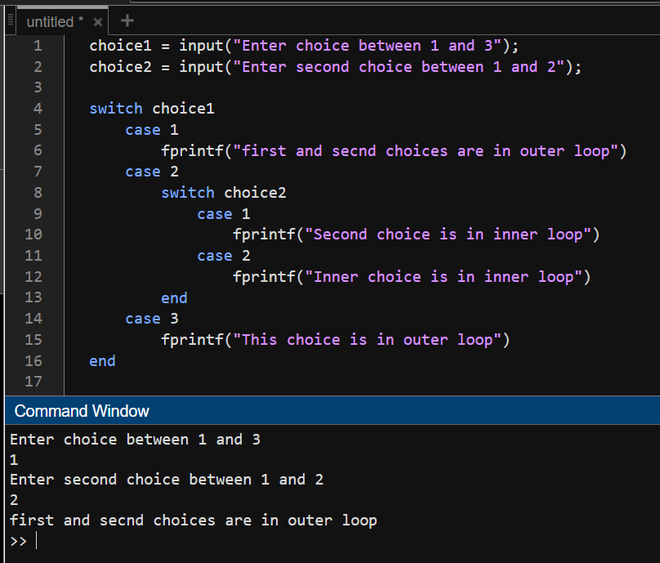
Now we see the below example printing the switch whether it is inner or outer.
Example 1:
Output:
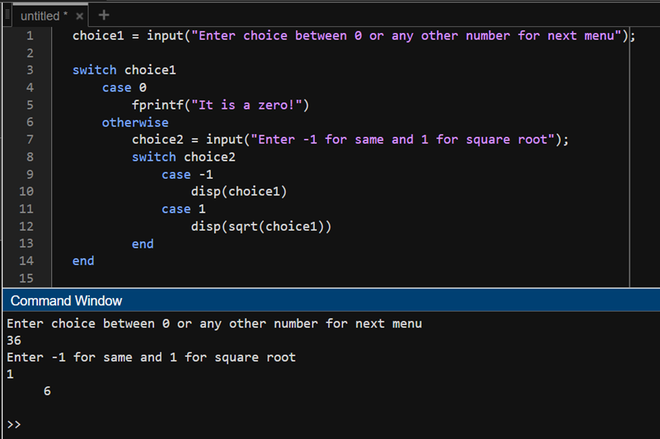
Now we will use the nested switch for the situation where if the input number is 0, it prints "It is zero!" else if it is not 0, it will ask for new choice whether you want to print the number or its square root.
Example 2:
Output: