|
VOOZH | about |
|
VOOZH | about |
Matrices are 2-dimensional arrays that are the most popular data type in MATLAB. A matrix can contain theoretically infinite elements as long as the computer has the required memory. In practice, when dealing with large data, there are scenarios when the majority of data contains zeroes as elements and this results in memory wastage.
As a resolution, sparse matrices are created. A sparse matrix is a representation of a matrix in which all zero elements are removed and non-zero elements are stored as row, column, and value triplet.
In this article, we shall see how to create a sparse matrix, convert an existing matrix to a sparse matrix, etc.
Syntax:
s = sparse(matrix)
The above method converts an existing matrix into a sparse matrix. See the following example.
Example 1:
Output:
MATLAB provides the option to create a sparse matrix of all zeroes of a definite size. The same can be done using the sparse command only, this time passing two arguments, one for row size and the other for column size. See the below example.
Example 2:
Output:
This code creates a sparse matrix of all zeroes of size 3x5.
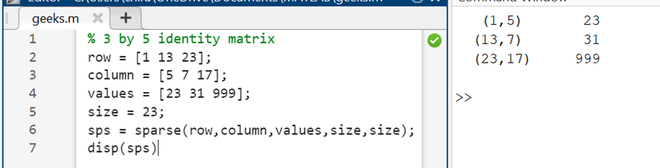
The sparse function also converts values for rows, columns, and values into a sparse matrix of pre-defined length. As can be seen in the code below where three nonzero elements are added to a sparse matrix of size 23 by 23.
Example 3:
Output:
The full () function takes input from a sparse matrix and converts it back into a regular, full-sized matrix.
Example 4:
Output:
The above code first generated a sparse matrix of size 7x7 and then, converts it back to a full matrix.