|
VOOZH | about |
|
VOOZH | about |
SQLite a lightweight and versatile relational database managementsystem offers powerful querying capabilities through its support for various SQL operators. Two commonly used operators, 'LIKE' and 'IN', enable developers to write flexible and efficient queries for data retrieval.
In this article, we'll explore how to combine 'LIKE' and 'IN' operators in SQLite statements with the help a sample table to demonstrate their practical applications.
The 'LIKE' operator is used to match patterns within strings. It allows wildcard characters such as '%' (matches zero or more characters) and '_' (matches a single character) to be used for flexible pattern matching.
Syntax:
SELECT column1, column2, ...
FROM table_name
WHERE columnN LIKE pattern;
Explanation: In the WHERE clause, columnN is the column you want to search in, and pattern is the pattern you want to match. The pattern can include the wildcard characters % (matches zero or more characters) and _ (matches exactly one character).
The IN operator is a operator which is used to specify multiple values in a WHERE clause. The IN Operator checks whether a value matches any value in a list of specified values.
Syntax:
SELECT column1, column2, ...
FROM table_name
WHERE column_name IN (value1, value2, ...);
Explanation: The IN operator in SQLite allows us to specify multiple values in a WHERE clause to filter rows based on those values. It simplifies the query by avoiding the need for multiple OR conditions.
Combining 'LIKE' and 'IN' operators in an SQLite statement allows for more intricate querying, especially when dealing with pattern matching and multiple value comparisons.
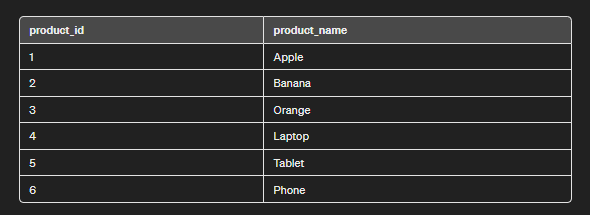
To understand Combining 'like' and 'in' in an SQLite statement we need a table on which we will perform various operations and queries. Here we will consider a table called products which contains product_id and product_name as Columns.
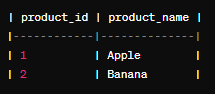
Suppose we want to retrieve products whose names contain either 'apple' or 'banana'. We can achieve this using the following query:
SELECT *
FROM products
WHERE product_name LIKE '%apple%' OR product_name LIKE '%banana%';
Output:
Explanation: In the above query, we retrieves all records from the products table where the product_name column contains the words "apple" or "banana" using the LIKE operator with wildcard characters %.
If we want to filter products by specific names, such as 'Apple', 'Banana', and 'Laptop', we can use the 'IN' operator:
SELECT *
FROM products
WHERE product_name IN ('Apple', 'Banana', 'Laptop');
Output:
Explanation: In the above query, we retrieves all records from the products table where the product_name column matches 'Apple', 'Banana', or 'Laptop' using the IN operator.
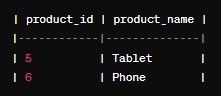
We can combine 'LIKE' and 'IN' operators for more complex queries. For example, to retrieve products with names containing 'phone' or 'tablet' and also having 'a' or 'e' in their names, we can write:
SELECT *
FROM products
WHERE (product_name LIKE '%phone%' OR product_name LIKE '%tablet%')
AND product_name LIKE '%a%' OR product_name LIKE '%e%';
Output:
Explanation:This query retrieves all records from the products table where the product_name column contains 'phone' or 'tablet' and also contains the letters 'a' or 'e'.
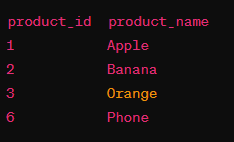
SELECT *
FROM products
WHERE product_name LIKE '%a%'
OR
product_name LIKE '%o%' ORDER BY product_id;
Output:👁 productsContainingAorO
Overall, by combining 'LIKE' and 'IN' operators in SQLite developers can construct different queries to retrieve specific data subsets based on pattern matching and multiple value comparisons. Understanding how to effectively use these operators that help developers to write more efficient and precise SQL queries also enhancing data retrieval and analysis capabilities in SQLite .databases.