|
VOOZH | about |
|
VOOZH | about |
SQLite is a lightweight, embedded relational database management system (RDBMS)which famous for its simplicity and fewer setup requirements. It is a self-contained, serverless, and zero-configuration database engine, SQLite is widely used in various applications, including mobile devices, desktop software, and embedded systems.
SQLite supports standard SQL syntax provides ACID (Atomicity, Consistency, Isolation, Durability), and ensures reliable and transactional data operations.
Comma-separated values (CSV) is a widely used file format for plain-text and exchanging tabular data in a plain-text format. In CSV files, each line represents a row of data, with fields separated by commas. This simplicity and human-readable structure make CSV files easy to create, manipulate, and understand.
CSV is commonly employed for data interchange between different applications, databases, and spreadsheetsoftware, providing a straightforward and universal means of sharing structured information while remaining lightweight and versatile.
Before we start, make sure we have SQLite3 installed on our system. To create a new SQLite database, use the following command:
Query:
./sqlite3.exe Database.dbThe above command will create a Database in the current working directory.
Consider the below Data in the CSV file which will be imported. The first row includes the attribute names and then the data.
Let the Absolute Location of the below import file be C:\Sqlite-Proj\Import-CSV\importFile.csv
Change the mode to CSV using the .mode command:
.mode csvCopy the absolute path of the CSV File. Use the .import command to import the file
If the table does not exist then the table will be created with all the attributes of the TEXT datatype.
.import absolute_path table_name Example:
Let the absolute path be C:\Sqlite-Proj\Import-CSV\importFile.csv ,and table name be students.
.import C:\Sqlite-Proj\Import-CSV\importFile.csv studentsBy executing the above commands we will get imported by the data of the csv file into the database.
We will create the students table using the below command.
 CREATE TABLE students
(
 roll_number INTEGER PRIMARY KEY,
 name TEXT,
 class TEXT,
 percentage REAL
);
Change the mode to CSV:
.mode csvNow as we are already having a Table, we cannot just directly import the CSV file. Executing the normal import command will raise a datatype mismatch error for the first row. To skip the first line (column names), use the following command:
.import C:\Sqlite-Proj\Import-CSV\importFile.csv studentsOutput:
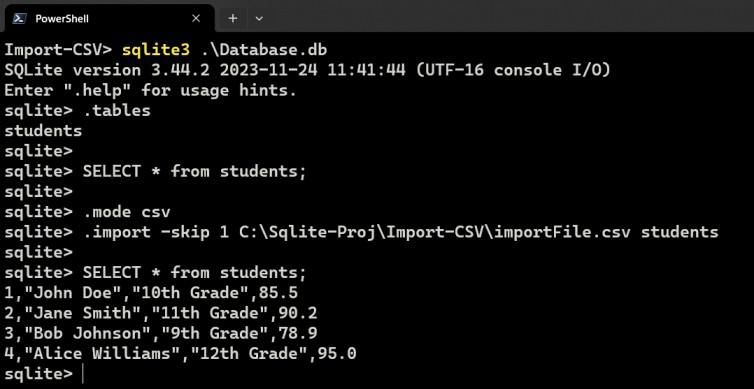
Just to ignore the datatype mismatch error we can just skip the first line of csv file (column names) using the below command.
.import -skip 1 C:\Sqlite-Proj\Import-CSV\importFile.csv studentsOutput:
Explanation: Importing the data into a table which is already having data will just append the data.
Open SQLiteStudio and navigate to the Import options from the Tools Menu bar.
Choose the target database and table for data import.
Some of the configurations are:
Now Click on Finish and the data will be imported in the table.
SQLite's import from CSV feature provides a efficient way to populate a database with data from Comma-Separated Values (CSV) files. This feature simplify the process of transferring large datasets into SQLite databases by allowing users to easily map CSV file columns to corresponding database table columns. This capability enhances the versatility of SQLite, making it a practical choice for applications that require the unlimited integration of structured data from CSV files.