An EMI Calculator (Equated Monthly Installment) is a financial tool that computes the fixed monthly repayment amount on a loan, incorporating principal and interest.
Steps to use EMI Calculator
Step 1: Enter the Loan Amount
Input the loan amount in the Loan Amount field or adjust the slider to set the desired value.
Step 2: Select Loan Tenure
Enter the loan tenure in years or use the slider to choose how long you plan to repay the loan.
Step 3: Set the Interest Rate
Provide the annual interest rate (%) using the input box or the slider.
Step 4: Calculate the EMI
Click the Calculate button to view your monthly EMI amount instantly. You can also use the Reset button to clear all values and start again.
EMI
EMI, or Equated Monthly Installment, is a fixed payment amount made by a borrower to a lender at a specified date each calendar month.
It comprises both principal and interest components, ensuring a gradual repayment of a loan, commonly used for mortgages, car loans, or other installment-based financial arrangements.
EMI Calculator Formula
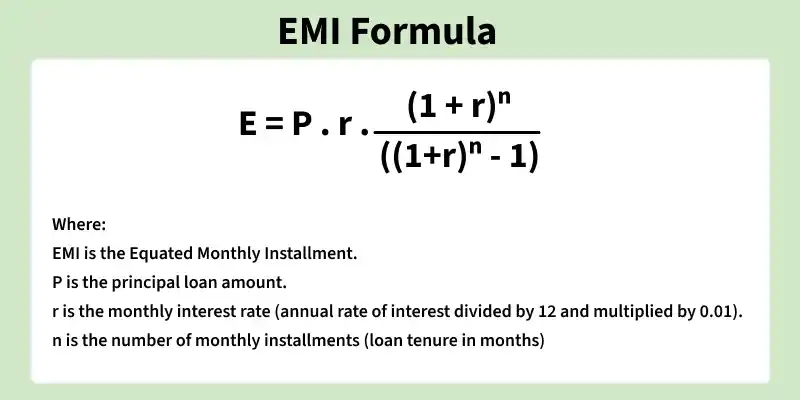
The formula to calculate Equated Monthly Installment (EMI) is:
To compute Equated Monthly Installment (EMI), employ the formula:
EMI = .
Here, P denotes the loan amount, r represents the monthly interest rate (annual rate divided by 12 and converted to a decimal), and n is the loan tenure in months. This formula facilitates the systematic repayment of a loan over time.
-Using the formula, we can calculate the monthly EMI:
EMI = = ₹13,982.
You’ll repay ₹13,982 monthly for 180 months, resulting in a total repayment of ₹25,16,760, including ₹10,16,760 as interest.
How to Use EMI Calculator
Input Loan Details :
Start by entering the loan amount you intend to borrow from the financial institution.
Next, input the rate of interest agreed upon by your lender. This represents the annual interest rate at which you’ll be borrowing the money.
Determine Loan Tenure :
Decide on the loan tenure, which is the total duration in months for which you plan to take the loan.
Calculate Monthly Interest Rate :
Divide the annual interest rate by 12 to obtain the monthly interest rate (since the interest is calculated monthly).
Compute the EMI :
Utilize the following formula to calculate the Equated Monthly Installment
Where , (P) represents the principal amount (loan amount). (r) denotes the monthly interest rate (annual interest rate divided by 12). (n) stands for the number of monthly installments (loan tenure in months).
Validate the Result :
Double-check your calculation to ensure consistency and accuracy.
Confirm that the EMI aligns with the loan terms provided by the lender.
Applications of EMI Calculator
Accurate Loan Planning: Precisely calculate monthly EMIs, aiding borrowers in planning repayment schedules for loans with varying amounts, tenures, and interest rates.
Dynamic Visualization: Instantly visualize the impact of changes in loan amount, tenure, and interest rate, empowering users with dynamic and insightful EMI variations.
Responsive User Interface: Enjoy a seamless experience with a responsive interface that adapts effortlessly to different devices, providing accessibility and ease of use.
Comprehensive Financial Insights: Gain comprehensive financial insights with a detailed breakdown of loan components, including principal, interest, and total repayment, enhancing financial decision-making.