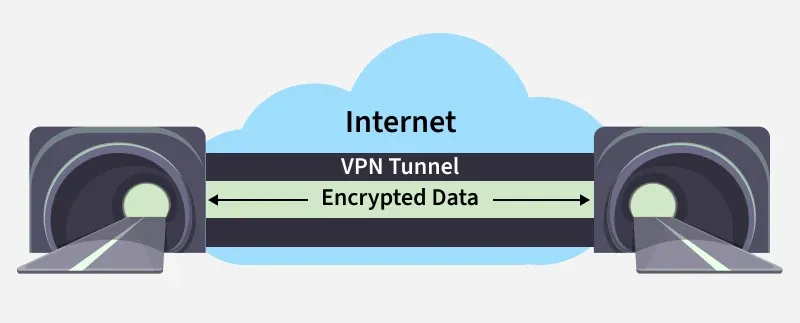
A Virtual Private Network (VPN) is a security technology that creates an encrypted tunnel between your device and a VPN server over the internet, so your traffic travels privately and your real IP address is hidden.
Privacy protection: Hides your IP and encrypts traffic, so ISPs, advertisers, and third parties can’t easily monitor your browsing.
Security on public Wi-Fi: Encryption protects logins and personal data on unsafe networks (airports, cafes).
Bypass geo-restrictions: Changes your apparent location by routing through another region’s server, unlocking region-limited sites or services.
Reduce ISP throttling: Since traffic is encrypted, ISPs can’t easily identify specific activities (streaming/gaming) to selectively slow them.
Secure remote access: Let employees connect to internal company resources securely from outside the organization.
1. Connection establishment: When you turn on the VPN, the VPN client authenticates you and sets up a secure session with a VPN server.
2. Data encryption: Your outgoing traffic is encrypted using cryptographic algorithms, so intercepted packets look like unreadable ciphertext to hackers, ISPs, or attackers on public Wi-Fi.
3. Traffic redirection (tunnelling): The encrypted traffic is sent through the tunnel to the VPN server, and the VPN server replaces your real IP with its own public IP, hiding your identity/location from the destination site.
4. Decryption and forwarding: The VPN server decrypts the traffic and forwards it to the actual website/service; replies come back to the VPN server and then travel back to you through the same encrypted tunnel.
5. End-to-end protection: This tunnel provides privacy (confidentiality), helps maintain integrity against tampering during transit, and improves anonymity by masking your IP.
Types of VPN
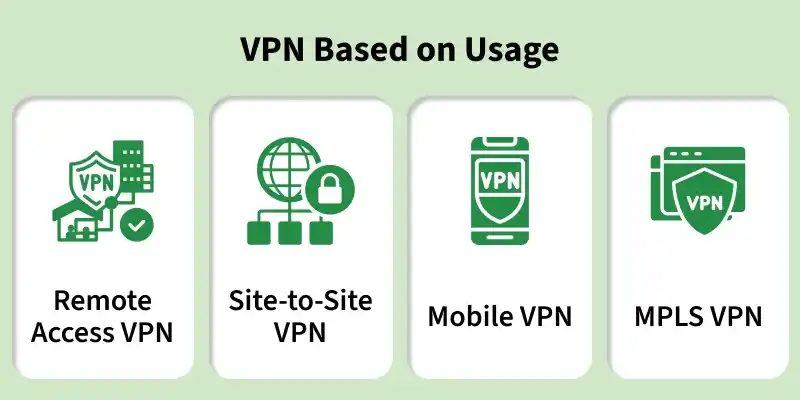
A) Types based on usage (deployment)
A deployment-based VPN type describes who is connecting and what network is being protected.
Remote Access VPN: It allows an individual user to securely connect to a private network over the internet, and it is widely used by employees working remotely.
Site-to-Site VPN: It securely connects two or more separate networks, such as a head office and branch offices, so internal communication remains protected across locations.
Mobile VPN: It is designed for mobile users and keeps the VPN session stable even when the device switches between Wi-Fi and cellular networks.
MPLS VPN: It is a provider-managed enterprise WAN solution that offers scalable connectivity and traffic prioritization, but it typically does not provide end-to-end encryption by default.
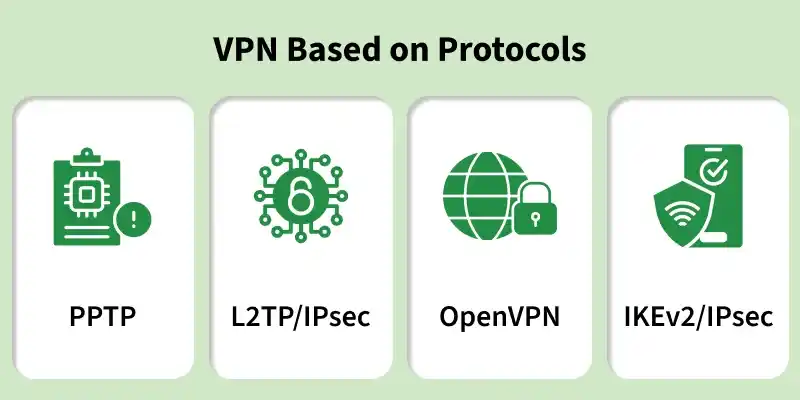
B) Types based on protocols (tunnelling technology)
Protocol-based VPN types describe how the tunnel is created and secured, and they affect speed, security, and compatibility.
PPTP: It is an older protocol that can be fast, but it provides weak security, so it is mainly used only for legacy systems.
L2TP/IPsec: It combines L2TP tunnelling with IPsec encryption, which improves security, but it can add performance overhead.
OpenVPN: It is an open-source protocol that uses SSL/TLS for encryption, and it is widely adopted because it provides strong security and flexibility.
IKEv2/IPsec: It is a secure and fast protocol that works very well on mobile devices because it reconnects quickly when network conditions change.
VPN Protocols
1) OpenVPN
OpenVPN is an open-source VPN protocol that uses SSL/TLS to provide secure authentication and encryption.
It can run on UDP for better speed and on TCP for higher reliability on unstable networks.
It supports strong encryption such as AES-256 and ChaCha20 to protect confidentiality and integrity.
It works on most operating systems and often passes through NAT and firewalls more easily than older protocols.
It is commonly used for secure remote access, privacy, and bypassing network restrictions.
2) WireGuard
WireGuard is a modern VPN protocol designed to be lightweight, fast, and easier to secure due to a small codebase.
It mainly uses UDP and modern cryptography like ChaCha20, Poly1305, and BLAKE2s.
It delivers high speed and low latency, which makes it suitable for streaming and online gaming.
It works very well on mobile devices because it reconnects quickly when the network changes.
3) IKEv2/IPsec
IKEv2/IPsec uses IKEv2 to set up secure tunnels and IPsec to provide encryption and integrity.
It automatically re-establishes the VPN session when switching between Wi-Fi and mobile data.
It supports strong encryption like AES-256 and can use Perfect Forward Secrecy for better long-term security.
It is widely used in enterprise environments for secure remote access.
4) L2TP/IPsec
L2TP/IPsec combines L2TP tunnelling with IPsec encryption to secure traffic.
It provides better security than PPTP, but it uses double encapsulation, which can reduce throughput.
It is supported on many platforms, so it is useful for legacy and cross-platform setups.
It is often chosen only when newer protocols are not available.
5) PPTP
PPTP is an older VPN protocol that is fast but not secure by modern standards.
It has low overhead, which improves speed, but it uses weak encryption and is vulnerable to attacks.
It is not recommended for sensitive data and should be used only for legacy compatibility.
6) SSTP
SSTP is a Microsoft VPN protocol that tunnels traffic over SSL/TLS using TCP port 443.
It can pass through many firewalls because it looks similar to normal HTTPS traffic.
It offers strong security, especially on Windows, but it has limited support on non-Windows platforms.
It is a good choice when networks block common VPN protocols.
How to Choose the Right VPN for Your Needs?
Choosing the right VPN means selecting a service that gives strong security, good speed, wide compatibility, and reliable operation for your specific use case.
Security features: You should choose a VPN that provides strong encryption such as AES-256, supports secure protocols like OpenVPN, WireGuard, or IKEv2/IPsec, and follows a strict no-logs policy for better privacy.
Performance and speed: You should select a VPN with fast servers and low latency if you need smooth streaming, gaming, or video calls, because high latency and overloaded servers reduce performance.
Server locations: You should prefer a VPN with many server locations across countries, because it improves connection options and helps access geo-restricted content.
Device and platform compatibility: You should ensure the VPN supports all your devices, including Windows, macOS, Android, iOS, and routers if you want whole-network protection.
Customer support and reliability: You should pick a provider that offers responsive support, clear setup guides, and consistent uptime, so issues get resolved quickly and the connection stays stable.
Drawbacks of Using VPN
Reduced internet speed: Encryption and routing traffic through remote servers can increase latency and lower connection speeds.
Inconsistent provider quality: Some VPN providers may use weak encryption or maintain user logs, which can compromise privacy.
Blocking and restrictions: Certain websites, streaming services, and countries actively detect and block VPN traffic, limiting access.
Configuration complexity: Advanced setups and manual configurations may require technical expertise, particularly in enterprise environments.
Cost factors: Free VPNs often impose limits on bandwidth and features, while reliable premium services require ongoing subscription fees.