Add Breaks in Word documents in C# and VB.NET
The following example shows how to add various text breaks into a document in C# and VB.NET using the GemBox.Document library.
using GemBox.Document;

class Program
{
 static void Main()
 {
 // If using the Professional version, put your serial key below.
 ComponentInfo.SetLicense("FREE-LIMITED-KEY");

 var document = new DocumentModel();

 var section = new Section(document,
 new Paragraph(document,
 new Run(document, "First line."),
 new SpecialCharacter(document, SpecialCharacterType.LineBreak),
 new Run(document, "Next line."),
 new SpecialCharacter(document, SpecialCharacterType.ColumnBreak),
 new Run(document, "Next column."),
 new SpecialCharacter(document, SpecialCharacterType.PageBreak),
 new Run(document, "Next page.")));

 section.PageSetup.TextColumns = new TextColumnCollection(2);

 document.Sections.Add(section);

 document.Save("Breaks.%OutputFileType%");
 }
}
Imports GemBox.Document

Module Program

 Sub Main()

 ' If using the Professional version, put your serial key below.
 ComponentInfo.SetLicense("FREE-LIMITED-KEY")

 Dim document As New DocumentModel()

 Dim section As New Section(document,
 New Paragraph(document,
 New Run(document, "First line."),
 New SpecialCharacter(document, SpecialCharacterType.LineBreak),
 New Run(document, "Next line."),
 New SpecialCharacter(document, SpecialCharacterType.ColumnBreak),
 New Run(document, "Next column."),
 New SpecialCharacter(document, SpecialCharacterType.PageBreak),
 New Run(document, "Next page.")))

 section.PageSetup.TextColumns = New TextColumnCollection(2)

 document.Sections.Add(section)

 document.Save("Breaks.%OutputFileType%")

 End Sub
End Module
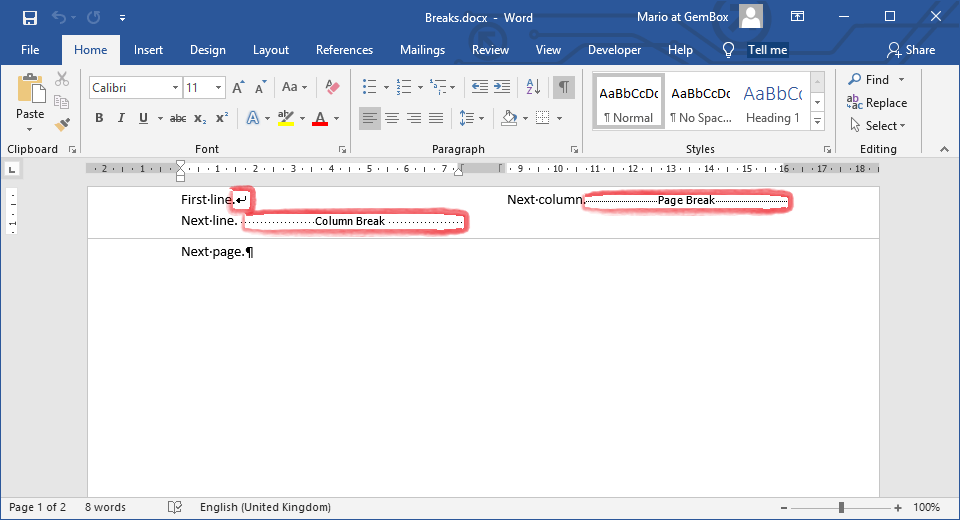
Most of the document operations that work with plain text, which accept String values, can handle the conversion of specific Char objects to SpecialCharacter elements. For instance, '\v' is converted to SpecialCharacterType.LineBreak, '\t' is converted to SpecialCharacterType.Tab, etc.
Among those operations are the Paragraph constructor, LoadText methods, and the MailMerge.Execute process.
However, note that Run constructor and Run.Text don't handle this conversion: the text that you provide to these operations shouldn't contain special characters like '\n', '\r', '\t', '\v' and '\f'.