Redacting text, images, and paths in PDF files in C# and VB.NET
The following example shows how you can use the GemBox.Pdf library to redact content in a PDF file using C# and VB.NET.
using GemBox.Pdf;

class Program
{
 static void Main()
 {
 // If using the Professional version, put your serial key below.
 ComponentInfo.SetLicense("FREE-LIMITED-KEY");

 using (var document = PdfDocument.Load("%InputFileName%"))
 {
 var page = document.Pages[0];

 // Adding and applying redaction annotation to the area with the content we want to redact.
 var redaction = page.Annotations.AddRedaction(300, 440, 225, 160);
 redaction.Apply();

 document.Save("Redacted.pdf");
 }
 }
}
Imports GemBox.Pdf

Module Program

 Sub Main()

 ' If using the Professional version, put your serial key below.
 ComponentInfo.SetLicense("FREE-LIMITED-KEY")

 Using document = PdfDocument.Load("%InputFileName%")
 Dim page = document.Pages(0)

 ' Adding and applying redaction annotation to the area with the content we want to redact.
 Dim redaction = page.Annotations.AddRedaction(300, 440, 225, 160)
 redaction.Apply()

 document.Save("Redacted.pdf")
 End Using
 End Sub
End Module
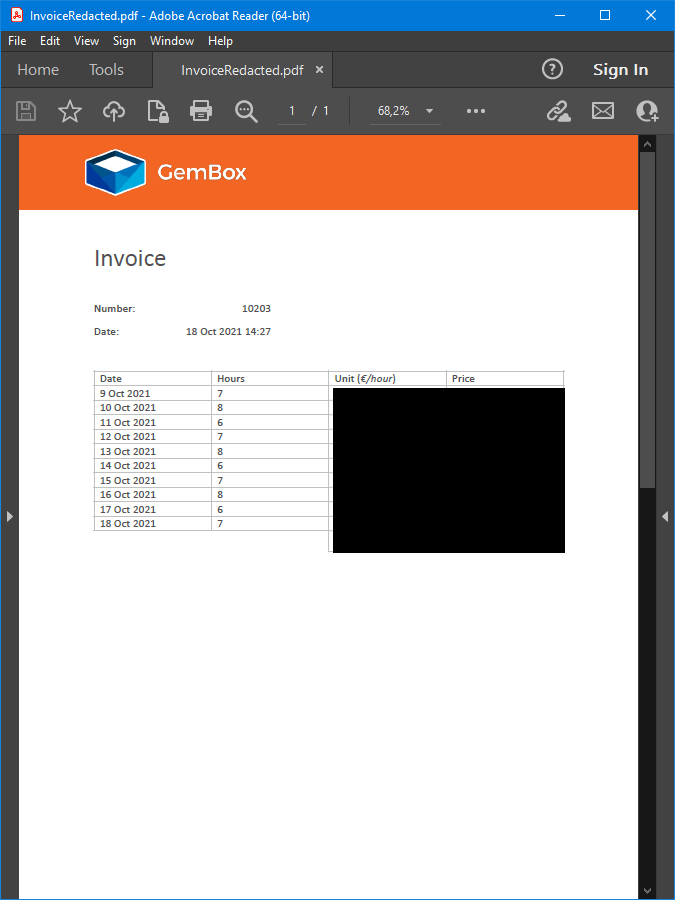
As demonstrated above, you can use GemBox.Pdf to redact (remove or obscure) specific elements such as text, images, and paths by specifying their coordinates. This capability can be handy for privacy or security purposes, where sensitive information must be concealed.
The following example shows how you can add multiple redactions with the same annotation. This feature makes it faster to execute and easier to modify the appearance of the redaction.
using GemBox.Pdf;
using GemBox.Pdf.Content;

class Program
{
 static void Main()
 {
 // If using the Professional version, put your serial key below.
 ComponentInfo.SetLicense("FREE-LIMITED-KEY");

 using (var document = PdfDocument.Load("%InputFileName%"))
 {
 var page = document.Pages[0];

 // Adding redaction annotation with any non-zero area.
 var redaction = page.Annotations.AddRedaction(0, 0, 1, 1);

 // Adding quads for the areas we want to redact
 redaction.Quads.Add(new PdfQuad(0, 0, 100, 100));
 redaction.Quads.Add(new PdfQuad(200, 0, 300, 100));
 redaction.Quads.Add(new PdfQuad(400, 0, 500, 100));
 redaction.Quads.Add(new PdfQuad(100, 100, 200, 200));
 redaction.Quads.Add(new PdfQuad(300, 100, 400, 200));
 redaction.Quads.Add(new PdfQuad(0, 200, 100, 300));
 redaction.Quads.Add(new PdfQuad(200, 200, 300, 300));
 redaction.Quads.Add(new PdfQuad(400, 200, 500, 300));
 redaction.Quads.Add(new PdfQuad(100, 300, 200, 400));
 redaction.Quads.Add(new PdfQuad(300, 300, 400, 400));
 redaction.Quads.Add(new PdfQuad(0, 400, 100, 500));
 redaction.Quads.Add(new PdfQuad(200, 400, 300, 500));
 redaction.Quads.Add(new PdfQuad(400, 400, 500, 500));

 // Applying redaction to remove all content in the area.
 redaction.Apply();

 document.Save("MultipleRedactions.pdf");
 }
 }
}
Imports GemBox.Pdf
Imports GemBox.Pdf.Content

Module Program

 Sub Main()

 ' If using the Professional version, put your serial key below.
 ComponentInfo.SetLicense("FREE-LIMITED-KEY")

 Using document = PdfDocument.Load("%InputFileName%")
 Dim page = document.Pages(0)

 ' Adding redaction annotation with any non-zero area.
 Dim redaction = page.Annotations.AddRedaction(0, 0, 1, 1)

 ' Adding quads for the areas we want to redact
 redaction.Quads.Add(New PdfQuad(0, 0, 100, 100))
 redaction.Quads.Add(New PdfQuad(200, 0, 300, 100))
 redaction.Quads.Add(New PdfQuad(400, 0, 500, 100))
 redaction.Quads.Add(New PdfQuad(100, 100, 200, 200))
 redaction.Quads.Add(New PdfQuad(300, 100, 400, 200))
 redaction.Quads.Add(New PdfQuad(0, 200, 100, 300))
 redaction.Quads.Add(New PdfQuad(200, 200, 300, 300))
 redaction.Quads.Add(New PdfQuad(400, 200, 500, 300))
 redaction.Quads.Add(New PdfQuad(100, 300, 200, 400))
 redaction.Quads.Add(New PdfQuad(300, 300, 400, 400))
 redaction.Quads.Add(New PdfQuad(0, 400, 100, 500))
 redaction.Quads.Add(New PdfQuad(200, 400, 300, 500))
 redaction.Quads.Add(New PdfQuad(400, 400, 500, 500))

 ' Applying redaction to remove all content in the area.
 redaction.Apply()

 document.Save("MultipleRedactions.pdf")
 End Using
 End Sub
End Module
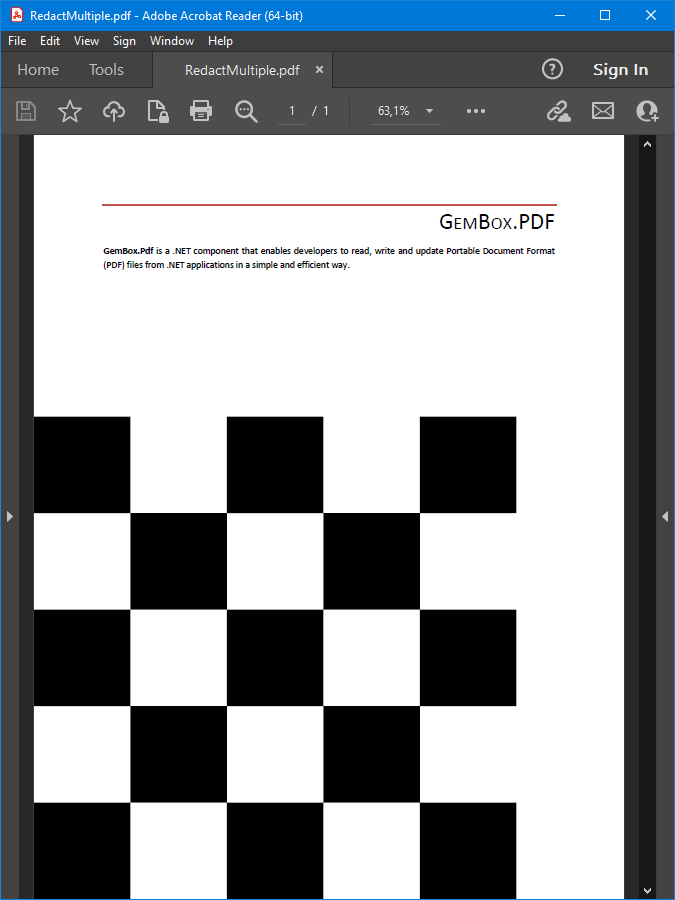
GemBox.Pdf can also apply all redactions on a page at once. It helps when we have a PDF document that already contains redaction annotations which are not applied.
using GemBox.Pdf;

class Program
{
 static void Main()
 {
 // If using the Professional version, put your serial key below.
 ComponentInfo.SetLicense("FREE-LIMITED-KEY");

 using (var document = PdfDocument.Load("%#Document.pdf%"))
 {
 // Applying all redactions existing in the PDF document
 foreach (var page in document.Pages)
 page.Annotations.ApplyRedactions();

 document.Save("RedactedOutput.pdf");
 }
 }
}
Imports GemBox.Pdf

Module Program

 Sub Main()

 ' If using the Professional version, put your serial key below.
 ComponentInfo.SetLicense("FREE-LIMITED-KEY")

 Using document = PdfDocument.Load("%#Document.pdf%")
 ' Applying all redactions existing in the PDF document
 For Each page In document.Pages
 page.Annotations.ApplyRedactions()
 Next

 document.Save("RedactedOutput.pdf")
 End Using
 End Sub
End Module
Redacting Text Content in PDFs with Regex Search
The following example shows how you can use GemBox.Pdf to redact specific text content in PDF files using regular expressions (regex).
using GemBox.Pdf;
using GemBox.Pdf.Content;
using System.Text.RegularExpressions;

class Program
{
 static void Main()
 {
 // If using the Professional version, put your serial key below.
 ComponentInfo.SetLicense("FREE-LIMITED-KEY");

 using (var document = PdfDocument.Load("%#Invoice.pdf%"))
 {
 var page = document.Pages[0];

 // Regex to match with decimal numbers
 var regex = new Regex(@"\d+\.\d+");

 // Redacting everything that matches with the regex
 foreach (PdfText text in page.Content.GetText().Find(regex))
 text.Redact();

 document.Save("RegexRedactedOutput.pdf");
 }
 }
}
Imports GemBox.Pdf
Imports GemBox.Pdf.Content
Imports System.Text.RegularExpressions

Module Program

 Sub Main()

 ' If using the Professional version, put your serial key below.
 ComponentInfo.SetLicense("FREE-LIMITED-KEY")

 Using document = PdfDocument.Load("%#Invoice.pdf%")
 Dim page = document.Pages(0)

 ' Regex to match with decimal numbers
 Dim regex = New Regex("\d+\.\d+")

 ' Redacting everything that matches with the regex
 For Each text As PdfText In page.Content.GetText().Find(regex)
 text.Redact()
 Next

 document.Save("RegexRedactedOutput.pdf")
 End Using
 End Sub
End Module
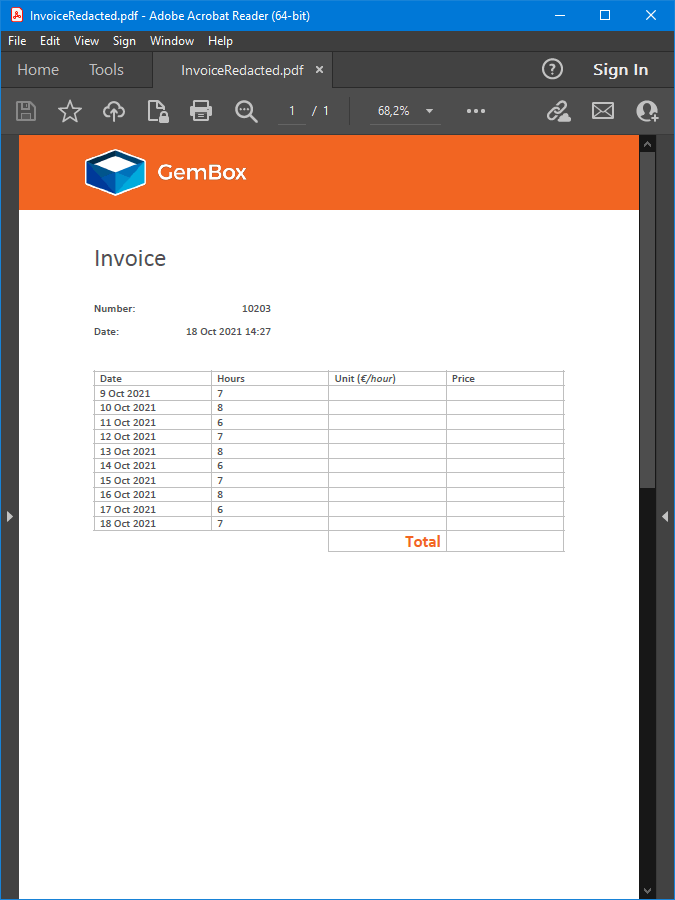
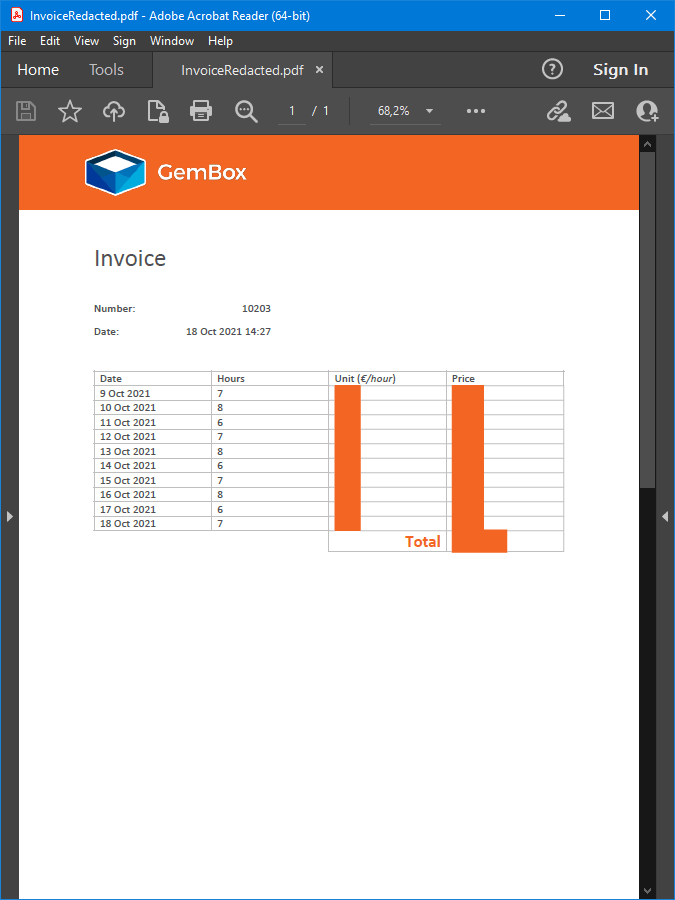
With the flexibility of redaction annotation you can also control the redaction appearance by setting a custom fill color, as you can see in the following example.
using GemBox.Pdf;
using GemBox.Pdf.Content;
using System.Text.RegularExpressions;

class Program
{
 static void Main()
 {
 // If using the Professional version, put your serial key below.
 ComponentInfo.SetLicense("FREE-LIMITED-KEY");

 using (var document = PdfDocument.Load("%#Invoice.pdf%"))
 {
 var page = document.Pages[0];
 var redaction = page.Annotations.AddRedaction(0, 0, 1, 1);
 var regex = new Regex(@"\d+\.\d+");

 // Adding quads for each matching text
 foreach (PdfText text in page.Content.GetText().Find(regex))
 redaction.Quads.Add(text.Bounds);

 // Setting custom fill color for the redacted areas
 redaction.Appearance.RedactedAreaFillColor = PdfColor.FromRgb(0.95, 0.4, 0.14);
 redaction.Apply();

 document.Save("CustomFilledRedactedOutput.pdf");
 }
 }
}
Imports GemBox.Pdf
Imports GemBox.Pdf.Content
Imports System.Text.RegularExpressions

Module Program

 Sub Main()

 ' If using the Professional version, put your serial key below.
 ComponentInfo.SetLicense("FREE-LIMITED-KEY")

 Using document = PdfDocument.Load("%#Invoice.pdf%")
 Dim page = document.Pages(0)
 Dim redaction = page.Annotations.AddRedaction(0, 0, 1, 1)
 Dim regex = New Regex("\d+\.\d+")

 ' Adding quads for each matching text
 For Each text As PdfText In page.Content.GetText().Find(regex)
 redaction.Quads.Add(text.Bounds)
 Next

 ' Setting custom fill color for the redacted areas
 redaction.Appearance.RedactedAreaFillColor = PdfColor.FromRgb(0.95, 0.4, 0.14)
 redaction.Apply()

 document.Save("CustomFilledRedactedOutput.pdf")
 End Using
 End Sub
End Module