
The Persistent Notification integrationIntegrations connect and integrate Home Assistant with your devices, services, and more. [Learn more] can be used to show a notification on the frontend that has to be dismissed by the user.
Automation
Persistent notification triggers enable automations to be triggered when persistent notifications are updated. Triggers can be limited to a specific notification by providing an ID for notification_id, or when this value is omitted the automation will trigger for any notification ID. If no update_type is provided, the automation will trigger for the following update types: added, removed, updated, or current. By providing one or more of these values to the update_type option, the automation triggers only on these update_type events.
Review the Automating Home Assistant getting started guide on automations or the Automation documentation for full details.

An example of a persistent notification trigger in YAML:
automation:
 - triggers:
 - trigger: persistent_notification
 # Optional. Possible values: added, removed, updated, current
 update_type:
 - added
 - removed
 # Optional.
 notification_id: invalid_config
See Automation Trigger Variables: Persistent Notification for additional trigger data available for conditions or actions.
Action: Create
The persistent_notification.create action creates a persistent notification with a message, title, and notification ID.
| Data attribute | Optional | Description |
|---|---|---|
message |
no | Body of the notification. |
title |
yes | Title of the notification. |
notification_id |
yes | If notification_id is given, it will overwrite the notification if there already was a notification with that ID. |
Here is how an action of your automation setup with static content could look like.
actions:
 - action: persistent_notification.create
 data:
 message: "Yourmessagegoeshere"
 title: "Customsubject"
If you want to show some runtime information, you have to use templates.
actions:
 - action: persistent_notification.create
 data:
 title: >
 Thermostat is {{ state_attr('climate.thermostat', 'hvac_action') }}
 message: "Temperature{{state_attr('climate.thermostat','current_temperature')}}"
The persistent_notification.dismiss action requires a notification_id.
| Data attribute | Optional | Description |
|---|---|---|
notification_id |
no | the notification_id is required to identify the notification that should be removed. |
This action allows you to remove a notifications by script or automation.
actions:
 - action: persistent_notification.dismiss
 data:
 notification_id: "1234"
The persistent_notification.dismiss_all action allows you to remove all notifications.
actions:
 - action: persistent_notification.dismiss_all
Markdown support
The message attribute supports the Markdown formatting syntax. Some examples are:
| Type | Message |
|---|---|
| Headline 1 | # Headline |
| Headline 2 | ## Headline |
| Newline | \n |
| Bold | **My bold text** |
| Italic | *My italic text* |
| Link | [Link](https://home-assistant.io/) |
| Image |  |
Note
/local/ in this context refers to the .homeassistant/www/ folder.
Create a persistent notification
Go to Settings > Developer tools > Actions, then select the persistent_notification.create action from the Action dropdown. Enter something like the sample below into the data field and press the Perform action button.
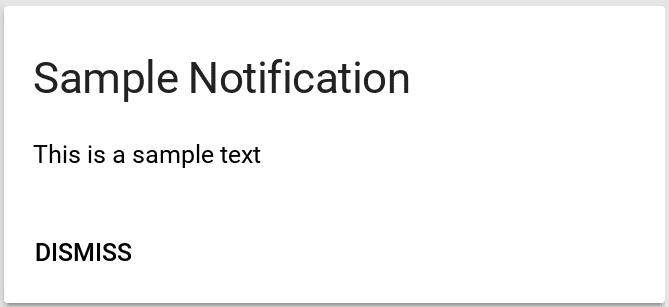
{"notification_id":"1234","title":"Sample notification","message":"This is a sample text."}This will create the notification entry shown above.
Use as a notifier
Persistent notifications can also be used as a pre-configured notifier for the Notify integration if that integration is loaded. It is available as notify.persistent_notification. This enables it to be used with features that require a notifier like Notify Groups or the Alert integration.
The following attributes can be placed inside data for extended functionality.
| Data attribute | Optional | Description |
|---|---|---|
notification_id |
yes | If notification_id is given, it will overwrite the notification if there already was a notification with that ID. |