
Integrates SNOOZ devices into Home Assistant.
Configuration
To add the Snooz device to your Home Assistant instance, use this My button:

The SNOOZ integration will automatically discover devices once the Bluetooth integration is enabled and functional.
Supported devices
Setup
Once a device is discovered, it needs to be put into pairing mode to complete setup.
Entering pairing mode
- Ensure the device is not connected to a mobile app or any other Bluetooth controller.
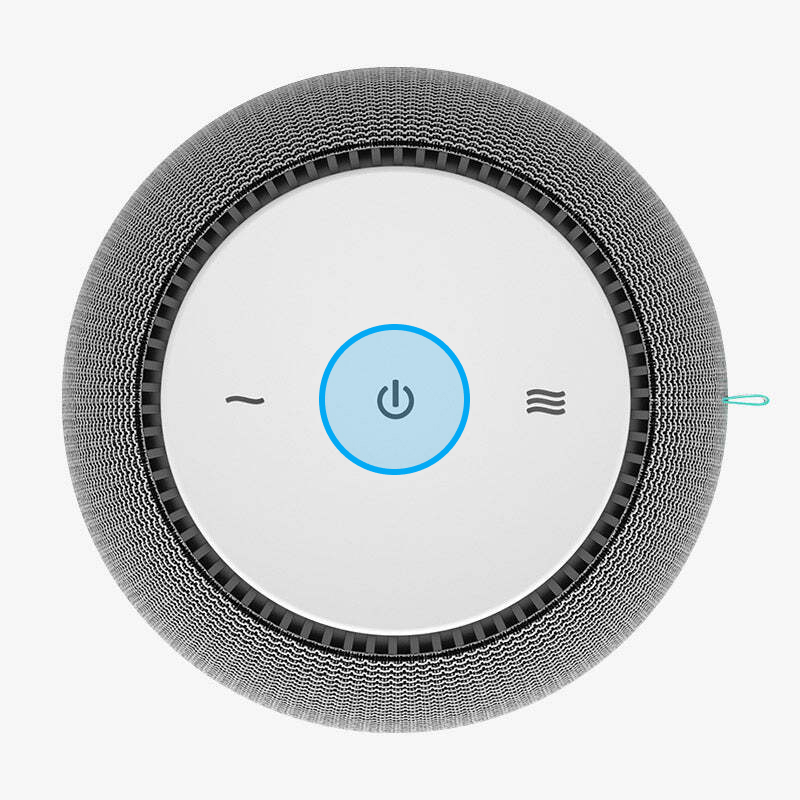
- Hold your finger on the power button until all buttons begin pulsing on and off (~ 5 seconds).
👁 Top down view of a SNOOZ White Noise Machine, highlighting the power button.
Platforms
Fan
Devices are exposed as Fan entities with a persistent connection to the device.
Fan speed percentage is mapped to the device volume level.
Note
Speed percentages less than 10 have no effect - they all map to a value of 1 on the device.
List of actions
The Snooz integrationIntegrations connect and integrate Home Assistant with your devices, services, and more. [Learn more] provides the following actions. Each link below opens a dedicated page with examples, parameters, and a step-by-step UI walkthrough.
-
Transition off (
snooz.transition_off) Gradually lowers a Snooz device’s volume, then turns it off. -
Transition on (
snooz.transition_on) Gradually changes a Snooz device’s volume over a set duration.
For an overview of every action across all integrations, see the actions reference.