
How To
Summary
The Power Systems POWER8 Enterprise Servers E870 and E880 are a marvel of engineering - in this article we through pictures take a look at the components.
Objective
👁 Nigels Banner

Steps
Warning:
- I need to make it clear that these pictures are from an Early Ship Program machine, which might vary a little from the final Generally Available (GA) models in November 2014. For example, missing labels or stickers plus colors of handles and parts. The engineering is much the same.
See my 8-minute video of the machine on YouTube here:
-
POWER8 Enterprise - Power E870 First Look
-
https://www.youtube.com/watch?v=jOzPTopt7HE
These pictures were taken by Gareth Coates and the machine installed by: Clive Benjamin, Mike Pearson, Emily Barrett, Martin Wells, Gareth Coates and myself (Nigel Griffiths). For larger images, click the pictures.
Here is what the front of the new Power E870 - 64 POWER8 CPU cores and 4 TB of memory looks like with two POWER8 I/O Drawers above it and the SAS disk drawer on top:
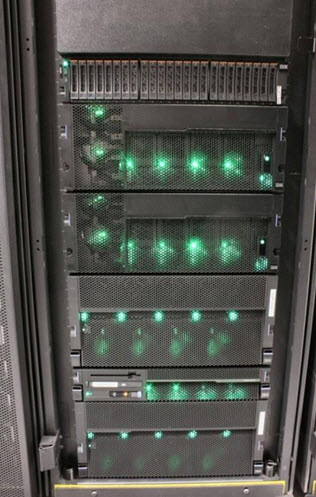
From the top
- Top 2U SAS Disk Drawer FC5887 - with loads of 2.5 inch SAS disks
- Two 4U POWER8 I/O Expansion Drawers for 12 PCIe adapters each - four bright LEDs and two less bright LEDs on the left
- First 5U POWER8 E870 CEC node with POWER8 CPU, memory, and 8 high speed - five bright LEDs and four less bright
- System Control Unit 2U - with duplicate System Clocks, duplicate service processors, operator panel (for the LED coded, when starting up), and a single DVD on the front. The DVD is used for initial boot up, VIOS installation, and diagnostics.
- Second 5U POWER8 E870 CEC node with POWER8 CPU, memory, and 8 high speed - five bright LEDs and four less bright
- Note: CEC is a Central Electronic Complex - main CPUs, memory, and I/O drawers. Also called a CEC node or CEC Drawer. The Power E870 has one or two CECs but the Power E880 up to four (2 only in 2014).
After removing the fount covers, the server looks like the following picture (reminder click the picture for a larger image):


In the picture above we show the POWER8 I/O Drawer, which we mounted above the Power E870 with the covers off thus showing two power supplies and four fans on the fount.
At the back of the server, we find all the connections to make all these units into one computer:


Third, in the above picture, the service processor cables

Four, in the above picture, the SMP cables between the CECs to join up all the POWER8 processors and their memory in to one large machine. Note the thick copper cables with a braided outside for robustness and they get fairly near the rear door. If you need extra cabling room, then IBM recommends the 8-nch rack extension option.
Finally, the PCIe adapter in the CEC node is used to support the POWER8 I/O Drawer using the special "chunky" optical cables. One adapter runs one cable pair to half of an I/O Drawer.

Here is the final picture with the server with power on and the redundant power cords added:

Note: this server was field integrated (built from parts in London but most machines are delivered pre-built in an IBM T42 Rack = ready to roll in and power on in minutes. This machine is positioned at the bottom (for a low center of gravity) on the rack as our cables run in from the ceiling. Factory-integrated pre-built machines arrive a few "U" higher in the rack to allow cables under the floor. In the case of a E880 model, it would be 5 U higher to allow an upgraded later to the full four CEC Drawers.
Given the value of these servers one per rack makes sense.
Now lets take a look inside:
The following picture shows the Blind Swap Cassette for the CEC nodes. The adapter slots are not a full height adapter and not full length either but then modern high-speed adapters are generally smaller. To remove, gently pull and lower the orange handle and then pull-out from the machine. Push the silver colored button and you can open it to remove or insert the adapter


In the following picture is the CEC node before we placed it in the rack. Start at the top:
- Adapters slots (underneath the metal cover) as they slide out the rear:
- Four POWER8 CPU heat sinks with four VRMs
- 32 Memory Cards all in a row
- 12 more VRMs
- Five Fans and underneath them but not visible the four Power Supplies


More pictures and lots more information can be found in the currently Draft Redbook for the Power E870 and E880
- Power E870/880 Redbook
- Other POWER8 Redbooks & topics
For the rPerf and CPW performance numbers and lots of information
- - - The End - - -
Additional Information
Other places to find content from Nigel Griffiths IBM (retired)
- YouTube - YouTube Channel for Nigel Griffiths
- AIXpert Blog
Document Location
Worldwide
Was this topic helpful?
Document Information
Modified date:
14 June 2023
UID
ibm11165372