
InfoQ Homepage News Technical Preview of Github Copilot Workspace: Copilot-Native Developer Environment
Technical Preview of Github Copilot Workspace: Copilot-Native Developer Environment
May 14, 2024 2 min read
Write for InfoQ
Feed your curiosity. Help 550k+ globalsenior developers
each month stay ahead.Get in touch
Recently, GitHub released a technical preview of GitHub Copilot Workspace, a developer environment built on GPT-4 Turbo explicitly designed for Copilot. This workspace lets developers quickly brainstorm, plan, build, test, and run code using natural language. Moreover, with a task-centric approach, developers can utilize various Copilot-powered agents throughout development, maintaining complete control at every step.
GitHub Copilot Workspace is an AI-powered assistant that guides developers through the challenges at the start of a project. It offers a systematic and reliable plan to resolve issues by comprehending the codebase and issue context. The workspace efficiently streamlines the development process by presenting all the necessary elements for plan validation and code testing in a clear and understandable natural language.
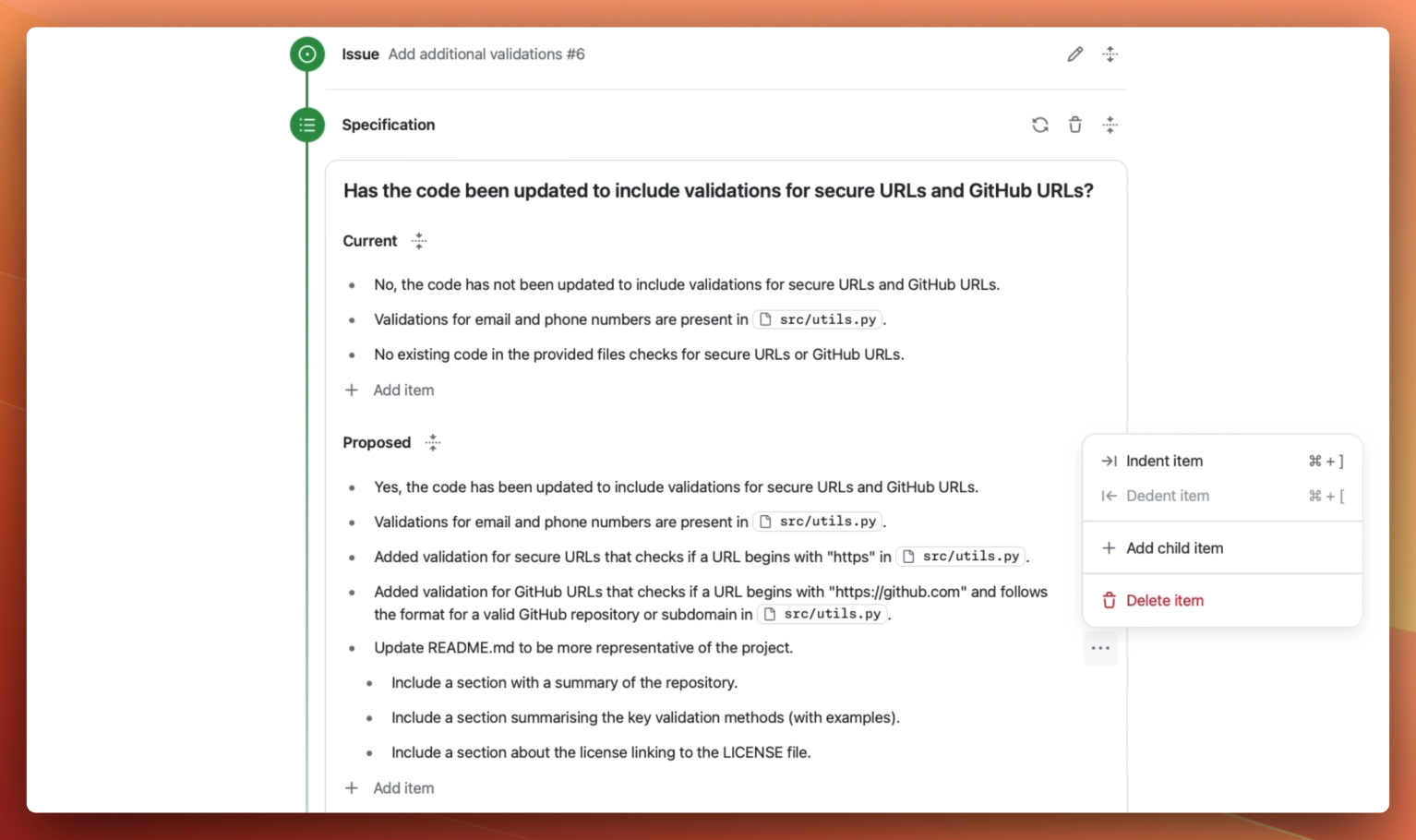
Workspace builds a full plan (Source: GitHub blog post)
In addition, GitHub Copilot Workspace is flexible in allowing developers to customize and edit the proposed code suggested by the AI. They can use the integrated terminal to run tests, builds, and checks. The workspace allows them to share their work with teammates, iterate until they are confident in their approach, and transition to the underlying GitHub Codespace for further refinement. Finally, they can file pull requests, execute GitHub Actions and security code scanning, and seek human code review from team members.
Simon Meier, a full stack developer at LGT Financial Services AG, writes in a blog post on Copilot Workspace:
That's a whole different coding process, where the developer can focus more on what he wants to implement instead of how he must implement it. Of course, the developer still needs to review and know what the code is doing, but often, the developer may rely on the code change being good. On the one hand, this fastens the process and lowers the hurdles for new or more inexperienced developers to get into coding. Still, on the other hand, it might introduce new bugs and security risks or even software that causes a major incident.
And, a respondent, LagT_T, on a Reddit thread commented:
I'm quite impressed with Copilot, but not to the extent that I can trust it with code. Maybe this new scope suits it better, as there is less wiggle room in the procedure itself, but I can only see it work in small bug fixes and maybe common feature requests. It seems the diminishing returns are coming faster than anticipated, but hey, if it helps out in clearing out clerical tasks, I'm still happy.
While Thomas Dohmke, CEO at GitHub, writes:
We believe the step change in productivity gains that professional developers will experience by virtue of Copilot, and now Copilot Workspace will only continue to increase labor demand.
Lastly, GitHub states that Copilot Workspace was designed to be utilized from any device, enabling a real-world development environment that efficiently operates on a desktop, laptop, or mobile device.
About the Author
Steef-Jan Wiggers
This content is in the Developer Experience topic
Related Topics:
-
Related Editorial
-
Related Sponsors
-
Popular across InfoQ
-
ArrowJS Reaches 1.0, Recast as the First UI Framework for the Agentic Era
-
Anthropic Releases and Temporarily Suspends Claude Fable 5
-
Slack Eliminates SSH in EMR Pipelines, Migrates 700+ Jobs to Rest-Based Architecture
-
Anthropic Explains How Claude Builds Its Own Execution Harnesses
-
Spring Boot 4.1 Adds gRPC Auto-Configuration, SSRF Mitigation, and Kotlin 2.3 Support
-
Increasing Users' Data Agency: From BlueSky's AT Protocol to the Local-First Software Movement
-
The InfoQ Newsletter
A round-up of last week’s content on InfoQ sent out every Tuesday. Join a community of over 250,000 senior developers. View an example