 |
VOOZH | about |
|
VOOZH | about |
17 min
read
Explore the benefits, applications, and implementation steps of Business Process Automation (BPA) to streamline workflows and improve efficiency
By
Jesus Vargas
Updated on
May 29, 2026
.
Reviewed by
Real-World Experience with No-Code Tools: With over 320 apps built, we know firsthand what works—and what doesn't—when using no-code platforms like Glide, Bubble, FlutterFlow and Webflow.
Expert Team with 40+ Years of Combined Experience: Our team has deep technical knowledge, with experts who use no-code tools to solve real-world problems for clients every day, ensuring our advice is actionable and reliable.
Detailed Guides Based on Actual Projects: We don’t just talk about no-code; we use it daily to solve real business problems for our clients, from MVPs to complex automations.
Take a deeper look at our editorial guidelines
How many hours does your team spend on repetitive tasks each week? Probably more than you realize. Studies show that businesses lose over 10 hours per employee every week on manual tasks that could be automated. That’s 520 hours per year per person, time that could be better spent on strategic work.
At LowCode Agency, we've seen firsthand how automation transforms businesses. After building 330+ automation solutions, we've helped companies cut manual work by up to 70%, freeing up time for more valuable tasks.
Want to know if automation is right for your business? In this article, we will cover everything you need to know about Business Process Automation (BPA), from basics to implementation.
Business Process Automation (BPA) utilizes technology by automating your repetitive business tasks. Think of it as your digital workforce that takes care of routine operations while you focus on growing your business.
Unlike traditional task management, which focuses on individual assignments, BPA takes a broader perspective. It connects multiple processes across your organization to work together smoothly.
Let's break this down with a practical example: Consider your payroll process. Without automation, your HR team might spend days collecting timesheets, calculating hours, processing deductions, and sending payment confirmations. With BPA, the system automatically:
Business Process Automation (BPA) comes with a range of benefits, including:
When you implement business process automation, you'll notice immediate time-saving benefits on repetitive tasks. For example, automating email responses and follow-ups can save your customer service team 3-4 hours daily. This means your team can handle a higher volume of requests, which leads to process streamlining.
The financial impact of BPA extends beyond just saving time. Automation also reduces operational costs. This comes from several areas:
For instance, mid-sized companies can save money by automating their purchase order system, eliminating manual data entry errors that previously led to costly shipping mistakes.
Human mistakes in data entry and processing can lead to significant costs for your business. By automating these processes, you'll prevent errors, particularly in data-intensive tasks like accounting and inventory management.
For example, at LowCode, we built a Salary Calculation Tool for Zapier using Glide, which allows for real-time salary updates that match market conditions. By giving employees accurate salary information based on their location, the tool improved transparency and trust.
As a result, employee satisfaction increased significantly to 35%, leading to a more motivated and engaged workforce. This demonstrates how automation reduces errors, ensures accuracy, and simplifies important HR processes.
Automation allows employees to focus on higher‐value tasks instead of spending time on repetitive, manual work. By reducing routine workloads, teams can dedicate more effort to strategic initiatives, problem-solving, and customer interactions that require a human touch — and organizations can better engage frontline workers by providing the infrastructure and freedom they need to contribute their best.
For example, a customer service department automated responses for common inquiries, freeing up agents to handle complex cases more effectively. As a result, customer satisfaction scores increased by 25%, demonstrating how automation improves both efficiency and service quality. Partnering with specialized providers like NeoWork ensures access to advanced AI-driven solutions and 24/7 support capabilities, maximizing the benefits of streamlined workflows.
Automation creates clear, consistent processes across your organization. When different departments use connected automated systems, information flows smoothly without manual handoffs or delays.
For example, when a sales team closes a deal, an automated workflow can:
This coordination happens without countless emails or status update meetings, reducing delays and miscommunication between teams.
Business Process Automation (BPA) continues to reshape how organizations operate across various sectors. Let's explore the key areas where BPA makes the biggest impact in your business operations.
Data entry is one of the most time-consuming tasks in business operations. Manual data input not only drains your team's time but also introduces the risk of human error. By automating this process, you can significantly improve accuracy while freeing up your staff for more valuable tasks.
A prime example of successful data entry automation comes from our work with Scott Crawford, a growing real estate development company. Their team was struggling with scattered information across multiple platforms, from emails to various cloud storage solutions. This fragmented approach meant employees spent countless hours searching for documents and manually entering data.
To solve this challenge, we built a centralized document repository system, BuildGenius. This solution automatically organizes and stores all project-related files in one accessible location.
The system reduces manual data entry requirements by:
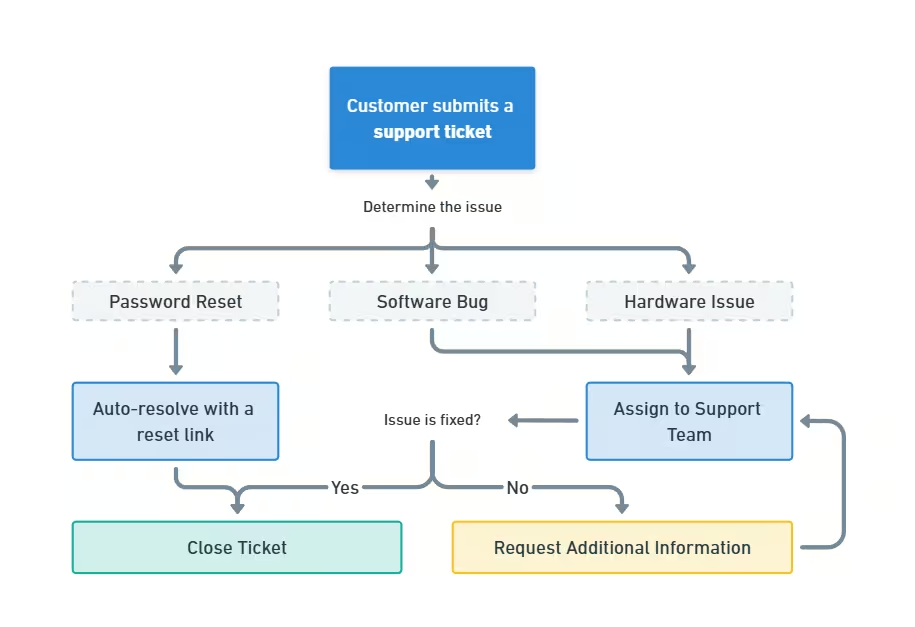
Your customer service operations can run 24/7 with automated solutions. While automated ticketing systems ensure that no customer request is overlooked, modern chatbots handle common customer inquiries, and AI Phone Calls manage phone-based questions with intelligent, automated responses, providing seamless support across channels.
These systems categorize and route tickets to appropriate departments, track response times, and maintain detailed interaction histories. This means your support team can focus on complex issues that require human attention.
Business Process Automation (BPA) improves inventory management by automating stock tracking, order processing, and replenishment workflows. Instead of relying on manual updates, businesses can use automated systems to maintain real-time inventory visibility, reducing errors and improving efficiency.
With BPA, inventory levels can be automatically updated across multiple sales channels, ensuring accurate stock counts and preventing overselling. Automated reorder triggers can notify suppliers or initiate purchase orders when stock reaches a predefined threshold, eliminating the risk of running out of essential products.
Additionally, integrating inventory management with sales and accounting systems ensures seamless tracking of stock movements, helping businesses make data-driven decisions about restocking and demand planning.
Employee onboarding is a multi-step process that involves paperwork, system access, training, and role integration. Instead of relying on manual workflows, you can build custom internal tools to automate and simplify these tasks. A tailored onboarding system ensures that every new hire follows a structured process while still allowing for flexibility based on specific role requirements.
For example, Google developed an internal tool called gHire to automate its onboarding process. This system assigns tasks, sets up employee accounts, schedules training, and ensures compliance, which reduces manual HR efforts and improves efficiency.
By automating repetitive tasks like collecting documents, setting up accounts, and scheduling training, businesses can lessen administrative burdens, enhance compliance, and create a smooth onboarding experience for new employees.
Automated invoice processing eliminates manual data entry and reduces payment cycles.
Many businesses rely on invoice software like QuickBooks and Zoho to automatically capture invoice data, match it with purchase orders, and route for approval. You'll see fewer errors, faster processing times, and better vendor relationships. These systems also maintain detailed audit trails and can flag unusual patterns for review.
The integration of AI technology is enhancing these applications further. Machine learning algorithms now help predict maintenance needs, identify fraud patterns, and personalize customer interactions.
As you consider implementing BPA in your organization, remember that successful automation starts with identifying your specific needs and choosing the right tools to address them.
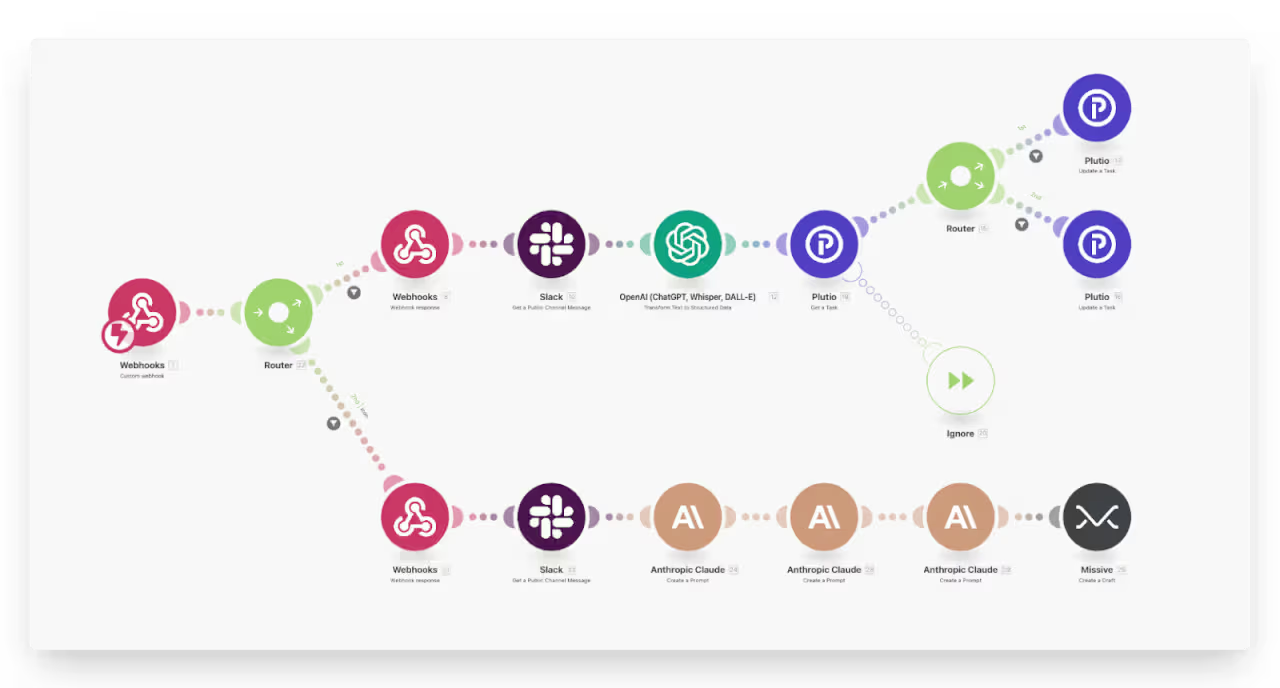
At LowCode, our team has created an advanced automated troubleshooting workflow that integrates Make.com, OpenAI, and Slack, ensuring faster issue resolution with minimal manual effort. The system follows a smooth, automated process:
For example, if a "400 error" occurs, the system automatically identifies the affected module and captures relevant error details. ChatGPT then analyzes the issue and generates a precise resolution, such as "Service unavailable—check server status." This automation significantly reduces troubleshooting time, enhances response accuracy, and keeps teams informed in real-time.
Implementing business process automation requires careful planning and execution. Here's how you can successfully bring automation into your operations:
Before you start automating processes, you need to identify which tasks will bring the most value. Look for these characteristics in your processes:
Choosing the right automation tools depends on the specific tasks you want to automate. No-code platforms like Zapier and Make are great for connecting apps and automating everyday workflows.
Enterprise workflow platforms such as Kissflow and ProcessMaker are designed for managing complex approval processes and tasks.
For tasks that involve a lot of documents, AI-powered tools like UiPath and Automation Anywhere can automate data extraction and processing. By selecting tools based on your business needs, you can ensure efficient and scalable automation.
Creating accurate workflow maps is a crucial step before implementing automation. You'll need to document every step, decision point, and outcome in your current processes to ensure successful automation.
Start by mapping your existing workflow:
When creating your workflow maps, include these essential elements:
Before moving to automation, test your workflow maps thoroughly:
By investing time in detailed workflow mapping and testing, you significantly increase your chances of successful automation implementation. This preparation helps you spot potential issues early and ensures your automated process will work as intended.
Start with focused pilot programs before expanding automation across your organization. This helps you verify the system works as intended and address any issues early.
During testing:
For example, when automating invoice processing, begin with a small batch of 50 invoices. Once you confirm everything works properly, steadily increase the volume while maintaining quality checks.
Encourage regular audits to identify areas for improvement.
Keep track of your automated processes:
Make adjustments based on real data and user experience. Remember that automation is an ongoing process that requires regular attention and updates to maintain peak performance.
While Business Process Automation (BPA) improves efficiency, businesses often face challenges, including:
When bringing new automation tools into your current tech environment, you'll likely face compatibility issues. Older systems often use outdated protocols or proprietary formats that don't align with modern BPA solutions.
Solution:
Staff concerns about automation are valid and common. Your accounting team might worry about how automated invoice processing will affect their daily work, while customer service representatives might question their role once chatbots are implemented.
Solution:
As you automate processes, you'll handle increasing amounts of sensitive information across multiple systems. This raises questions about data access, storage, and compliance with regulations like GDPR and HIPAA.
Solution:
RPA and BPA are often confused, but they serve different purposes in improving business operations. Here's what sets them apart:
RPA handles specific tasks, while BPA reshapes your entire workflow through a broader approach based on business process management principles. Think of RPA as a digital worker performing repetitive actions, while BPA is the architect that redesigns how work flows through your organization.
Regarding its implementation approach, BPA requires planning and often involves restructuring existing processes, while RPA can be implemented quickly to address immediate needs without changing the underlying process
BPM and BPA work together but serve different functions. While BPM focuses on making processes better, BPA brings in the technology to automate them.
BPM is a well-established management approach that combines business expertise with modern tools and methods. It looks at your organization's processes from start to finish rather than focusing on individual departments.
Here's how BPM and BPA connect:
When you use BPM, you're mapping out and enhancing your processes. When you add BPA, you're bringing in technology to carry out those improved processes automatically.
Business Process Automation (BPA) tools come in different categories, each designed to simplify specific tasks. Here’s a breakdown of the most effective tools based on their use cases:
These tools help businesses automate repetitive tasks by connecting different apps and services. They minimize manual work and improve efficiency.
Example: A marketing team can automate lead capture by integrating Typeform (for forms), HubSpot (for CRM), and Slack (for notifications) using Zapier, saving hours of manual entry.
Read this guide to discover the top no-code automation tools that can streamline your current workflows.
These tools incorporate artificial intelligence to enhance decision-making, data processing, and predictive analysis.
Example: A financial services firm can use UiPath to extract data from invoices and automatically fill in accounting records. This reduces human error and saves hours each week.
Managing multiple tools for different business functions can create inefficiencies, data silos, and broken workflows. Instead of juggling various applications, you can create a custom, centralized platform using no-code tools. This approach streamlines operations, automates processes, and keeps everything in one place.
With the right no-code platform, you can eliminate tool-switching and create an all-in-one system tailored to your business needs. If you don’t have the expertise to build it yourself, reach out to us. We specialize in building fully customized automation solutions.
Focus on effectively implementing business process automation throughout your organization to maximize its benefits. Here are essential practices that will help you succeed with your automation initiatives:
Your automation tools and processes shouldn't remain static. Make your systems future-ready by regularly evaluating and updating them. Set up quarterly reviews to assess your automated workflows and identify areas that need adjustment. Consider factors like process speed, error rates, and user feedback to guide your improvements.
Keep track of emerging automation technologies and assess if they could enhance your current processes. Remember that small, incremental improvements often lead to significant long-term benefits. When you spot inefficiencies, address them promptly rather than waiting for major system overhauls.
The success of your automation projects largely depends on your team's support and understanding. Create detailed documentation and training materials that explain how automated processes work and their benefits to daily operations. Encourage your staff to share their insights about which tasks would benefit most from automation.
Host regular training sessions to ensure everyone knows how to work with automated systems effectively. Create channels for employees to report issues or suggest improvements. When team members feel invested in the automation process, they're more likely to embrace and correctly use the new systems.
Consistent monitoring ensures your systems continue performing effectively. Set up clear metrics to track performance, such as processing times, error rates, and cost savings. Use this data to make informed decisions about system adjustments.
Establish a regular maintenance schedule to check system performance and address potential issues before they affect operations. Pay attention to user feedback and system logs to identify patterns that might indicate needed improvements. When you spot inconsistencies or bottlenecks, adjust your automated processes accordingly.
Business Process Automation (BPA) is transforming how companies manage their operations. It helps streamline workflows and improve efficiency. By automating repetitive and time-consuming tasks, BPA allows your team to focus on what really matters: driving business growth and providing excellent customer experiences.
The benefits of BPA are clear: it reduces human error, speeds up processes like data entry and customer service responses, and improves overall operational efficiency.
However, it's essential to understand that automation is not about replacing people; it's about empowering your team. By freeing employees from routine tasks, BPA enables them to take on more complex challenges, innovate, and build stronger relationships with customers, ultimately leading to long-term success.
If you have any repetitive tasks to automate, reach out to us. We have built over 330 apps and automation solutions using no-code tools like Glide. Check out our case studies and book a free call to discuss how we can streamline your workflows.
Last updated on
May 29, 2026
.
Jesus Vargas
-
Founder
Jesus is a visionary entrepreneur and tech expert. After nearly a decade working in web development, he founded LowCode Agency to help businesses optimize their operations through custom software solutions.
Custom Automation Solutions
Save Hours Every Week
We automate your daily operations, save you 100+ hours a month, and position your business to scale effortlessly.
Our AI — trained on 300+ shipped products — tells you what to build, what to skip, and what it'll actually cost. No fluff.
Assess My Idea"Working with LowCode Agency was the best decision I made in 2025"
Franklin Frith
CEO at HRM
BPA is a technology-driven approach that handles your repetitive business tasks automatically. It connects multiple processes across departments to work together smoothly. For example, in payroll processing, BPA automatically collects attendance data, calculates wages, generates pay slips, and updates records without manual intervention.
While BPA concentrates on enhancing complete business processes, RPA functions as a digital employee, carrying out specific repetitive tasks. BPA reshapes your overall workflow and connects different systems, whereas RPA mimics human actions for individual tasks, such as copying data between applications or filling out forms.
BPA reduces manual errors, saves time, and cuts operational costs. Your team spends less time on repetitive tasks and more on meaningful work. For instance, automating email responses can save your customer service team 3-4 hours daily, while automated invoice processing prevents costly data entry mistakes and speeds up payment cycles.
No-code BPA lets you automate business processes without writing computer code. Using visual interfaces, you can create workflows by dragging and dropping elements to connect different applications and define their interactions. This makes automation accessible to team members without programming expertise.
No-code platforms make automation quick and cost-effective. You can build and modify workflows without hiring developers, test ideas faster, and make changes as needed. These platforms often include pre-built templates and integrations with popular business tools, reducing the time needed to set up automated processes.
Business Automation
Get Instant Slack Alerts for High-Priority Support Tickets
Learn how to set up instant Slack notifications for urgent support tickets to improve response times and customer satisfaction.
Business Automation
Key Skills to Look for in a Zapier Developer
Discover essential Zapier developer skills to hire the right expert for your automation needs and boost workflow efficiency.
Business Automation
How to Extract Structured Data from Documents Using AI
Learn how AI can extract structured data from any document efficiently with practical steps and tools for better data management.
Business Automation
Comparison
Zapier vs Pabbly | 9 Factors to Decide the Best One
Compare Zapier vs Pabbly on pricing, features, app integrations, and ease of use. Learn which automation tool is best for your business in 2025
Business Automation
Automate Proposal Follow-Ups Without Sounding Robotic
Learn how to automate proposal follow-ups effectively while keeping your messages natural and engaging.
Business Automation
9 Must-Know Business Process Automation Types
9 business automation types that every company needs! Automate processes, speed up workflows, and enhance productivity with no-code platforms








.avif)


