|
VOOZH | about |
|
VOOZH | about |
17 min
read
Learn how to build a custom CRM in 2026 using no-code tools. Full guide with features, cost, steps, and expert tips.
By
Jesus Vargas
Updated on
May 29, 2026
.
Reviewed by
Real-World Experience with No-Code Tools: With over 320 apps built, we know firsthand what works—and what doesn't—when using no-code platforms like Glide, Bubble, FlutterFlow and Webflow.
Expert Team with 40+ Years of Combined Experience: Our team has deep technical knowledge, with experts who use no-code tools to solve real-world problems for clients every day, ensuring our advice is actionable and reliable.
Detailed Guides Based on Actual Projects: We don’t just talk about no-code; we use it daily to solve real business problems for our clients, from MVPs to complex automations.
Take a deeper look at our editorial guidelines
Custom CRM development means building a customer relationship management (CRM) system designed specifically for your business. Unlike off-the-shelf CRMs like Salesforce or HubSpot, a custom CRM gives you only the features you need, nothing extra.
Off-the-shelf CRMs are quick to use but often include too many features or miss key functions. A custom CRM fits your exact workflow. You can manage leads, track sales, and follow up with clients in your own way.
No-code tools like Bubble, Glide, or FlutterFlow make custom CRM development faster and easier. What once took months can now be done in just a few weeks. A Gartner report shows that no-code tools can cut development time by up to 70 percent.
No-code custom CRMs work well for startups, small businesses, agencies, and service teams who need simple and flexible tools without the high cost of coding.
At LowCode Agency, we’ve built over 330 custom apps, including many CRM systems tailored to specific business needs. Using Bubble, Glide, and FlutterFlow, we turn complex workflows into smart, no-code solutions.
What makes us different is our focus on both tech and business. We study your process, find ways to improve it, and build tools that support your growth.
We’ve helped:
Each CRM we build is scalable and easy to update as your needs grow. With a dedicated project manager, we ensure smooth communication and fast delivery—giving you a system that works today and evolves tomorrow.
Ready to transform how you manage customer relationships? Schedule a free discovery call with our team to discuss your custom CRM project and see how we can accelerate your business growth.
Read more | LowCode Agency case studies
A custom CRM gives your team the tools they actually need, built around how your business works. With platforms like Bubble, Glide, and FlutterFlow, you can build fast, flexible solutions without writing code. Here are the key benefits:
Custom CRMs are built to support your team, improve efficiency, and grow with your business over time.
A custom CRM should do more than store contacts. It should support your team, match your business flow, and help you close more deals. Here are the essential features every custom CRM must include:
Together, these features create a CRM that supports your business at every stage.
Once your custom CRM covers the basics, you can make it even more powerful by adding advanced features. These extras help you automate tasks, make smarter decisions, and stay connected with customers across channels.
Adding these capabilities transforms your CRM into a complete business tool that goes beyond tracking contacts. It saves time, improves outreach, and supports smarter decision-making.
Read more | AI contract management
A custom CRM is most useful when it works with the tools you already use. With no-code APIs and plugin support, you can connect your CRM to almost any system without writing backend code. This helps you automate processes, reduce manual work, and keep your data in sync across departments.
These integration options turn your CRM into a powerful, connected system that saves time and helps your team move faster.
Read more | Best backends for Bubble
When building a custom CRM, one key decision is choosing between a cloud-based system or an on-premise setup. Each has pros and cons depending on your business size, security needs, and tech setup.
Most no-code tools like Bubble, Glide, and FlutterFlow are cloud-first. This means your CRM is hosted online and can be accessed from anywhere.
This option stores your data and systems on your own servers. It offers more control but also comes with higher setup and maintenance needs.
If your business needs on-premise logic or stricter data control, a hybrid approach works well. You can build your frontend using no-code tools, then connect it to a custom backend using platforms like Xano or external APIs. This gives you the flexibility of no-code with the control of custom code.
When building a custom CRM, keeping customer data safe is very important. No-code platforms like Bubble, Glide, and FlutterFlow follow strong security practices and offer tools to help you stay compliant with privacy laws.
If you need more control, you can combine no-code with custom backends or external databases. This hybrid setup gives you extra flexibility while keeping your data secure and compliant with business standards.
Moving from an old CRM or spreadsheet-based system to a custom CRM may sound difficult, but no-code platforms make the process easier. Tools like Bubble, Glide, and FlutterFlow support data imports using CSV uploaders or API integrations.
This allows you to bring in contacts, leads, tasks, and other records without writing backend code. You can also map old data fields to your new structure during import to avoid confusion.
With the right steps, your data migration can be smooth and safe. No-code tools simplify the process, helping you switch faster and keep your business running without delay.
Building a custom CRM with no-code tools follows a clear, step-by-step process. From planning to launch and beyond, each phase plays a key role in building a system that works and grows with your business.
The first step is understanding your business needs. This includes listing the problems you want to solve, the types of users who will use the CRM, and the features you need—like contact tracking, reminders, or reporting.
At this stage, it helps to talk with your team to learn their pain points and what they expect from the system. These insights guide the design and ensure your CRM fits real workflows, not just surface-level tasks. Clear goals lead to a better build.
You don’t have to do it alone. You can partner with expert teams like LowCode Agency to speed things up and avoid mistakes. We have certified developers in Bubble, Glide, and FlutterFlow.
But we are more than just builders; we act as strategic tech partners. We help you choose the right platform, define the key features, and plan for scale from day one. Our experience across 330+ projects helps you move faster with fewer risks.
Once the requirements are clear, the next step is planning how everything connects. You’ll use flowcharts or visual tools inside your no-code platform to map out steps like lead capture, deal stages, or email follow-ups.
This step ensures the user journey makes sense and no actions are missed. Workflow mapping also shows which steps can be automated, saving time later. Getting this part right prevents confusion during the build and makes the system more user-friendly.
Now it’s time to build the actual CRM interface and logic. Using drag-and-drop elements, you can create pages, forms, dashboards, and workflows without code. Bubble is great for full web CRMs, Glide works well for mobile-first needs, and FlutterFlow supports responsive UI across platforms.
You can link data, set conditions, and define user roles—all visually. Because you're not writing code, changes are easier to make, and the build process moves much faster than traditional development.
Before going live, testing helps catch errors and improve the user experience. No-code platforms allow you to test in preview mode, where you can interact with your CRM as if it were live. You should check for broken logic, missing features, or confusing UI.
Invite a few users to try the system and give feedback. Make updates as needed to improve the flow. Testing in stages also gives you confidence that your CRM will work well from day one.
After testing, you can launch the CRM for your full team. But going live is not the end. You should continue watching how people use the system and adjust as needed. With no-code tools, making updates is quick.
You can fix bugs, add fields, or change workflows in minutes. This flexibility helps your CRM grow with your business and stay useful over time.
Ongoing maintenance includes fixing small bugs, improving performance, and adding features as business needs change. If your team is trained on the no-code platform, they can handle most updates internally.
For bigger changes or scale-ups, agencies like LowCode can step in. No-code platforms make updates quicker and less costly compared to traditional code, giving you flexibility as your needs evolve.
Custom CRM development has become dramatically more affordable thanks to no-code platforms. Traditional custom CRM projects often required 6-12 months and budgets exceeding $250,000. No-code development cuts these costs by 50-60% while delivering solutions in weeks instead of months.
The final cost depends on several key factors that determine project complexity and development time:
Cost Factors by Complexity:
Development Team Models:
A basic CRM built in Bubble might cost $15,000 and take 6 weeks, while the same functionality using traditional full-stack development could easily reach $125,000 and require 6 months. The time-to-market advantage alone often justifies the no-code approach.
Ongoing Costs to Consider:
A well-designed custom CRM system typically pays for itself within 6-12 months through operational improvements and cost savings. The return on investment extends far beyond the initial development costs, creating lasting value for your business.
Selecting the right development partner can make or break your custom CRM project. The decision between building internally or hiring experts significantly impacts your timeline, budget, and final results.
Building your own CRM makes sense if you have dedicated technical team members with no-code experience and can afford extended timelines. However, most businesses benefit from partnering with specialized agencies that bring proven methodologies and avoid common pitfalls.
DIY development often takes 2-3 times longer than expected, especially when handling complex integrations or user experience design. Agencies like LowCode Agency have refined processes that deliver professional results in predictable timeframes while avoiding costly mistakes that plague first-time builders.
Your ideal development partner should demonstrate deep expertise in your chosen platform, whether that's Bubble, Glide, or FlutterFlow. Look for agencies with portfolios showing similar complexity to your project and clear communication throughout the development process.
Experience with business process optimization matters as much as technical skills. The best partners don't just build what you ask for; they analyze your workflow and suggest improvements that maximize efficiency and user adoption.
At LowCode Agency, we follow a proven process that starts with detailed discovery sessions to understand your unique business needs. We then create visual mockups and workflow diagrams before any development begins, ensuring alignment on functionality and design.
Throughout development, you receive weekly progress updates and can test features in real-time, allowing for adjustments before final delivery. After launch, we still are your partners and co-creators for continued growth and innovation.
Start by asking potential partners about their development methodology and project timeline estimates. How do they handle scope changes, and what's included in their testing process? Understanding their approach to data migration and post-launch support prevents surprises later.
Ask for specific examples of CRM projects they've completed, including challenges they encountered and how they solved them. Request references from recent clients to verify their claims about delivery timelines and ongoing support quality.
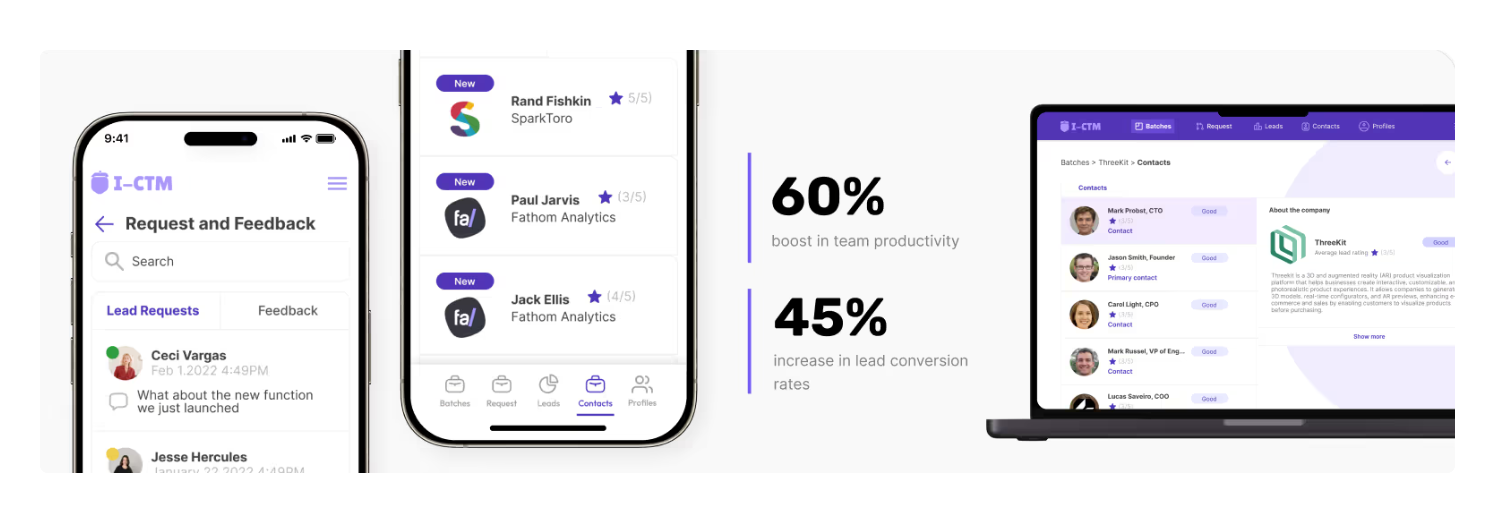
We recently built in just two weeks IntroCRM for Harris Kenny and his sales team who were trapped in manual data entry instead of building relationships with prospects. Their tedious process of manually entering each lead was consuming hours of valuable time while creating data entry errors and missed opportunities.
Using Glide, we created a custom solution that included batch upload features, a lead rating system for prioritization, and comprehensive contact management capabilities.
The system launched in just 2 weeks and delivered immediate impact: 60% boost in team productivity, 45% increase in lead conversion rates, and 75% reduction in time to first contact with new leads.
Each no-code platform has unique strengths and limitations that significantly impact your project's success. Bubble excels at complex web applications with sophisticated workflows, while Glide transforms spreadsheet data into elegant mobile apps quickly.
Experienced developers know which platform best suits your specific requirements and can leverage advanced features that inexperienced builders might miss. They also understand platform limitations and can architect solutions that avoid performance bottlenecks as your system scales.
A no-code custom CRM can be a smart choice if you need flexibility, speed, and control without the high cost of traditional development. It works well for small to mid-sized businesses, agencies, and startups looking to improve sales, service, or internal operations. If your needs are clear and your workflows are standard, no-code is often more than enough.
The best way to start is small. Focus on one use case—like lead tracking or customer onboarding. Build a working version in Bubble, Glide, or FlutterFlow, and improve it based on real use.
Ready to explore whether custom CRM development is right for your business? Schedule a free discovery call with our team to discuss your specific needs and see how a tailored solution could transform your sales operations.
Last updated on
May 29, 2026
.
Jesus Vargas
-
Founder
Jesus is a visionary entrepreneur and tech expert. After nearly a decade working in web development, he founded LowCode Agency to help businesses optimize their operations through custom software solutions.
Custom Automation Solutions
Save Hours Every Week
We automate your daily operations, save you 100+ hours a month, and position your business to scale effortlessly.
Our AI — trained on 300+ shipped products — tells you what to build, what to skip, and what it'll actually cost. No fluff.
Assess My Idea"Working with LowCode Agency was the best decision I made in 2025"
Franklin Frith
CEO at HRM
Yes, you can build a fully functional CRM without writing code. No-code platforms like Bubble, Glide, and FlutterFlow offer visual tools to create custom dashboards, workflows, and forms. You can manage leads, automate tasks, and track data—all through simple drag-and-drop features.
It depends on your needs. Bubble is great for complex web CRMs, Glide is ideal for mobile-first apps, and FlutterFlow works well for responsive mobile and web designs. All three support custom workflows, user roles, and integrations, making them strong choices for building CRM systems.
Yes, most no-code platforms offer strong security features like SSL encryption, role-based access, and data backups. You can also add audit logs and privacy controls. For added security or compliance, you can combine no-code frontends with secure backends or external databases.
No-code CRM development is faster than traditional coding. A simple version can be built in 1–3 weeks. More complex systems may take 4–6 weeks, including testing and feedback. Using expert help speeds things up and avoids common mistakes.
Yes, one of the biggest advantages of no-code is flexibility. You can add new features, pages, or automations anytime without starting over. No-code platforms make it easy to update your CRM as your business grows or your needs change.
Yes, LowCode Agency has built over 330 custom apps, including many CRM systems. We are certified experts in Bubble, Glide, and FlutterFlow. We guide you from strategy to launch, helping you choose the right tools and scale with confidence.
Custom App Development
Warehouse Management App Development Guide
Learn how to build a custom warehouse management application with key features, development steps, costs, and future trends explained
Custom App Development
How to Hire Developers for Your Startup (2026 Guide)
Skip slow hiring and expensive dev teams. Learn how startups are building faster with no-code agencies instead of traditional developers
Custom App Development
Enterprise Software Development Cost: Complete Guide
Understand enterprise software development costs, pricing factors, typical ranges, and how to budget effectively for custom software projects.
Custom App Development
Best 9 Insurance App Development Companies (Top Rated)
Compare the best 9 insurance app development companies. See top-rated teams, expertise, and how to choose the right partner for your insurance product.
Custom App Development
How to Build a DoorDash-Like App Using Low-code
Learn how to build a DoorDash-like app using low-code. Covers features, tech stack, workflows, costs, and scaling a food delivery platform.
Custom App Development
Best Custom Software Development Companies in 2026 (Top 20 Reviewed)
We reviewed 20+ top custom software development companies. Compare pricing, Clutch ratings, and tech stacks — from startups to enterprise.