|
VOOZH | about |
|
VOOZH | about |
7 min
read
Learn how to build and implement AI agents in Slack to automate tasks, enhance team collaboration, and transform your digital workplace efficiency.
By
Jesus Vargas
Updated on
May 29, 2026
.
Reviewed by
Real-World Experience with No-Code Tools: With over 320 apps built, we know firsthand what works—and what doesn't—when using no-code platforms like Glide, Bubble, FlutterFlow and Webflow.
Expert Team with 40+ Years of Combined Experience: Our team has deep technical knowledge, with experts who use no-code tools to solve real-world problems for clients every day, ensuring our advice is actionable and reliable.
Detailed Guides Based on Actual Projects: We don’t just talk about no-code; we use it daily to solve real business problems for our clients, from MVPs to complex automations.
Take a deeper look at our editorial guidelines
What’s the ultimate goal of including AI into your workplace? We’d say the real value of bringing AI into your workplace goes beyond simple automation; it's about working smarter and focusing your team's talents where they matter most.
By delegating routine tasks to AI assistants, your team can concentrate on work that demands human creativity, judgment, and collaboration.
Slack has grown from its origins as a messaging tool into a central hub that connects and powers modern organizations. The platform now offers exciting possibilities for AI integration, opening new ways to enhance how teams communicate and work together. Let's walk through the process of creating and implementing an AI assistant in Slack.
AI agents in Slack transform workplaces by automating tedious tasks, allowing teams to focus on creative and complex work. These customizable digital teammates integrate with existing workflows, offering features like task automation, communication monitoring, and actionable insights to improve collaboration and efficiency.
Read more | 9 Best Generative AI Development Companies
Before diving into the specific building process, it's important to understand what Slack AI agents are. Let's explore what Slack AI agents are and how they can help your team.
Think of Slack AI agents as digital assistants that work directly in your workplace chat. They handle routine tasks automatically and provide you with instant information when you need it. The best part? You can modify them to fit exactly what your team does, and they work smoothly with the tools you already use every day.
Adding AI agents to your Slack workspace can significantly improve how your team works. Let's look at what this means for your organization in practical terms.
When AI agents handle routine tasks, your team can concentrate on complex work that requires human judgment and creativity. This reduces the mental strain of switching between different types of tasks and helps people work more effectively.
This method can fundamentally change how teams operate. How? By helping them complete work faster and more efficiently.
Let’s address some of the specific benefits of incorporating a Slack AI agent for businesses:
We have briefly gathered the main use cases and different ways to implement Slack’s AI agents. Let’s assess them thoroughly in this section.
Workflows automation: AI agents in Slack cut down repetitive task processing, such as meeting organization or content production, by automation.
Custom AI agents: This specific AI use case allows for a customized creation of an AI agent tailored to your business needs. Slack allows users to make custom AI agents using APIs specifically to carry out content creation or data collection.
Summaries: AI agents can summarize conversation threads and notify users as soon as the process is finished, which makes it simpler to remain informed about vital discussions.
Provide specific content: Analyze specific written data to identify patterns and key insights from users queries. This accelertaes search by synthesizing information from specific sources and databases.
In this section, we present and address some specific implementations we've developed that showcase the practical applications of AI agents in Slack:
At LowCode Agency, we maintain hundreds of SOPs articles covering every aspect of our company operations. Given the extensive nature of these documents, we developed an application that combines and updates our internal documentation monthly, creating a specialized learning model.
We've developed a specialized implementation of ChatGPT within Slack that:
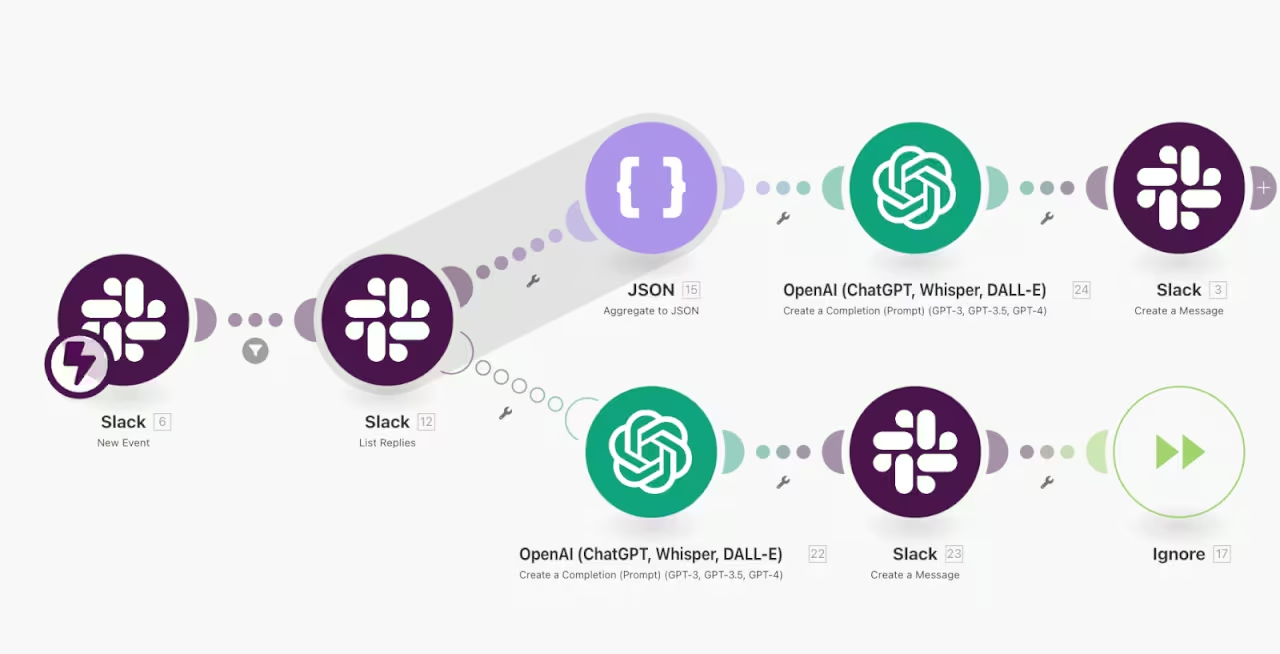
We've developed a sophisticated error-handling system using Make.com, OpenAI and Slack. When a bug occurs in our scenarios, the system automatically:
For example, if we encounter an "error 400," the system collects the failing app information and error message, then OpenAI analyzes it and provides practical solutions like "Server is down. Check service availability."
We've implemented an intelligent support ticket routing system that combines emoji reactions with automated project management:
We've created an automated lead engagement workflow that:
Your AI agent or agents can be adapted to match your team's requirements. This includes adjusting their configuration and permissions to integrate smoothly with your existing workflows.
Organizations can develop specialized AI agents for specific functions using available APIs.
Regular performance monitoring of these AI tools is crucial. This helps identify areas for improvement and ensures they continue to serve your team effectively.
Incorporating AI agents from third parties into Slack can significantly enhance your workspace by providing tailored AI-driven workflows.
These AI tools are available through Slack's Marketplace and can handle specific tasks to help your team work better. Slack carefully reviews these external AI assistants for both performance and security before making them available, ensuring they're safe and reliable for your team to use.
Here's a step-by-step guide to creating your own AI agent in Slack:
The integration of AI agents into Slack represents a crucial advancement in workplace technology and team collaboration.
By combining custom solutions with third-party integrations, organizations can create a more efficient, streamlined work environment that connects seamlessly with existing tools and processes.
As AI technology continues to evolve, Slack AI agents emerges as a tool for enhancing productivity, automating routine tasks, and enabling teams to focus on high-value work that demands human creativity and judgment.
Need help building and integrating your Slack AI agent? We specialize in developing custom AI solutions that fit your organization's specific workflow. Reach us to develop a solution tailored to your needs.
Last updated on
May 29, 2026
.
Jesus Vargas
-
Founder
Jesus is a visionary entrepreneur and tech expert. After nearly a decade working in web development, he founded LowCode Agency to help businesses optimize their operations through custom software solutions.
Custom Automation Solutions
Save Hours Every Week
We automate your daily operations, save you 100+ hours a month, and position your business to scale effortlessly.
Our AI — trained on 300+ shipped products — tells you what to build, what to skip, and what it'll actually cost. No fluff.
Assess My Idea"Working with LowCode Agency was the best decision I made in 2025"
Franklin Frith
CEO at HRM
AI agents help teams save time by automating routine tasks, enhance overall productivity, and reduce meeting durations. They allow employees to focus on complex work requiring human judgment while handling repetitive daily operations.
You can either find pre-built AI assistants in the Slack Marketplace or create your own custom agent using Slack's APIs. The process involves creating an app, configuring permissions, setting up Socket Mode, and properly installing the agent in your workspace.
Yes, organizations can develop specialized AI agents using available APIs to match their unique operational requirements. These custom agents can be tailored for specific functions like content creation, data collection, or workflow automation while integrating smoothly with existing tools and processes.
AI
AI Employee for Event Venues: Book More Events
Book more events and impress every client. An AI Employee handles venue inquiries, availability checks, and follow-ups for you.
AI
AI Agents Explained: What They Do and Cost
Understand what AI agents are, how they work, and what they cost to build or deploy. Learn real use cases, pricing models, and when businesses should use AI agents.
AI
AI Log File Analysis: Discover Patterns Fast
Use AI to analyze log files quickly and find patterns in minutes instead of hours. Improve troubleshooting and system monitoring efficiently.
AI
Best AI Employee Platforms for Small Business
Compare the top AI Employee platforms built for small business. Find the right tool to automate your workflow, reduce costs, and grow without hiring more staff.
AI
How to Build an AI Upsell Recommendation Engine
Learn step-by-step how to create an AI-powered upsell recommendation engine to boost sales and enhance customer experience effectively.
AI
AI Employee for Call Answering: Never Miss a Lead
Never miss a call again. Your AI Employee answers, qualifies, and routes calls 24/7 so no opportunity slips through the cracks.